TIEGlobalSettings.EnableTheming
Declaration
property EnableTheming: Boolean;Description
When enabled, VCL Themed colors will be used for ImageEn visual controls.Affected TImageEnView Properties
◼Background
◼GradientEndColor
◼RulerParams.Color
◼RulerParams.Font.Color
◼RulerParams.GripColorDefault
◼RulerParams.GripPenColor
◼RulerParams.MeasureColor
Affected TImageEnMView/TImageEnFolderMView/TImageEnLayerMView Properties
◼Background
◼GradientEndColor
◼TopTextFont.Color
◼InfoTextFont.Color
◼BottomTextFont.Color
◼TextBackgroundColor
◼SelectedFontColor
◼SelectionColor
◼ThumbnailsBackground
◼ThumbnailsBackgroundSelected
◼ThumbnailsBorderColor
Other Affected Properties
◼PreviewImageBackgroundColor
◼RulerColor
◼GripColorDefault
◼GripPenColor
Only system colors will be themed. Controls with fixed colors such as clBlue, clBlack, $$00FCFCFC will not be themed.
The following colors are themed: clWindow, clWindowText, clBtnFace, clHighlight, clHighlightText, cl3DLight, clGrayText, clBtnShadow, clWindowFrame and Explorer colors of TImageEnMView
A themed TImageEnMView:
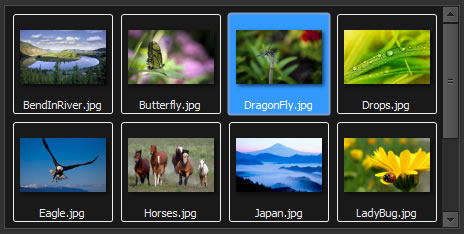
A themed TImageEnViewToolbar:

Default: True (VCL theme colors are used if theming is enabled)
Demo
 | Demos\Other\ImageEn_Theming\VclStylesDemo.dpr |
Examples
// Disable VCL theme colors in ImageEnIEGlobalSettings().EnableTheming := False;
ImageEnView1.Update();
ImageEnMView1.Update();
// Compare the following...
IEGlobalSettings().EnableTheming := True;
ImageEnView1.Background := clBtnFace; // Background will be a themed color
ImageEnView1.Background := clBlue; // Background will be blue
IEGlobalSettings().EnableTheming := False;
ImageEnView1.Background := clBtnFace; // Background will be clBtnFace (gray)
ImageEnView1.Background := clBlue; // Background will be blue