TIETextLayer.RichText
Declaration
property RichText: string;Description
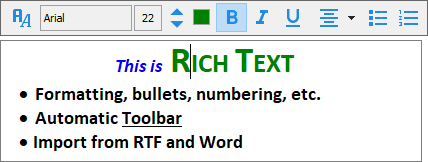
Specifies the displayed text as an RTF formatted string.RichText is only used if EnableFormatting = True.
Note:
◼The default text for new layers is specified by DefaultLayerText
◼Setting RichText has no effect if RulerMode is iermLabel
◼If you have not enabled Rich Text formatting, then use Text to specify the text
◼If RichText is blank, then Text will be used
◼A toolbar is displayed when editing the text of a layer. This can be disabled in LayerOptions
Rich Text Limitations
The following are unsupported when EnableFormatting=True◼Text can only be rotated at 90 deg. angles
◼A BorderRotate is not supported
◼A TextOverflow is not supported
◼Formatting is ignored when exporting to PDF or SVG
◼It is recommended that you use solid fill color. Artefacts may be present with a transparent background
◼Images and tables in RTF are not output
Demo
 | Demos\LayerEditing\Layers_Text\TextLayers.dpr |
Examples
// Set text as bold "ImageEn!"TIETextLayer( ImageEnView1.CurrentLayer ).EnableFormatting := True;
TIETextLayer( ImageEnView1.CurrentLayer ).RichText := #123'\rtf1\ansi\ansicpg1252\deff0'#123'\fonttbl'#123'\f0\fnil\fcharset0 Tahoma;'#125#125'\viewkind4\uc1\pard\lang1033\b\f0\fs24 ImageEn!\b0\par'#125;
ImageEnView1.Update();
// Append a text layer
ImageEnView1.LayersAdd( ielkText );
TIETextLayer( ImageEnView1.CurrentLayer ).EnableFormatting := True;
TIETextLayer( ImageEnView1.CurrentLayer ).RichText := ***RTF formatted string***;
TIETextLayer( ImageEnView1.CurrentLayer ).BorderColor := clBlack;
TIETextLayer( ImageEnView1.CurrentLayer ).BorderWidth := 1;
TIETextLayer( ImageEnView1.CurrentLayer ).FillColor := clWhite;
ImageEnView1.Update();
See Also
◼SizeToText◼AutoSize
◼TextOverflow
◼Text
◼EnableFormatting