TImageEnLayerMView
Properties · Methods · Events · Demos · ExamplesDeclaration
TImageEnLayerMView = class(TIECustomMView);Description
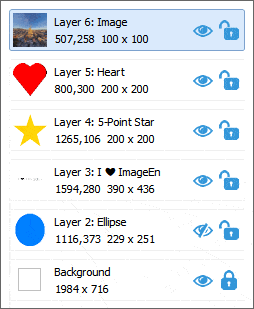
The TImageEnLayerMView component is a descendent of TImageEnMView, but is designed to display the layers of a TImageEnView (i.e. all of the layers of a multi-layer file format, such as a PSD, IEN or SVG file).To use TImageEnLayerMView, simply set the AttachedImageEnView property to a TImageEnView.
TImageEnLayerMView provides the following features:
◼Preview of all layers of a TImageEnView, with thumbnail, layer type, position, size and rotation information
◼Selection of thumbnails to select the relevant layer (Optional)
◼Buttons to set the Visible, Locked or IsMask status of layers (Optional)
◼Dragging of thumbnails to re-arrange them (Optional)
◼Dragging of thumbnails outside the control (or clicking Delete) to remove them (Optional)
Note: You can also display layers in a standard TImageEnMView, using AssignLayers
Demos
 | Demos\Actions\Actions_Layers\LayerActions.dpr |
| | Demos\LayerEditing\Layers_AllTypes\Layers.dpr |
| | Demos\LayerEditing\Layers_Images\Layers.dpr |
| | Demos\LayerEditing\Layers_Lines\Layers.dpr |
| | Demos\LayerEditing\Layers_Text\TextLayers.dpr |
Examples
// Set upIELayerMView1.AttachedImageEnView := ImageEnView1;
// Thumbnails or details?
if fShowLayersAsThumbs then
IELayerMView1.Style := iemsFlat
else
IELayerMView1.Style := iemsFlatAndWide;
// Background down to front-most, or reversed?
if fLayerViewReversed then
IELayerMView1.LayerOrder := ieloTopFirst
else
IELayerMView1.LayerOrder := ieloBackgroundFirst;
// Enable dragging of thumbnails to rearrange layers and remove layers
IELayerMView1.LayerOptions := IELayerMView1.LayerOptions + [ lvDragOrdering, lvDragDelete ];
// Move buttons to the top-right of thumbnail
ImageEnLayerMView1.ButtonParams.Position := iecpTopRight;
Methods and Properties
Common Members
 | AutoAdjustStyle |
| | AttachedImageEnView |
| | ButtonParams  |
 | IndexToLayer |
| | LayerOptions |
| | LayerOrder |
| | LayerToIndex |
| | PopupMenus |
| | Style |
| | Update (Refresh) |
Display
Thumbnail Text
Thumbnail Appearance
Thumbnail Spacing
Selections
User Interaction
 | Gestures |
| | GetImageVisibility |
| | ImageAtGridPos |
| | ImageAtPos |
| | InsertingPoint |
| | IsVisible |
| | KeyInteract |
| | MouseInteract |
| | MouseWheelParams (Default) |
| | MouseWheelParamsAlt (Ctrl Key) |
ScrollBars
Other
| | CalcGridHeight |
| | CalcGridWidth |
| | DesignTimeView |
| | DrawDebugInfo |
| | DrawVersion |
| | ImageEnVersion |
| | ImageCacheSize |
| | ImageCacheUseDisk |
| | LoadProperties |
| | SaveProperties |
| | SetDrawTextProperties |
Events
Layer Events
User Interaction Events
 | OnEditText |
| | OnImageDeselect |
| | OnImageSelect |
| | OnImageEnGesture |
| | OnKeyboardShortcut |
| | OnSelectionChanging |
| | OnSelectionChanged |
| | OnZoomIn |
| | OnZoomOut |
Paint Events
| | OnBeforeImageDrawEx |
| | OnBeforeImageDraw |
| | OnDrawProgress |
| | OnGetColors |
| | OnGetText |
| | OnGetTextEx |
| | OnImageDraw |
| | OnImageDraw2 |
| | OnImageOut |
Other Events
Unique to TImageEnLayerMView