TImageEnView.GetIdealZoom
Declaration
function GetIdealZoom(Cropping: Double = 0): Double; overload;function GetIdealZoom(CanStretch, CanShrink: Boolean; FitMode: TIEFitMode): Double; overload;
procedure GetIdealZoom(out x, y: Double; IgnoreScrollBars: Boolean = False); overload;
Description
Returns the best zoom value to stretch the image to fit within the component. If second overload is used, independent Zoom values are given for x and y (Optionally you can calculate value without the effect of the scrollbars).Cropping specifies the amount of image that can be hidden (top/left of portrait images, or left/right side of landscape images) to better fill the control. This value is a percentage of the difference between the min and max zooms, so 0.0 means no cropping, whereas 1.0 would completely fill the control (see examples below).
Note: If the image is empty, result will be zero.
Example
// Both the following code snippets will have the same resultImageEnView1.Zoom := ImageEnView1.GetIdealZoom;
// Or
ImageEnView1.Fit();
// Zoom to fit width
ImageEnView1.GetIdealZoom( zoomX, zoomY );
ImageEnView1.Zoom := zoomX;
// Zoom to fill control by cropping image view (while maintaining the aspect ratio)
ImageEnView1.GetIdealZoom( zoomX, zoomY );
ImageEnView1.Zoom := dmax( zoomX, zoomY );
// Stretch image to control size without maintaining the aspect ratio
ImageEnView1.GetIdealZoom( zoomX, zoomY );
ImageEnView1.ZoomX := zoomX;
ImageEnView1.ZoomY := zoomY;
Cropping Examples
// 0% cropping (resulting in 17.9% zoom)ImageEnView1.Zoom := ImageEnView1.GetIdealZoom( 0.0 );
ImageEnView1.CenterImage();

// 33% cropping (resulting in 19.4% zoom)
ImageEnView1.Zoom := ImageEnView1.GetIdealZoom( 0.33 );
ImageEnView1.CenterImage();
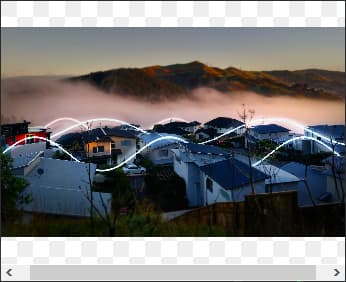
// 66% cropping (resulting in 21.8% zoom)
ImageEnView1.Zoom := ImageEnView1.GetIdealZoom( 0.66 );
ImageEnView1.CenterImage();
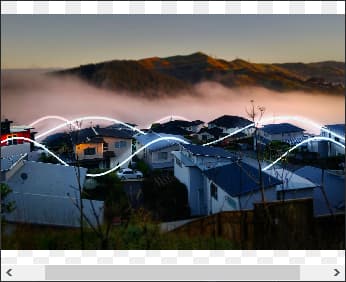
// Full cropping (resulting in 24.3% zoom)
ImageEnView1.Zoom := ImageEnView1.GetIdealZoom( 1.0 );
ImageEnView1.CenterImage();

// Full cropping without scrollbars (resulting in 25.9% zoom)
ImageEnView1.ScrollBars := ssNone;
ImageEnView1.Zoom := ImageEnView1.GetIdealZoom( 1.0 );
ImageEnView1.CenterImage();

// 200% cropping (resulting in 31.6% zoom)
ImageEnView1.Zoom := ImageEnView1.GetIdealZoom( 2.0 );
ImageEnView1.CenterImage();
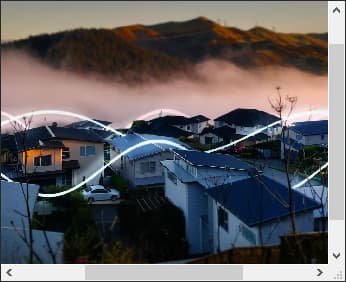
// Allow a user to zoom the image or toggle between 100% or Zoom-to-Fit
// Controls:
// - lblZoom: TLabel with Caption of 'Zoom'
// - chkFit: TCheckbox with Caption o 'Fit'
// - trkZoom: TTrackBar with Min = 1, Max = 500, Position = 100
// chkFit.OnClick, trkZoom.OnChange and ImageEnView1.OnResize should all point to the following event:
procedure TMainForm.trkZoomChange(Sender: TObject);
begin
if ( Sender = chkFit ) and not chkFit.Checked then
begin
ImageEnView1.Zoom := 100;
trkZoom.Position := 100;
end
else
if ( Sender <> trkZoom ) and chkFit.Checked then
begin
trkZoom.Position := Trunc(ImageEnView1.GetIdealZoom);
ImageEnView1.Fit();
end
else
if trkZoom.Position <> Trunc(ImageEnView1.GetIdealZoom) then
begin
ImageEnView1.Zoom := trkZoom.Position;
chkFit.Checked := False;
end;
end;
See Also
◼loFitToLayersWhenZooming◼IdealComponentWidth
◼IdealComponentHeight
◼IdealImageWidth
◼IdealImageHeight