IEShowImageInfo
Declaration
// IOParams overloadfunction IEShowImageInfo(Params: TIOParams;
ShowTabs: TIEInfoTabs = [];
const Caption: string = '';
PreviewWidth: Integer = -1; PreviewHeight: Integer = -1;
Maximized: Boolean = False;
MapProvider: TIESlippyMapProvider = iesmpOpenStreetMap;
MapZoom: Integer = 12;
MapCachePath: string = '';
MapApiKey: string = '';
ReadOnly: Boolean = True): Boolean; overload;
// IEBitmap overload
function IEShowImageInfo(Bitmap: TIEBitmap;
ShowTabs: TIEInfoTabs = [];
const Caption: string = '';
PreviewWidth: Integer = -1; PreviewHeight: Integer = -1;
Maximized: Boolean = False;
MapProvider: TIESlippyMapProvider = iesmpOpenStreetMap;
MapZoom: Integer = 12;
MapCachePath: string = '';
MapApiKey: string = '';
ReadOnly: Boolean = True): Boolean; overload;
// File overload
function IEShowImageInfo(const FileName: string;
ShowTabs: TIEInfoTabs = [];
const Caption: string = '';
PreviewWidth: Integer = -1; PreviewHeight: Integer = -1;
Maximized: Boolean = False;
MapProvider: TIESlippyMapProvider = iesmpOpenStreetMap;
MapZoom: Integer = 12;
MapCachePath: string = '';
MapApiKey: string = '';
ReadOnly: Boolean = True): Boolean; overload;
// Meta-Data only overload
function IEShowImageInfo(Params: TIOParams; const Caption: string;
AutoShowTypes: TIEMetaTypes = [];
AlwaysShowTypes: TIEMetaTypes = [];
ReadOnly: Boolean = True;
PreviewWidth: Integer = -1; PreviewHeight: Integer = -1;
Maximized: Boolean = False): Boolean; overload;
// TImageEnView or TImageEnMView overload
function IEShowImageInfo(const Viewer: TIEView;
ShowTabs: TIEInfoTabs = [];
const Caption: string = '';
PreviewWidth: Integer = -1; PreviewHeight: Integer = -1;
Maximized: Boolean = False;
MapProvider: TIESlippyMapProvider = iesmpOpenStreetMap;
MapZoom: Integer = 12;
MapCachePath: string = '';
MapApiKey: string = '';
ReadOnly: Boolean = True): Boolean; overload;
Description
Display a pop-up window to show meta-data and other information about the image.The following tabs are available:
| Value | Description |
|---|---|
| ietImage | Show a zoomable preview of the image |
| ietMetaData | Show an editable list view of the EXIF, IPTC, XMP and other meta-data of the image |
| ietLocation | Show an interactive map of the location of the image using the EXIF GPS data |
| ietHistogram | Show a histogram of the image |

| Parameter | Description |
|---|---|
| FileName/Bitmap/Params | The source of the image information |
| ShowTabs | Which of the tabs above to display (tabs that are not relevant will be automatically excluded, e.g. ietLocation for images with no GPS data). Specify [] for all tabs |
| Caption | The heading for the window (defaults to the image filename if '' is specified) |
| AutoShowTypes | They types of meta-data to show (if the file includes that type). If [] is specified then all available types will be shown |
| AlwaysShowTypes | They types of meta-data to show even if the file does not include that type (will be shown with blank entries) |
| ReadOnly | If True, the user can edit EXIF, DICOM or IPTC fields, and OK and Cancel buttons are displayed. Changes made by users will update the values in the Params objects. You will need to save the image to file to keep the changes |
| PreviewWidth, PreviewHeight | The size of the display window. If -1 it will be made the same as the image (though it will be shrunk to ensure it is no larger than the screen) |
| Maximized | Set to True to display the window in a maximized state |
| MapZoom | Specifies the zoom level (0-...). Level 0 is the minimum zoom (supported by all map providers) which is the most zoomed out (country level). Maximum zoom is map provider specific, but high values, e.g. 18, are most zoomed in (street level). See TIESlippyMapProvider for maximum value for each map provider. |
| MapProvider | Specifies a Predefined map provider |
| MapCachePath | If specified, maps are saved to the specified path to speed up reuse |
| MapApiKey | Specifies the user key for map providers that requires registration |
Result is True if the data is modified (ReadOnly = False). If ReadOnly = True the result is always True.
Note:
◼The background style of the image preview is defined by PreviewImageBackgroundColor and PreviewImageBackgroundStyle
◼You can also show an image preview using IEShowImagePreview
Demo
 | Demos\ImageEditing\EveryMethod\EveryMethod.dpr |
Examples
// Show preview, meta-information, map and histogram for a fileIEShowImageInfo( 'D:\MyImage.jpg' );
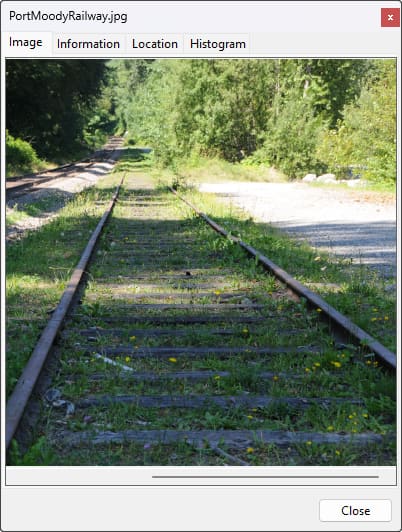
// Show for image loaded into a TImageEnView
IEShowImageInfo( ImageEnView1 );
// Show for the selected image in a TImageEnMView
IEShowImageInfo( ImageEnMView1 );
// Show a maximized Info window for a file (Location tab is selected - Only appears if image contains EXIF GPS data)
IEShowImageInfo( ImageEnView1.IO.Params, [], '', -1, -1, True );
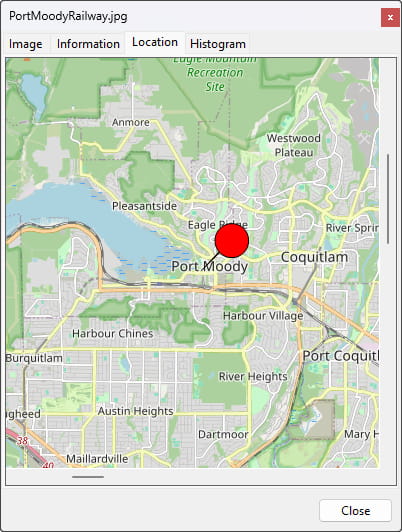
// Prompt user to add or edit exif data
if IEShowImageInfo( ImageEnView1.IO.Params, 'Edit EXIF', [], [iemEXIF], False, -1, -1, True ) = True then
btnSaveChanges.Enabled := True;
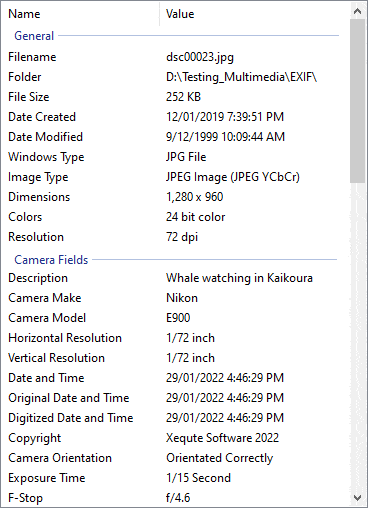
// Show meta-data only
IEShowImageInfo( ienResult.IO.Params, [ ietMetaData ]);
// Which is the same as... (meta-data overload)
IEShowImageInfo( ienResult.IO.Params, '' );