TIEBitmapHelper.DetectCharuco
Declaration
function DetectCharuco(SquaresX, SquaresY: Integer; Dictionary: TIEVisionArucoDictionary; out IDs: TIEArrayOfInteger; out Rects: TIERectArray; out Quality: TIEArrayOfDouble): Integer;Description
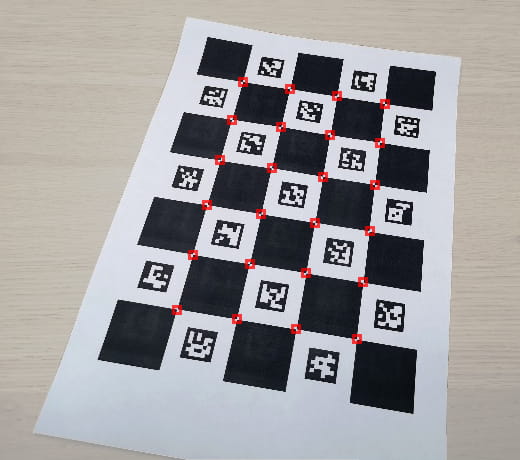
A shortcut method that creates a TIEVisionCharucoDetector object, calls setBoard and detect.SquaresX and SquaresY are the chessboard square counts (not the marker counts).
Returns the number of interpolated corners found. Parallel arrays IDs, Rects and Quality describe each corner.
Quality is 100 for each detected corner (OpenCV does not return a per-corner confidence).
Use ievDictAuto to try common dictionaries when the printed dictionary is unknown.
Note:
◼You must add the iexHelperFunctions unit to your uses clause
◼Delphi/C++ 2005 or newer is required to use helper classes
◼You can draw the rects to a canvas using DrawRects
◼Charuco detection requires IEVision. You will need to register it before calling the method
Method Behavior
The following call:count := ImageEnView1.IEBitmap.DetectCharuco( 5, 7, ievDict4x4_50, ids, rects, quality );
Is the same as calling:
detector := IEVisionLib.createCharucoDetector();
detector.setBoard( 5, 7, 1.0, 0.75, ievDict4x4_50 );
corners := detector.detect( ImageEnView1.IEBitmap.GetIEVisionImage(), IEVisionRect( 0,0,0,0 ) );
Demo
 | Demos\IEVision\Aruco\Aruco.dpr |
Example
Also see: Automated Samples
// Detect Charuco corners on a 5x7 / 4x4_50 boardcount := ImageEnView1.IEBitmap.DetectCharuco( 5, 7, ievDict4x4_50, ids, rects, quality );
for i := 0 to count - 1 do
begin
ImageEnView1.IEBitmap.IECanvas.Brush.Style := bsClear;
ImageEnView1.IEBitmap.IECanvas.Pen.Color := clLime;
ImageEnView1.IEBitmap.IECanvas.Pen.Width := 2;
ImageEnView1.IEBitmap.IECanvas.Rectangle( rects[i] );
end;
ImageEnView1.Update();
See Also
◼TIEVisionCharucoDetector◼TIEVisionCharucoCorner
◼DetectAruco
◼detect