TIEBrushToolInteraction.Transparency
Declaration
property Transparency: Integer;Description
Specify the transparency of the brush.0 is transparent, 255 is opaque, 1 - 254 are partially transparent.
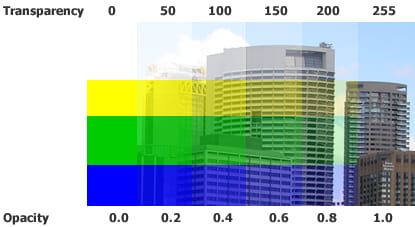
Note: The effect of a transparent brush is controlled by TransparencyMode
Default: 255
Examples
// Paint at 50% transparencyImageEnView1.BrushTool.Transparency := 128;
// Enable painting of the alpha channel (set transparency to 50% without changing the image content)
ImageEnView1.BrushTool.BrushShape := iecsCircle;
ImageEnView1.BrushTool.BrushFill := iebfSolid;
ImageEnView1.BrushTool.BrushSize := 50;
ImageEnView1.BrushTool.Transparency := 128;
ImageEnView1.BrushTool.TransparencyMode := ietmReplace;
ImageEnView1.MouseInteractGeneral := [ miBrushTool ];
See Also
◼TransparencyMode◼EraserOpacity
◼EraserColor