TIEVisionImage.getConnectedComponents
Declaration
function getConnectedComponents(connectivity: int32_t = 8; minWidth: int32_t = 0; minHeight: int32_t = 0; maxWidth: int32_t = 0; maxHeight: int32_t = 0): TIEVisionVectorRect; safecall;Description
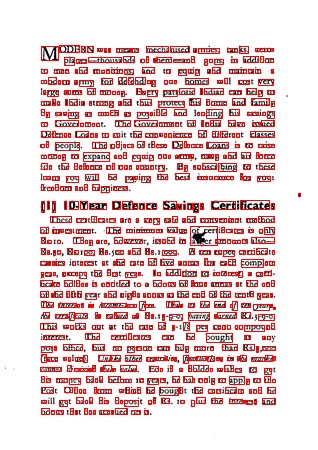
Finds every group of touching dark pixels (via Leptonica) and returns their bounding rectangles.The image is binarized with Otsu first (black and white images are unchanged by this), so it should contain dark objects on a light background.
Useful for finding characters, blobs and lines, measuring text size, and locating noise or borders.
| Parameter | Description |
|---|---|
| connectivity | 4 (pixels touch horizontally or vertically) or 8 (diagonals also count) |
| minWidth, minHeight | Skip components smaller than this |
| maxWidth, maxHeight | Skip components larger than this. 0 means no limit |
Examples
// Outline every character-sized componentrects := ImageEnView1.IEBitmap.GetIEVisionImage().getConnectedComponents( 8, 3, 5, 100, 100 );
for i := 0 to rects.size - 1 do
with rects.getRect( i ) do
ImageEnView1.IEBitmap.Canvas.Rectangle( x, y, x + width, y + height );
ImageEnView1.Update();
// Outline the dark connected components of a document (e.g. characters)
rects := ImageEnView1.IEBitmap.GetIEVisionImage().getConnectedComponents( 8, 3, 3, 100, 100 );
ImageEnView1.IEBitmap.IECanvas.Pen.Width := 1;
ImageEnView1.IEBitmap.IECanvas.Pen.Color := clRed;
ImageEnView1.IEBitmap.IECanvas.Brush.Style := bsClear;
for i := 0 to rects.size() - 1 do
begin
r := rects.getRect( i );
ImageEnView1.IEBitmap.IECanvas.Rectangle( r.x, r.y, r.x + r.width, r.y + r.height );
end;
ImageEnView1.Update();
See Also
◼removeSpeckles◼findContours