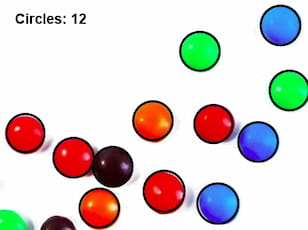
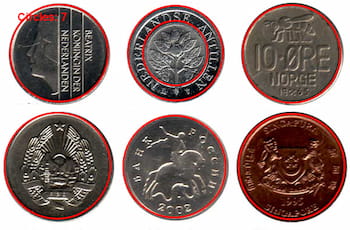
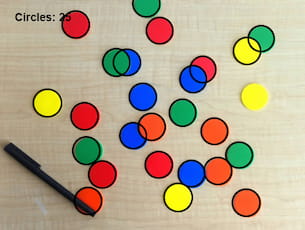
TIEVisionImage.houghCircles
Declaration
function houghCircles(method: TIEVisionHoughModes; dp: double; minDist: double; param1: double = 100; param2: double = 100; minRadius: int32_t = 0; maxRadius: int32_t = 0): TIEVisionVectorScalarFloat;Description
Find circles in a grayscale image using the Hough transform.Returns a vector (list) of circles. Each circle is represented by a 4-element vector:
◼val[0] = x
◼val[1] = y
◼val[2] = radius
◼val[0] = votes
Note:
◼Pixel format of input image must be ie8g
◼You can draw the ellipses to a canvas using DrawRects
| Parameter | Description |
|---|---|
| method | Detection method. The available methods are ievHOUGH_GRADIENT and ievHOUGH_GRADIENT_ALT |
| dp | Inverse ratio of the accumulator resolution to the image resolution. Min value >0, typically 1.0 or 1.5 |
| minDist | Minimum distance in pixels between the centers of the detected circles. Min value >0 |
| param1 | Higher threshold of the two passed to the Canny edge detector. Min value 1. Typical value up to 300 |
| param2 | If method is ievHOUGH_GRADIENT then this is the accumulator threshold for the circle centers at the detection stage. If method is ievHOUGH_GRADIENT_ALT then this is the circle "perfectness" measure. The closer it to 1, the better shaped circles algorithm selects. Min value: 1 |
| minRadius | Minimum circle radius in pixels. 0 = no limit |
| maxRadius | Maximum circle radius in pixels. 0 = no limit |

Demos
 | Demos\IEVision\CirclesDetect\CirclesDetect.dpr |
| | Demos\ImageEditing\EveryMethod\EveryMethod.dpr |
Example
// Load test imageImageEnView1.IO.LoadFromFile( 'D:\TestImage.jpg' );
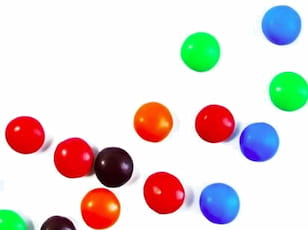
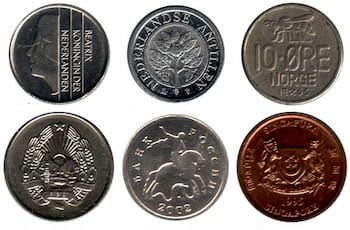
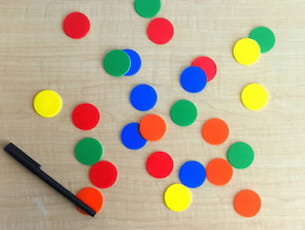
// Find circles in an image using the Hough algorithm
ImageEnView1.Proc.SaveState();
ImageEnView1.IEBitmap.PixelFormat := ie8g;
ImageEnView1.IEBitmap.GetIEVisionImage().blur( IEVisionSize(3, 3), IEVisionPoint(-1, -1) );
circles := ImageEnView1.IEBitmap.GetIEVisionImage().houghCircles( ievGRADIENT_ALT, 1.5, 10, 300, 0.9, 0, 0 );
ImageEnView1.IEBitmap.RestoreState(); // Restore image to full color
circlesCount := circles.size();
for i := 0 to circlesCount - 1 do
begin
circlePos := circles.getScalarFloat(i);
with ImageEnView1.IEBitmap.IECanvas do
begin
Pen.Width := 3;
Pen.Color := clBlack;
Brush.Style := bsClear;
Ellipse( trunc( circlePos.val[0] - circlePos.val[2] ), // left side
trunc( circlePos.val[1] - circlePos.val[2] ), // top side
trunc( circlePos.val[0] + circlePos.val[2] ), // right side
trunc( circlePos.val[1] + circlePos.val[2] )); // bottom side
end;
end;
ImageEnView1.Proc.TextOut( Align_Text_Near_Left, Align_Text_Near_Top, Format( 'Circles: %d', [ circlesCount ]), 'Arial', 14, clBlack, [fsBold] );
ImageEnView1.Update(); // Show changes to canvas