

ImageEn FAQ

 |
Do you have a FireMonkey version of ImageEn? |
 |
We have an older version of ImageEn available that works with FireMonkey (FMX). However it only supports the Windows platform. There are unlikely to be updates to this version in the near future.
Information about the earlier beta is available on our forum. |
|
Is the .NET version of ImageEn the same as the Delphi version? |
|
IEvolution is our imaging library for .NET. It offers a subset of ImageEn functionlity, including all key functionality.
You can review the IEvolution Help Documentation for more information. |
|
After updating ImageEn I get the following error on Delphi start-up: "The procedure entry point ... could not be located in the dynamic link library DPKIECtrl26.bpl" |
|
There are two common causes for this error:
1. You have multiple copies of the ImageEn BPL files on your system (generally error is for DPKIECtrl*.bpl) Search your system for any PKIE*.* and DPKIE*.* files and remove them (it might help to review the library paths under Tools > Options, Library). Then reinstall ImageEn. 2. You have another package that uses the ImageEn BPL (generally error is for PKIECtrl*.bpl) A package - either one of ImageEn's or one of your own - is trying to access PKIECtrl26.bpl, but is failing because PKIECtrl26.bpl has been recompiled more recently. The error may be followed by another one that advised you which package is giving you the error: "Xyz package could not be loaded. Would you like to load it next time you run Delphi...". If you know which package has caused the problem, open it's DPK file and recompile it. Otherwise, go through each of your packages and recompile any that use ImageEn. |
|
During installation I get a download error. How can I install ImageEn? |
|
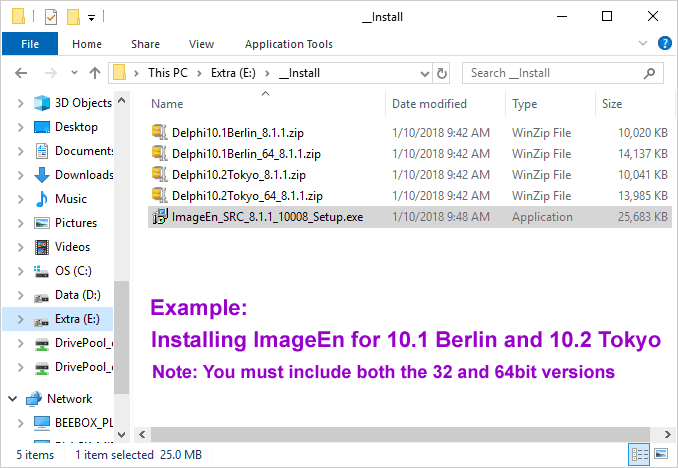
The installer is unable to download via some proxy configurations. In this case you should download the required packages manually:
i. Follow the link in your order email to the download page
Your install folder should look something like:
If you continue to have problems, please email us with the install log file (from your Windows temp folder). |
|
Can I load PDF files with ImageEn? |
|
PDF loading requires one of the following plug-ins:
|
|
How can I prevent the scrollwheel from causing the image to zoom? I want it to remain the original size at all times. |
|
Just write:
ImageEnView1.MouseWheelParams.Action := iemwNone; other values are iemwVScroll and iemwZoom (default). |
|
How do I convert a multi-page GIF image to TIFF format without a visual component? |
|
There are several ways. The simplest is:
var mbmp:TIEMultiBitmap; Begin mbmp := TIEMultiBitmap.Create; mbmp.Read('D:\in.gif'); mbmp.Write('D:\out.tiff'); mbmp.free; End; |
|
How do I disable all keyboard shortcuts in ImageEn? |
|
You need to set the following properties (which are all enabled by default):
- Disable TImageEnView.KeyboardShortcuts - Remove loKeyboardShortcuts from TImageEnView.LayerOptions - Remove ieboEnableFileShortcuts from TImageEnFolderMView.FolderInteract - Disable TIERichEdit.KeyboardShortcuts - Disable TImageEnViewToolbar/TIERichEditToolbar.KeyboardShortcuts - Remove Shortcuts from any ImageEn Actions Configure or disable individual keyboard shortcuts using TIEGlobalSettings.KeyboardShortcuts> |
|
How can I improve the performance of TImageEnMView when I have many thumbnails? |
|
Ensure you have optimized your settings to ensure the best performance:
|
|
I've added the ImageMagick DLL to my application folder, but ImageEn does not support its formats. What do I need to do? |
|
You can automatically register available plug-in DLLs using RegisterPlugIns:
IEGlobalSettings().RegisterPlugIns(); Note: If ImageMagick has been installed on the system, ImageEn will automatically supports its formats. |
|
Can your component take a series of single page TIFF files and create a Multi-Page file from them? |
|
You can load the page using:
ImageEnView1.IO.LoadFromFile('page1.tif'); then save the page with: ImageEnView1.IO.Params.TIFF_ImageIndex := 0; // increment this for each page ImageEnView1.IO.InsertToFileTIFF('multipage.tif'); Otherwise you can use a TImageEnMView component or a TIEMultiBitmap. See "multi" example for more details. |
|
How do I change the current page of a TIFF image in TImageEnView? |
|
In order to load several pages from a TIFF you have two ways:
1) load a page at the time, using TImageEnView, example: ImageEnView1.IO.Params.TIFF_ImageIndex := page_number; // page_number stars from 0 (first page) ImageEnView1.IO.LoadFromFile('mytiff.tiff'); First instruction select the page to load. To know how many pages there are use: page_count := EnumTIFFIm('mytiff.tiff'); 2) load all pages, using TImageEnMView. Just write: ImageEnMView1.MIO.LoadFromFile('mytiff.tiff'); and you will see all pages. |
|
How can I validate that the fonts used when loading a layer file are available on the system? |
|
After loading an ImageEn layer file you can iterate through all of the fonts to ensure they are valid, for example:
ImageEnView1.IO.LoadFromFileIEN(...); // Validate fonts are installed on this system for i := 0 to ImageEnView1.LayersCount do begin if ImageEnView1.Layers[i].Kind = ielkText then fontName := TIETextLayer( ImageEnView1.Layers[i] ).Font else if ImageEnView1.Layers[i].Kind = ielkLine then fontName := TIELineLayer( ImageEnView1.Layers[i] ).LabelFont else continue; if Screen.Fonts.IndexOf( fontName ) = -1 then begin // This font is not installed. Substitute or install it... end; end; |
|
Is it possible to convert a multipage image to a different encoding? G3 and G4 specifically? |
|
Using TImageEnMView you have to change the compression property for all pages:
ImageEnMView1.MIO.LoadFromFile('original.tif'); // change compression for the first page ImageEnMView1.MIO.Params[0].TIFF_Compression := ioTIFF_G4FAX; // change compression for the other pages ImageEnMView1.MIO.DuplicateCompressionInfo; // now save ImageEnMView1.Mio.SaveToFile('output.tif'); |
|
How can I improve performance when working with many layers? |
|
The main performance properties are:
- LayersCaching: Caches the view of each layer. Much faster but uses more memory. - LayersFastDrawing: Display quality of layers (and whether the quality view is delayed). - ZoomFilter/DelayZoomFilter: Display quality of images (and whether the quality view is delayed). This option is ignored if LayersFastDrawing is active - LayersRotationUseFilterOnPreview: Whether the quality filter (LayersRotationFilter) is applied when previewing the image during rotation
Here is some example code from the Layers_AllTypes demo:
|
|
Using TImageEnMView, how do I load images as they are displayed? |
|
There are several ways to display images "on demand":
1) If you have a directory where are all files just write: ImageEnMView1.FillFromDirectory('c:\myimages'); 2) When you add a new image just set ImageFileName[] index, and ImageEn will load automatically specified file when needed. Example: idx := ImageEnMView1.AppendImage; ImageEnMView1.ImageFileName[idx] := 'first.jpg'; 3) When you add a new image just set the ImageID[] property. You have to create by hand an array of filenames where to get images. Example: var files:array [0..1] of string; begin files[0] := 'first.jpg'; files[1] := 'second.jpg'; ImageEnMView1.ImageID[ ImageEnMView1.AppendImage ] := 0; ImageEnMView1.ImageID[ ImageEnMView1.AppendImage ] := 1; end; You have also to create OnImageIDRequest event, on this you can write: procedure TForm1.OnImageIDRequest(Sender: TObject; ID:integer; var Bitmap:TBitmap); var io:TImageEnIO; begin io := TImageEnIO.Create(self); io.AttachedBitmap := bmp; // bmp is a TBitmap object, defined at class level (must exists after the OnImageIDRequest exits) io.LoadFromFile( files[ID] ); io.free; Bitmap := bmp; end; 4) If the images are frames of a media file (like AVI, MPEG, etc..) you can write: ImageEnMView1.LoadFromFileOnDemand('film.mpeg'); |
|
How do I burn the layers (Lines, Ellipses, etc) added in TImageEnView into the image? (Save them as a JPEG file) |
|
Lines, ellipses and other layers added to a TImageEnView can be merged to the background using the LayersMergeAll method, then save the image. |
|
How do I modify the IPTC fields without loading the actual image? |
|
To load IPTC info from a jpeg, just use LoadFromFile method. After this you have in ImageEnView.IO.Params.IPTC_Info object all IPTC informations loaded. To read the caption you can write:
ImageEnView.IO.LoadFromFile('image.jpg'); Idx := ImageEnView.IO. Params.IPTC_Info.IndexOf(2,120); Caption := ImageEnView.IO.Params.IPTC_Info.StringItem[idx]; this modify the caption: ImageEnView.IO.Params.IPTC_Info.StringItem[idx] := 'new caption'; ImageEnView.IO.SaveToFile('image2.jpg'); If you want to modify IPTC info without load the image use ParamsFromFile and InjectJpegIPTC methods, in this way: ImageEnView.IO.ParamsFromFile('one.jpg'); ...here modify the IPTC info ImageEnView.IO.InjectJpegIPTC('two.jpg'); |
|
How I can save my jpeg without EXIF or other metadata? |
|
Call Params.ResetInfo. Example:
ImageEnView.IO.LoadFromFile('input.jpg'); ImageEnView.IO.Params.ResetInfo(); ImageEnView.IO.SaveToFile('output.jpg'); |
|
How can I check if the TImageEnView is empty (no bitmap loaded)? |
|
To empty the component use "Blank" method. To check if it is empty use IsEmpty:
If ImageEnView1.IsEmpty() then ... |
|
When a user selects a page of a multipage tiff image displayed in a TImageEnMView, I want the image to be displayed in a TImageEnView. |
|
To handle image selection use the OnImageSelect event. To get the currently selected image simply use the Assign method:
procedure TForm1.ImageEnMView1ImageSelect(Sender: TObject; idx: Integer); begin ImageEnView1.Assign( ImageEnMView1.Bitmap ); end; |
|
What is the correct way to load a Resource Image at runtime into an TImageEnView component in C++? |
|
Here is an example:
TResourceStream *ResourceImage; // Load from resource the About image ( a JPEG file). ResourceImage = new TResourceStream((int)HInstance, "ABOUTBITMAP",RT_RCDATA); MainForm->ImageAbout->IO->LoadFromStreamJpeg(ResourceImage); delete ResourceImage; Here is a single line text file named "resource.rc" with the sentence: ABOUTBITMAP RCDATA "about.jpg" Just add the Resource file to the project and compile. |
|
How can I read custom TIFF tags? |
|
This example shows how read EXIF tags saved with Canon cameras:
var ms:TMemoryStream; tagReader1,tagReader2,tagReader3:TIETifTagsReader; i:integer; // some Canon tags m_nMacroMode,m_nLenghtTimer,m_Quality:integer; m_ImageType:string; begin with imageenvect1 do begin IO.LoadFromFile('Capture_00006.JPG'); with IO.Params.JPEG_MarkerList do begin i := IndexOf( JPEG_APP1 ); if i>=0 then begin // there are EXIF info ms := TMemoryStream.Create; ms.Write( MarkerData[i][6], MarkerLength[i] ); // bypass first 4 bytes (must contain 'Exif') ms.Position := 0; tagReader1 := TIETifTagsReader.CreateFromStream( ms,0 ); // read TIFF's IFD tagReader2 := TIETifTagsReader.CreateFromIFD( tagReader1, 34665 ); // read IFD in tag 34665 (SubEXIF) tagReader3 := TIETifTagsReader.CreateFromIFD( tagReader2, $927c ); // read IFD in tag $927C (MarkerData - Canon IFD data) // read Canon EXIF tags m_nMacroMode := tagReader3.GetIntegerIndexed(1,1); m_nLenghtTimer := tagReader3.GetIntegerIndexed(1,2); m_Quality := tagReader3.GetIntegerIndexed(1,3); m_ImageType := tagReader3.GetString(6); tagReader3.Free; tagReader2.Free; tagReader1.Free; ms.Free; end; end; end; end; |
|
How do I compress my JPEGs to make them smaller? |
|
Jpeg is a file format with variable compression rate. The property that regulates the compression (and the quality) is JPEG_Quality. So you should set this property before save. Example:
ImageEnView.IO.LoadFromFile('input.jpg'); ImageEnView.IO.Params.JPEG_Quality := 70; ImageEnView.IO.SaveToFile('output.jpg'); The default is 80, while other software uses 70. If you want estimate the value used to create your file, execute this: quality := IECalcJpegFileQuality('input.jpg'); So you could write: ImageEnView.IO.LoadFromFile('input.jpg'); ImageEnView.IO.Params.JPEG_Quality := IECalcJpegFileQuality('input.jpg'); ImageEnView.IO.SaveToFile('output.jpg'); If this is not enough, probably the file contains metatags (text info). To remove them execute: ImageEnView.IO.Params.ResetInfo; ..just before save. |
|
How do I load embedded JPEG images in a Raw file? |
|
// Load the embedded JPEG (loading a half size raw if there is no embedded JPEG)
ImageEnView.IO.Params.RAW_GetEmbeddedJpeg := True; ImageEnView.IO.Params.RAW_HalfSize := True; |
|
How do I always create a polygon when inserting a polyline layer? |
|
Just set:
// Always close polylines ImageEnView1.LayersAutoClosePolylines := iecmAlways; |
|
How do I read Camera RAW files? |
|
In order to read Camera RAW files you need to include ielib32.dll with your application. |
|
Why do I get "Floating point overflow" on printing? |
|
Sometime this happens on shared printers and depends by VCL or printer drivers bug.
Try to disable FPU exceptions executing this before your printing code: Set8087CW($133F); |