TImageEnMIO.DoPrintPreviewDialog
Declaration
function DoPrintPreviewDialog(const TaskName: string = ''; PrintAnnotations: Boolean = False; const Caption: string = ''; ThumbnailPrinting: Boolean = False): Boolean;Description
Executes the multi-page print preview dialog. This function is like DoPrintPreviewDialog of TImageEnIO, but allows working with multiple pages.| Parameter | Description |
|---|---|
| TaskName | Specifies the description of the task in the Print Manager and network header pages (defaults to the application name) |
| PrintAnnotations | If True and the image contains imaging or ImageEn annotations they will be printed |
| Caption | Specifies the caption of the Print Preview dialog |
| ThumbnailPrinting | If True then it defaults to printing of thumbnails, otherwise the default is read from PrintPreviewParams |
Result is true if user did not cancel out of the dialog.
Note:
◼The language used in the dialog is controlled by MsgLanguage. The styling can also be adjusted using UseButtonGlyphsInDialogs
◼You can customize the dialog using OnShowDialog
◼Use the OnPrintPage or OnPrintPage events to add a heading to the printed page
◼If you are printing a PDF, you should use Print
◼The selection in the calling TImageEnMView will be applied in the Print dialog. If Checkboxes are enabled, they will be used for selection
◼The background style of the image preview is defined by PreviewImageBackgroundColor and PreviewImageBackgroundStyle
Demos
 | Demos\Multi\Multiview\Multi.dpr |
| | Demos\Multi\ContactSheets\ContactSheets.dpr |
| | Demos\Other\ImageEn_Dialogs\ImageEn_Dialogs.dpr |
| | Demos\ImageEditing\EveryMethod\EveryMethod.dpr |
Examples
ImageEnMView1.MIO.DoPrintPreviewDialog();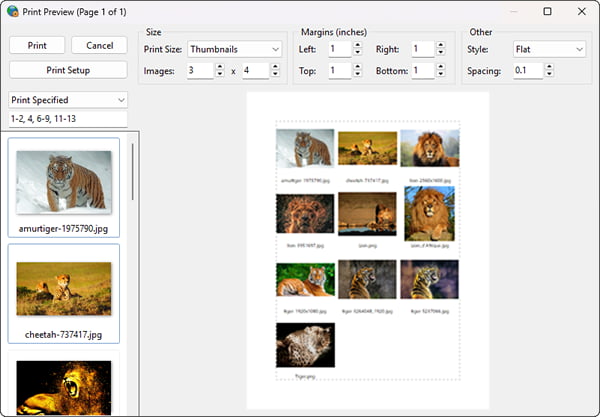
// Display the Print Preview maximized
ImageEnMView1.MIO.PrintPreviewParams.DlgMaximized := True;
ImageEnMView1.MIO.DoPrintPreviewDialog('', False, 'Print Preview');
See Also
◼PrintPreviewParams◼DialogMeasureUnit
◼PreviewPrintImages
◼PrintImage
◼PrintImages
◼OnPrintPage
◼OnShowDialog
◼DoSavePreviewDialog