TImageEnMIO.PrintImagesToBitmap
Declaration
function PrintImagesToBitmap(Dest: TIEBitmap; ImageWidth, ImageHeight: Integer; ColCount: Integer; RowCount: Integer; HorzSpace: Integer = 6; VertSpace: Integer = 6;PrintSelectedOnly: Boolean = False; HorzMargin: Integer = 12; VertMargin: Integer = 12; CellBorder: Boolean = False; ShowText: Boolean = True;
DropShadow: Boolean = True; BackgroundColor: TColor = clWhite; BorderColor: TColor = clBlack;
const Heading: string = ''; HeadingHeight: Integer = 5; HeadingColor: TColor = clBlack;
PageNo: Integer = 0; ImageBorder: Boolean = False; ClipImages: Boolean = False): Integer;
Description
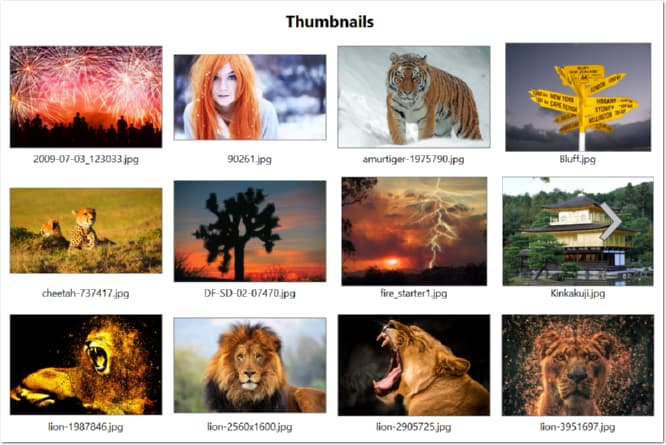
Outputs multiple images (all or just selected) in the attached TImageEnMView or TIEMultiBitmap as rows and columns of thumbnails to a file.Result is the number of pages (bitmaps) required to output all thumbnails.
| Parameter | Description |
|---|---|
| Dest | The destination bitmap for these thumbnails. If PageNo is not set, then only the first page will be output. Dest can be nil to return the count of pages |
| ImageWidth/ImageHeight | The output size for the image (in pixels) |
| ColCount | Specifies how many thumbnails span across the page |
| RowCount | Specifies how many thumbnails span down the page |
| HorzSpace | The horizontal space between thumbnails (in pixels) |
| VertSpace | The vertical space between thumbnails (in pixels) |
| PrintSelectedOnly | Set to True to print only selected images. False to print all image in the TImageEnMView |
| HorzMargin | Page margin on left and right of the image (in pixels) |
| VertMargin | Page margin on top and bottom of the image (in pixels) |
| CellBorder | Set to True to draw a box around the each image cell (space containing the area of the image and its text) |
| ShowText | Set to True to draw text associated with every image. Note: The font of the text will be used, e.g. BottomTextFont |
| DropShadow | Set to True to draw a shadow around the image |
| BackgroundColor | Specifies the underlying color of the image |
| BorderColor | Specifies the color of the box around the image or cell (i.e. when CellBorder or ImageBorder is True) |
| Heading | Specifies the heading to print at the top of the page. If you append ### (e.g. 'Thumbnails###') it will append "Page x" to printed pages after the first one |
| HeadingHeight | The height of the heading, as a PERCENTAGE of the overall page height, e.g. 5 will make the heading 5% of the page height |
| HeadingColor | Specifies the color of the heading text |
| PageNo | The page of thumbnails to output |
| ImageBorder | Set to True to draw a box around each thumbnail (edge of image) |
| ClipImages | Set to display images cropped to the ratio of the output (i.e. left/right or top/bottom of the image will be discarded to avoid space around the thumbnail) |
Note:
◼The images will maintain their aspect ratio when stretched
◼Use the OnPrintPage or OnPrintPage event to customize the heading
◼Also see the variant: TIECustomMultiBitmap.DrawToBitmap
Demo
 | Demos\ImageEditing\EveryMethod\EveryMethod.dpr |
Example
Also see: Automated Samples
// Save image of thumbnailsImageEnMView1.MIO.PrintImagesToBitmap(MyBitmap, Screen.Width, Screen.Height, 4, 3, ...);
// Get number of bitmaps needed to output all thumbnails
pageCount := ImageEnMView1.MIO.PrintImagesToBitmap(nil, Screen.Width, Screen.Height, 4, 3, ...);
See Also
◼PrintImages◼PrintImagesToFile
◼OnPrintPage
◼DoPrintPreviewDialog
◼PreviewPrintImages