TImageEnView.HasAlphaChannel
Declaration
function HasAlphaChannel(Validate: Boolean = False): Boolean;Description
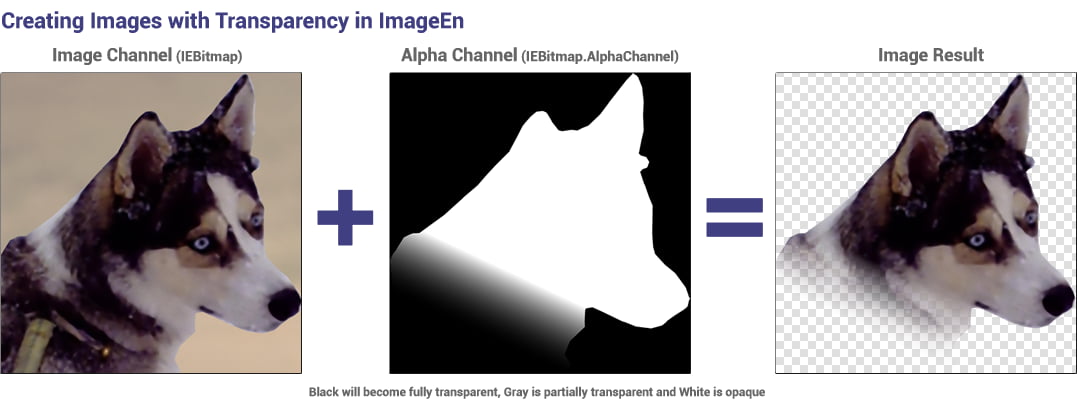
Returns True if the current image has an alpha channel.If Validate is False, HasAlphaChannel will return True even if the alpha channel is not used (image is completely opaque, but AlphaChannel is valid).
If Validate is True, it will check that the image uses the alpha channel, i.e. some parts of the image are transparent. The AlphaChannel is removed if not used.
Examples
if ImageEnView1.HasAlphaChannel() then... // Image has alpha channel, may or may not be usedif ImageEnView1.HasAlphaChannel( True ) then... // Image has alpha channel, part of the image are transparent
// Show the percentage of pixels that are partially or fully transparent
// Same as TImageEnProc.CalcImageNumColors()
var
px: PByte;
y, x, l: Integer;
alphaCount, denom: Integer;
bmp: TIEBitmap;
begin
bmp := ImageEnView1.IEBitmap;
alphaCount := 0;
if bmp.HasAlphaChannel() then
begin
l := IEBitmapRowLen( bmp.AlphaChannel.Width, bmp.AlphaChannel.BitCount, 8);
for y := 0 to bmp.AlphaChannel.Height - 1 do
begin
px := bmp.AlphaChannel.Scanline[y];
for x := 0 to l - 1 do
begin
if px^ < 255 then
Inc( alphaCount );
Inc( px );
end;
end;
end;
denom := bmp.Width * bmp.Height;
ShowMessage( Format( 'Image has %d%% transparent pixels', [ Round( alphaCount / denom * 100 )]));
end;
See Also
◼TIEBitmap.AlphaChannel◼TImageEnView.AlphaChannel
Compatibility Information
Prior to v10.0.1, TImageEnView had an HasAlphaChannel property, which is the same as HasAlphaChannel(False).For C++Builder, you will need to add an empty parenthesis to maintiain existing functionality, i.e. HasAlphaChannel must be changed to HasAlphaChannel().