TIEPolylineLayer.SetPoints
Declaration
// Point array overloadsprocedure SetPoints(const Points: array of TPoint; PointBase: TIEPointBase = iepbRange); overload;
procedure SetPoints(const Points: array of TPoint; ClosePolyline: Boolean; PointBase: TIEPointBase = iepbRange); overload;
procedure SetPoints(const Points: array of Integer; ClosePolyline: Boolean; PointBase: TIEPointBase = iepbRange); overload;
procedure SetPointsD(const Points: array of TDPoint; Count: Integer; PointBase: TIEPointBase); overload;
// Complex path overload
procedure SetPoints(const Points: array of TDPoint; const PointFormats: array of TIEPointFormat; PointBase: TIEPointBase = iepbRange); overload;
// Shape fill overload
procedure SetPoints(Shape: TIEShape; ClosePolyline: Boolean = True); overload;
// Arc overload
procedure SetPoints(StartAngle, SweepAngle: Double; PtCount: Integer = 0); overload;
// String overload
procedure SetPoints(const Points: string; ClosePolyline: Boolean; ScalePoints: Boolean = True); overload;
Description
Set the points of the polyline.PointBase specifies the basis of the points. The default is iepbRange, which means the x and y values are in the range 0 to 1000 where (0, 0) is the top-left pixel of the layer and (1000, 1000) is the bottom-right. Values less than 0 or more than 1000 will increase the size of the layer.
If you use the Shape overload, the point array will be filled with a TIEShape.
You can use the string overload to import point lists from other sources. It should be formatted as follows x1,y1,x2,y2,x3,y3, etc. Spaces, tabs and hard returns can be used instead of commas. If ScalePoints is True the layer will maintain its existing size (any range of input values can be used and will fill the existing layer).
There is also a complex path overload that allows you to add curves and arcs.
PolylineClosed will be set to ClosePolyline.
Examples
// Draw a triangle polygonWith TIEPolylineLayer( ImageEnView1.CurrentLayer ) do
begin
ClearAllPoints();
AddPoint( 500, 0 );
AddPoint( 1000, 1000 );
AddPoint( 0, 1000 );
PolylineClosed := True;
end;
ImageEnView1.Update();
// Which is the same as..
var
shapePoints: array of TPoint;
begin
SetLength( shapePoints, 3 );
shapePoints[0] := Point( 500, 0 );
shapePoints[1] := Point( 1000, 1000 );
shapePoints[2] := Point( 0, 1000 );
TIEPolylineLayer( ImageEnView1.CurrentLayer ).SetPoints( shapePoints, True );
ImageEnView1.Update();
end;
// Which is the same as...
TIEPolylineLayer( ImageEnView1.CurrentLayer ).SetPoints( [ Point(500, 0), Point(1000, 1000), Point(0, 1000) ], True );
ImageEnView1.Update();
// Which is the same as...
TIEPolylineLayer( ImageEnView1.CurrentLayer ).SetPoints( iesTriangle, True );
ImageEnView1.Update();

// If PolylineClosed is not enabled, we get a polyline, instead of a polygon
TIEPolylineLayer( ImageEnView1.CurrentLayer ).PolylineClosed := False;
ImageEnView1.Update();

// Fill points with Star shape
TIEPolylineLayer( ImageEnView1.CurrentLayer ).SetPoints( iesStar5, True );

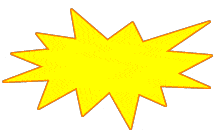
// Fill points with Explosion shape
TIEPolylineLayer( ImageEnView1.CurrentLayer ).SetPoints( iesExplosion, True );
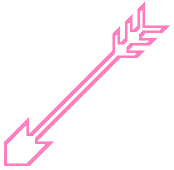
// Fill points with Arrow shape
TIEPolylineLayer( ImageEnView1.CurrentLayer ).SetPoints( iesShootingArrowSW, True );
// Fill points with Lightning shape
TIEPolylineLayer( ImageEnView1.CurrentLayer ).SetPoints( iesLightningLeft, True );

// Fill layer with arc from 270 (6 o'clock) anti-clockwise to 180 (9 o'clock)
StartAngle := 270;
EndAngle := 90;
SweepAngle := EndAngle - StartAngle + 360;
if SweepAngle >= 360 then
SweepAngle := SweepAngle - 360;
TIEPolylineLayer( ImageEnView1.CurrentLayer).SetPoints( StartAngle, SweepAngle );
// Add a polygon based on a string
triangleStr := '250, 0, 0, 500, 500, 500';
ImageEnView1.LayersAdd( ielkPolyline, 100, 100, 400, 400 );
TIEPolylineLayer( ImageEnView1.CurrentLayer ).SetPoints( triangleStr, True );
ImageEnView1.Update();
// Insert a polygon (closed polyline) of a star
ImageEnView1.LayersAdd( ielkPolyline, 100, 100, 400, 400 );
TIEPolylineLayer( ImageEnView1.CurrentLayer ).SetPoints( [ 125,0, 155,95, 250,95, 175,155, 202,250, 125,193, 48,250, 78,155, 0,95, 98,95 ], True, iepbBitmap );
ImageEnView1.Update();
// Create a polyline layer with a complex path
ImageEnView1.LayersAdd( ielkPolyline );
polyLayer := TIEPolylineLayer( ImageEnView1.CurrentLayer );
polyLayer.BorderColor := clWebOrange;
polyLayer.BorderWidth := 30;
polyLayer.FillColor := clNone;
polyLayer.PolylineClosed := False;
SetLength( pts, 6 );
SetLength( fmts, 6 );
fmts[0].Action := iepaMoveTo;
pts[0] := DPoint( 10, 10 );
fmts[1].Action := iepaLineTo;
pts[1] := DPoint( 90, 10 );
fmts[2].Action := iepaMoveTo;
pts[2] := DPoint( 50, 10 );
fmts[3].Action := iepaLineTo;
pts[3] := DPoint( 50, 190 );
fmts[4].Action := iepaMoveTo;
pts[4] := DPoint( 10, 190 );
fmts[5].Action := iepaLineTo;
pts[5] := DPoint( 90, 190 );
polyLayer.SetPoints( pts, fmts, iepbBitmap );
ImageEnView1.Update();

// Create a curved polyline layer with a complex path
ImageEnView1.LayersAdd( ielkPolyline );
polyLayer := TIEPolylineLayer( ImageEnView1.CurrentLayer );
polyLayer.BorderColor := clGreen;
polyLayer.BorderWidth := 3;
polyLayer.FillColor := clYellow;
// M 70,30
polyLayer.AddPoint( 70, 30, iepbBitmap, iepaMoveTo );
// C 130,-30 130,90 70,30
polyLayer.AddPoint( 70, 30, iepbBitmap, iepaBezierCurveTo, False, 130, -30, 130, 90 );
// C 10,90 10,-30 70,30 Z
polyLayer.AddPoint( 70, 30, iepbBitmap, iepaBezierCurveTo, True, 10, 90, 10, -30 );
ImageEnView1.Update();

See Also
◼Points◼GetPoints
◼AddPoint
◼SetPoint
◼RemovePoint
◼TIELineLayer.SetPoints
◼TIEAngleLayer.SetPoints