TImageEnMView.ThumbHeight
Declaration
property ThumbHeight: Integer;Description
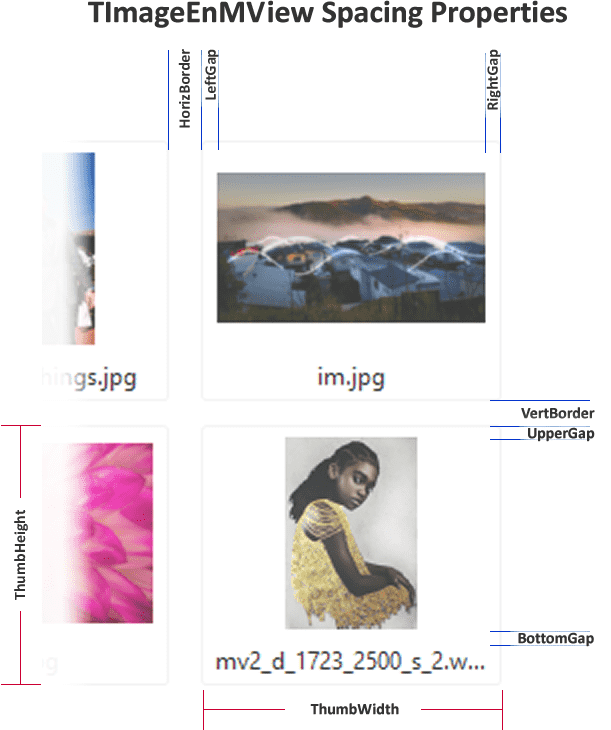
Specifies the height of the thumbnails displayed in the TImageEnMView.If ThumbHeight < 0, then the thumbnail height is automatically calculated to fit that number of rows, e.g. ThumbHeight = -1, the thumbnails will be the height of the control, -2, there will be two rows of thumbnails, etc.
Note: This is the height of the thumbnail frame (when the Style is iemsFlat). The thumbnail image itself will be ThumbHeight less UpperGap and BottomGap. See ThumbSizeInfo for actual display size. Use SetThumbnailSize to set the display size of the image itself.
TImageEnMView Default: 100;
TImageEnFolderMView Default: 130
TImageEnLayerMView Default: 120
Demos
 | Demos\Multi\Multiview2\Multiview2.dpr |
Examples
// Store images in control as 120 x 100 thumbnailsImageEnMView1.ThumbWidth := 120;
ImageEnMView1.ThumbHeight := 100;
ImageEnMView1.StoreType := ietThumb;
// Fit thumbnails to the size of the control
ImageEnMView1.ThumbWidth := -1;
ImageEnMView1.ThumbHeight := -1;
// Show a PDF document in a 2x2 layout
const
HORZ_COUNT = 2;
VERT_COUNT = 2;
begin
ImageEnMView1.LockUpdate();
try
ImageEnMView1.GridWidth := -1;
ImageEnMView1.ThumbWidth := -1 * HORZ_COUNT;
ImageEnMView1.ThumbHeight := -1 * VERT_COUNT;
ImageEnMView1.ScrollBars := ssVertical;
ImageEnMView1.LoadFromFileOnDemand( 'D:\MultiPageDoc.pdf' );
finally
ImageEnMView1.UnlockUpdate();
end;
end;
Compatibility Information
Prior to v15.2.2, ThumbHeight = -1 would return a thumbnail that was 3/4 of the height of ThumbWidth. ThumbHeight = -1 now means the thumbnail height will match the height of the controlSee Also
◼ThumbWidth◼SetThumbnailSize
◼ThumbSizeInfo
◼StoreType