TImageEnView.CalcSelectionArea
Declaration
function CalcSelectionArea(Units: TIEUnits = ieuPixels): Double;Description
Returns the area of current selection.Note:
◼Result will be inaccurate for intersected areas
◼Works with all selection types, including selection masks
◼For units other than ieuPixels, the value will be calculated using the image DPI
Demo
 | Demos\ImageEditing\EveryMethod\EveryMethod.dpr |
Examples
// Show statistics while making a selectionprocedure TfrmMain.ImageEnView1SelectionChanging(Sender: TObject);
const
Units = ieuPixels;
var
uS: string;
begin
uS := IEGlobalSettings().MeasureUnits[ Units ];
Label1.Caption := Format( 'Area: %.2f %s%s', [ ImageEnView1.CalcSelectionArea( Units ), uS, #178 ]);
Label2.Caption := Format( 'Perimeter: %.2f %s',[ ImageEnView1.CalcSelectionLen( Units ), uS ]);
Label3.Caption := Format( 'Centroid: %d,%d', [ ImageEnView1.CalcSelectionCentroid.X, ImageEnView1.CalcSelectionCentroid.Y ]);
end;
// Select a heart shape and calculate its area, perimeter and centroid
ImageEnView1.SelectionBase := iesbBitmap;
ix := ImageEnView1.IEBitmap.Width div 4;
iy := ImageEnView1.IEBitmap.Height div 4;
ImageEnView1.SelectShape( ix, iy, ImageEnView1.IEBitmap.Width - ix, ImageEnView1.IEBitmap.Height - iy, iesHeart );
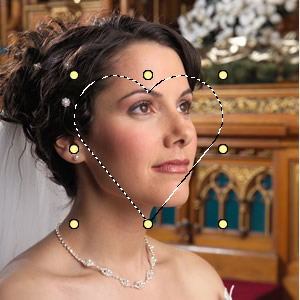
uS := IEGlobalSettings().MeasureUnits[ ieuPixels ];
area := ImageEnView1.CalcSelectionArea( ieuPixels );
len := ImageEnView1.CalcSelectionLen( ieuPixels );
Pt := ImageEnView1.CalcSelectionCentroid();
Label1.Caption := Format( 'Area: %.2f sq. %s', [ area, uS ]); // 14175.00 Pixels²
Label2.Caption := Format( 'Perimeter: %.2f %s', [ len, uS ]); // 475.90 Pixels
Label3.Caption := Format( 'Centroid: %d,%d', [ Pt.X, Pt.Y ]); // 149,133
See Also
◼CalcSelectionCentroid◼CalcSelectionLen
◼MeasureUnits