TPdfObjectList.FindObjectAt
Declaration
function FindObjectAt(Pt: TDPoint; LimitToType: TPdfObjectType = ptUnknown; VisibleOnly: Boolean = True): Integer; overload;function FindObjectAt(Pt: TPoint; LimitToType: TPdfObjectType = ptUnknown; VisibleOnly: Boolean = True): Integer; overload;
Description
Returns the index of any object found on the page at the specified position (in terms of PDF points).If VisibleOnly = True, only objects that are marked as Visible will be returned.
Result will be -1 if no objects are found.
PDF Page Points
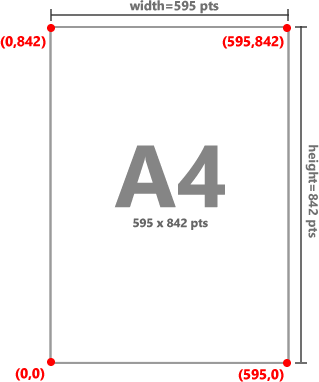
Objects on a PDF page are specified in points that originate at the bottom-left, i.e. when X,Y = (0,0). The top-left of the page is specified by (PageWidth, PageHeight).To convert PDF points to screen values, use PageToScr.
Example
// Select the clicked objectprocedure TfrmMain.ImageEnView1MouseDown(Sender: TObject; Button: TMouseButton; Shift: TShiftState; X, Y: Integer);
var
idx: Integer;
pt: TDPoint;
begin
pt := ImageEnView1.PdfViewer.ScrToPage( X, Y, True );
idx := ImageEnView1.PdfViewer.Objects.FindObjectAt( pt );
if idx > -1 then
begin
ImageEnView1.PdfViewer.SelectedObject := idx;
ImageEnView1.Invalidate();
end;
end;
See Also
◼SelectedObject◼HighlightedIndex