TIEBitmapHelper.DetectAndDeskew
Declaration
function DetectAndDeskew(ReferenceImage: TIEBitmap; OutImage: TIEBitmap = nil; MaxFeatures: Integer = 2000; GoodMatchPercentage: Double = 0.15; HomographyMethod: TIEVisionHomographyMethod = ievRANSAC; Algorithm: TIEVisionFeatureAlgorithm = ievFeatureSIFT): Boolean;Description
A shortcut method that creates a TIEVisionFeaturesDetector object, calls findHomography to determine the homography and then uses warpPerspective to deskew the image.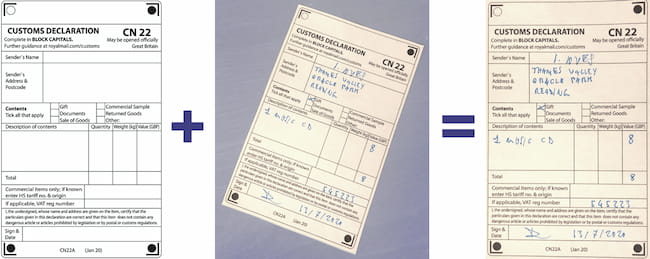
| Parameter | Description |
|---|---|
| Self | The input image to be deskewed |
| ReferenceImage | The image to use as a reference for optimal alignment |
| OutImage | Destination image for the result (needs to be created before calling method). If nil, then current image is updated |
| MaxFeatures | Maximum number of points to detect. The higher the value specified the more accurate the result is likely to be. ORB works with 500, but the other algorithms need 2000 or more |
| GoodMatchPercentage | Percentage (0..1) of "good-match" to choose which points to take. Only used with ievFeatureORB (see setMatchMode) |
| HomographyMethod | Method to compute the homography matrix |
| Algorithm | The keypoint detector. If alignment fails or is inaccurate, try another one |
Result is True, unless an error occurred. Typically errors occur because the homography matrix cannot be calculated (you should try increasing MaxFeatures).
Note:
◼You must add the iexHelperFunctions unit to your uses clause
◼Delphi/C++ 2005 or newer is required to use helper classes
◼You can draw the rects to a canvas using DrawRects
◼If attached to a TImageEnView, it will automatically call Update
◼Object detection requires IEVision. You will need to register it before calling the method
Method Behavior
The following call:ImageEnViewInput.IEBitmap.DetectAndDeskew( ImageEnViewReference.IEBitmap, ImageEnViewResult.IEBitmap, UpDownMaxFeatures.Position );
Is the same as calling:
// Detect matching points of the two images
det := IEVisionLib().createFeaturesDetector( ievFeatureSIFT );
det.detect( ImageEnViewInput.IEBitmap.GetIEVisionImage(), ImageEnViewReference.IEBitmap.GetIEVisionImage(), 2000 );
// Find homography matrix (hmat) from matching points
hmat := IEVisionLib().createMath().findHomography( det.getPoints1(), det.getPoints2(), ievRANSAC );
// Check homography validity
if IEVisionLib().createMath().isValidHomography(hmat) then
begin
// adjust "scanned-form" to the same skew of "form" image
imgres := ImageEnViewInput.IEBitmap.GetIEVisionImage().warpPerspective( hmat, IEVisionSize( ImageEnViewReference.IEBitmap.Width, ImageEnViewReference.IEBitmap.Height ));
ImageEnViewResult.IEBitmap.AssignIEVisionImage( imgres );
ImageEnViewResult.Update();
end;
Examples
// Skewed image is ImageEnViewInput, Reference image is ImageEnViewReference, deskewed result is shown in ImageEnViewResultImageEnViewInput.IEBitmap.DetectAndDeskew( ImageEnViewReference.IEBitmap, ImageEnViewResult.IEBitmap );
// Deskew current image using a reference image
ImageEnViewInput.IEBitmap.DetectAndDeskew( ImageEnViewReference.IEBitmap, nil );
See Also
◼deskew◼SkewDetection