TIEVisionImage.deskew
Declaration
function deskew(maxAngle: Double = 7.0; minConfidence: Double = 3.0): TIEVisionImage; safecall;Description
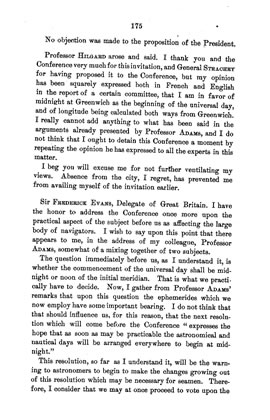
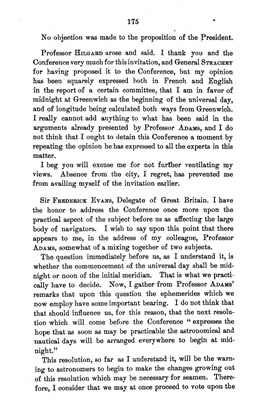
Measures the skew of the text lines (see findSkewAngle) and returns a copy of the image rotated so the lines are horizontal.The canvas is enlarged so no content is cropped, and the new areas are filled with the page's background color. The color format is kept (1-bit images become 8-bit gray). The current image is not changed.
If the skew cannot be measured with at least minConfidence, or is less than 0.1 degrees, an unrotated copy is returned.
Use getTransformInfo on the result to get the angle that was applied, and mapRectToSource to map positions found in the result (e.g. OCR boxes) back to the original image.
| Parameter | Description |
|---|---|
| maxAngle | Largest skew to correct, in degrees (greater than 0 and at most 45) |
| minConfidence | Minimum measurement confidence required to rotate (3 is reliable) |
Demo
 | Demos\ImageEditing\EveryMethod\EveryMethod.dpr |
Examples
Also see: Automated Samples
varimg: TIEVisionImage;
scale, angle: Double;
begin
img := ImageEnView1.IEBitmap.GetIEVisionImage().deskew();
img.getTransformInfo( @scale, @angle );
ImageEnView1.IEBitmap.AssignIEVisionImage( img );
ImageEnView1.Update();
end;
// Correct the skew of the text lines of a document
img := ImageEnView1.IEBitmap.GetIEVisionImage().deskew( 7, 3 );
img.getTransformInfo( nil, @angle ); // Rotation that was applied
ImageEnView1.IEBitmap.AssignIEVisionImage( img );
ImageEnView1.Update(); // Show changes in our viewer
// Result: Rotated -1.31 deg

See Also
◼findSkewAngle◼prepareForOCR
◼SkewDetection
◼RotateAndCrop
◼DetectAndDeskew