TIEVisionImage.mapRectToSource
Declaration
function mapRectToSource(const rect: TIEVisionRect): TIEVisionRect; safecall;Description
For an image returned by prepareForOCR or deskew, converts a rectangle in this image (for example an OCR box) to the matching rectangle in the source image.The scale, rotation and margin are reversed. If the image was rotated, the result is the bounding rectangle of the rotated area. The result is clipped to the source image.
For any other image the rectangle is returned unchanged.
| Parameter | Description |
|---|---|
| rect | Rectangle in this image |
Note: The information belongs to the TIEVisionImage object that was returned. It is lost if the image is assigned to a TIEBitmap and then retrieved again, so keep the returned object.
Examples
Also see: Automated Samples
prepared := ImageEnView1.IEBitmap.GetIEVisionImage().prepareForOCR();OCR.recognize( prepared, IEVisionRect( 0, 0, 0, 0 ));
boxes := OCR.getBoxes();
for i := 0 to boxes.size() - 1 do
begin
r := prepared.mapRectToSource( boxes.getOCRBox( i ).rect );
ImageEnView1.IEBitmap.Canvas.Rectangle( r.x, r.y, r.x + r.width, r.y + r.height );
end;
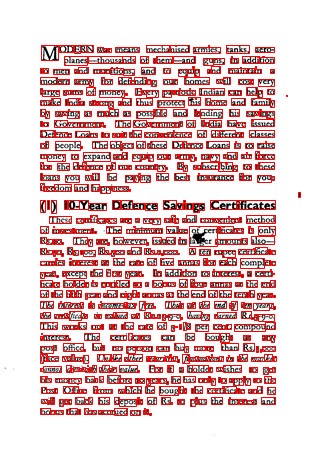
// Find the characters in a document prepared for OCR, and draw them on the original image
prepared := ImageEnView1.IEBitmap.GetIEVisionImage().prepareForOCR();
rects := prepared.getConnectedComponents( 8, 3, 3, 300, 300 );
ImageEnView1.IEBitmap.IECanvas.Pen.Color := clRed;
ImageEnView1.IEBitmap.IECanvas.Brush.Style := bsClear;
for i := 0 to rects.size() - 1 do
begin
r := prepared.mapRectToSource( rects.getRect( i ));
ImageEnView1.IEBitmap.IECanvas.Rectangle( r.x, r.y, r.x + r.width, r.y + r.height );
end;
ImageEnView1.Update();
See Also
◼prepareForOCR◼getTransformInfo