TIEBitmapHelper.DetectFaces
Declaration
function DetectFaces(MinScore: Double = 0.8): TIERectArray;Description
A shortcut method that creates a TIEVisionFaceDetector object and calls detect to return the rectangle of each face in the image, highest score first.MinScore is the minimum detection score (0 to 1). Lower values find more faces, but give more false detections.
Note:
◼You must add the iexHelperFunctions unit to your uses clause
◼Delphi/C++ 2005 or newer is required to use helper classes
◼You can draw the rects to a canvas using DrawRects
◼Use TIEVisionFaceDetector directly if you need the scores or facial landmarks
◼Face detection requires IEVision. You will need to register it before calling the method
Method Behavior
The following call:rects := ImageEnView1.IEBitmap.DetectFaces();
Is the same as calling:
detector := IEVisionLib.createFaceDetector();
faces := detector.detect( ImageEnView1.IEBitmap.GetIEVisionImage(), IEVisionRect( 0, 0, 0, 0 ));
Demo
 | Demos\ImageEditing\EveryMethod\EveryMethod.dpr |
Examples
Also see: Automated Samples
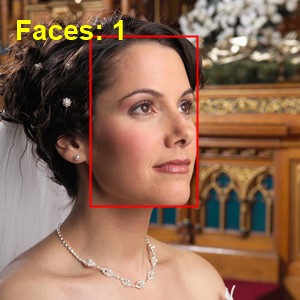
// Outline the faces in the imagerects := ImageEnView1.IEBitmap.DetectFaces();
for i := 0 to Length( rects ) - 1 do
ImageEnView1.LayersAdd( iesRectangle, rects[i], clRed, 2 );
// Outline all faces in the image (with a score of 0.8 or higher)
rects := ImageEnView1.IEBitmap.DetectFaces( 0.8 );
ImageEnView1.IEBitmap.IECanvas.Pen.Color := clRed;
ImageEnView1.IEBitmap.IECanvas.Pen.Width := 2;
ImageEnView1.IEBitmap.IECanvas.Brush.Style := bsClear;
for i := 0 to Length( rects ) - 1 do
ImageEnView1.IEBitmap.IECanvas.Rectangle( rects[i] );
ImageEnView1.Update();
See Also
◼LevelByEyes◼alignFace
◼CropToFace
◼BlurFaces
◼TIEVisionFaceDetector
◼detect