TIEVisionFeaturesDetector.detect
Declaration
procedure detect(image1, image2: TIEVisionImage; maxFeatures: int32_t = 500; goodMatchPercentage: Double = 0.15); safecall;Description
Detects the keypoints of both images and finds the best matching points between them.Retrieve the result with getPoints1 and getPoints2.
| Parameter | Description |
|---|---|
| image1 | First image |
| image2 | Second image |
| maxFeatures | Maximum number of keypoints to detect in each image (the strongest are kept). The higher the value specified the more accurate the result is likely to be, but the slower. 500 is suitable for ORB, but use 2000 or more for the other algorithms. 0 means no limit (except for ORB) |
| goodMatchPercentage | Percentage (0..1) of the best matches to keep. Only used when the match mode is ievMatchBestPercentage (the default for ORB). See setMatchMode |
Images can be gray, color (with or without alpha), 1-bit or 16-bit. They are converted to 8-bit gray for detection.
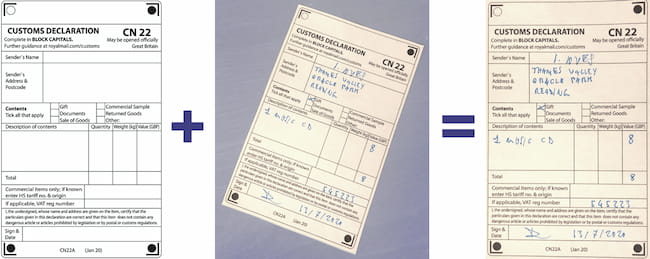
Note: A shortcut method for this is available: DetectAndDeskew
Example
detector := IEVisionLib().createFeaturesDetector( ievFeatureSIFT );detector.detect( img1.GetIEVisionImage(), img2.GetIEVisionImage(), 2000 );
ShowMessage( Format( '%d matches', [ detector.getMatchCount() ]));
See Also
◼getMatchingGraph◼getPoints1
◼getPoints2
◼findHomography
◼isValidHomography
◼warpPerspective