TIEVisionMath.delaunayTriangulation
Declaration
function delaunayTriangulation(points: TIEVisionVectorPoint2f): TIEVisionVectorInt32; safecall;Description
Divides the area within a point set into triangles, using Delaunay triangulation (triangles are as "fat" as possible: no point lies inside the circumcircle of any triangle).Returns three indices into points for each triangle, i.e. triangle n uses points result[n * 3], result[n * 3 + 1] and result[n * 3 + 2]. Together the triangles cover the convex hull of the points. All triangles have the same winding (clockwise on screen).
Triangulation is used for mesh warping and morphing: triangulate one set of points, then warp each triangle to the matching triangle of a second set of points (see getAffineTransform).
Note:
◼Duplicate points use the index of their first occurrence
◼Returns an empty list for fewer than three distinct points, or if all the points lie on one line
◼Raises an exception for NaN or infinite coordinates
◼20,000 points are triangulated in about 0.1 seconds
Demo
 | Demos\ImageEditing\EveryMethod\EveryMethod.dpr |
Examples
Also see: Automated Samples
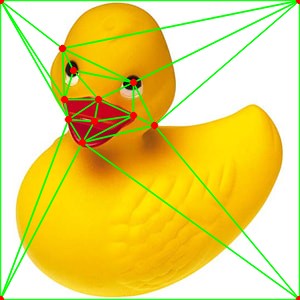
// Draw a Delaunay mesh over some pointstris := IEVisionLib().createMath().delaunayTriangulation( points );
contours := IEVisionLib().createVectorObjRef();
for i := 0 to tris.size() div 3 - 1 do
begin
tri := IEVisionLib().createVectorPoint();
for j := 0 to 2 do
begin
p := points.getPoint( tris.getInt32( i * 3 + j ));
tri.push_back( IEVisionPoint( Round( p.x ), Round( p.y )));
end;
contours.push_back( tri );
end;
IEVisionLib().createDrawing().drawContours( ImageEnView1.IEBitmap.GetIEVisionImage(), contours, IEVisionScalar( 255, 0, 0 ));
ImageEnView1.Update();
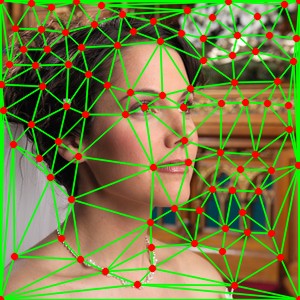
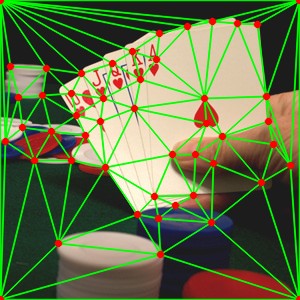
// Draw a Delaunay triangulation mesh of the corners of the image (found using goodFeaturesToTrack)
pts := ImageEnView1.IEBitmap.GetIEVisionImage().goodFeaturesToTrack( 150, 0.01, 20 );
pts.push_back( IEVisionPoint2f( 0, 0 ));
pts.push_back( IEVisionPoint2f( ImageEnView1.IEBitmap.Width - 1, 0 ));
pts.push_back( IEVisionPoint2f( ImageEnView1.IEBitmap.Width - 1, ImageEnView1.IEBitmap.Height - 1 ));
pts.push_back( IEVisionPoint2f( 0, ImageEnView1.IEBitmap.Height - 1 ));
tris := IEVisionLib().createMath().delaunayTriangulation( pts );
mesh := IEVisionLib().createVectorObjRef();
for i := 0 to tris.size() div 3 - 1 do
begin
tri := IEVisionLib().createVectorPoint();
for j := 0 to 2 do
begin
pt := pts.getPoint( tris.getInt32( i * 3 + j ));
tri.push_back( IEVisionPoint( Round( pt.x ), Round( pt.y )));
end;
mesh.push_back( tri );
end;
IEVisionLib().createDrawing().drawContours( ImageEnView1.IEBitmap.GetIEVisionImage(), mesh, IEVisionScalar( 0, 255, 0 ), -1, 1, 16 );
ImageEnView1.Update();
See Also
◼getAffineTransform◼warpAffine
◼convexHull