TIEVisionImage.warpAffine
Declaration
function warpAffine(M: TIEVisionMatrix; destSize: TIEVisionSize; interpolation: TIEVisionInterpolation = ievLINEAR; borderMode: TIEVisionBorderType = ievBORDER_CONSTANT; inverseMap: bool32 = False): TIEVisionImage; overload; safecall;function warpAffine(M: TIEVisionMatrix; destSize: TIEVisionSize; interpolation: TIEVisionInterpolation; borderMode: TIEVisionBorderType; const borderValue: TIEVisionScalar; inverseMap: bool32 = False): TIEVisionImage; overload; safecall;
Description
Apply an affine transformation (move, scale, rotate and skew) to an image.| Parameter | Description |
|---|---|
| M | 2x3 transformation matrix, e.g. from getAffineTransform |
| destSize | Size of the output image. IEVisionSize(0, 0) gives the same size as the source |
| interpolation | Interpolation method (ievNEAREST, ievLINEAR or ievCUBIC) |
| borderMode | How to fill pixels that come from outside the source (e.g. ievBORDER_CONSTANT, ievBORDER_REPLICATE or ievBORDER_REFLECT_101) |
| borderValue | Border color (B, G, R, 0) for ievBORDER_CONSTANT |
| inverseMap | M maps the destination to the source (rather than the source to the destination) |
Returns the warped image. Pixel (x, y) of the source moves to (m[0, 0] * x + m[0, 1] * y + m[0, 2], m[1, 0] * x + m[1, 1] * y + m[1, 2]).
Note:
◼This method will discard the AlphaChannel
◼1 bit images are not supported (convert to 8 bit first)
◼Unlike warpPerspective parallel lines stay parallel
Demo
 | Demos\ImageEditing\EveryMethod\EveryMethod.dpr |
Examples
Also see: Automated Samples
// Warp an image so that three points move to new positionsM := IEVisionLib().createMath().getAffineTransform( srcPoints, dstPoints );
img := ImageEnView1.IEBitmap.GetIEVisionImage().warpAffine( M, IEVisionSize( 0, 0 ));
ImageEnView1.IEBitmap.AssignIEVisionImage( img );
// Same, but fill the new border areas with red
img := ImageEnView1.IEBitmap.GetIEVisionImage().warpAffine( M, IEVisionSize( 0, 0 ), ievLINEAR, ievBORDER_CONSTANT, IEVisionScalar( 0, 0, 255, 0 ));
ImageEnView1.IEBitmap.AssignIEVisionImage( img );
// Load test image
ImageEnView1.IO.LoadFromFile( 'D:\TestImage.jpg' );
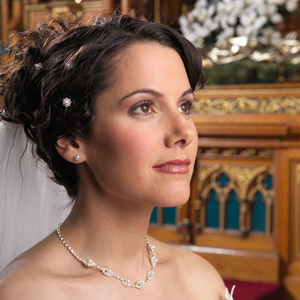
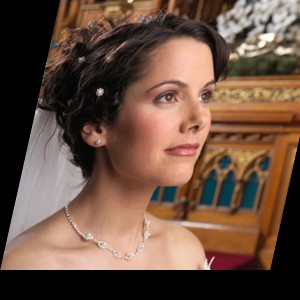
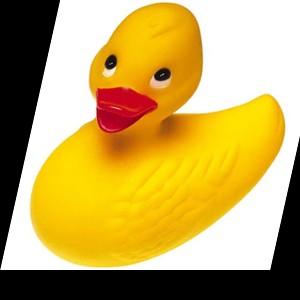
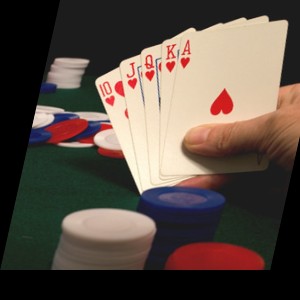
// Skew the image by 20% and scale it to 90%
w := ImageEnView1.IEBitmap.Width;
h := ImageEnView1.IEBitmap.Height;
skew := MulDiv( w, 20, 100 );
// Move the top-left, top-right and bottom-left corners
srcPoints := IEVisionLib().createVectorPoint2f();
dstPoints := IEVisionLib().createVectorPoint2f();
srcPoints.push_back( IEVisionPoint2f( 0, 0 )); dstPoints.push_back( IEVisionPoint2f( skew, 0 ));
srcPoints.push_back( IEVisionPoint2f( w, 0 )); dstPoints.push_back( IEVisionPoint2f( skew + w * 0.9, 0 ));
srcPoints.push_back( IEVisionPoint2f( 0, h )); dstPoints.push_back( IEVisionPoint2f( 0, h * 0.9 ));
M := IEVisionLib().createMath().getAffineTransform( srcPoints, dstPoints );
ImageEnView1.IEBitmap.AssignIEVisionImage( ImageEnView1.IEBitmap.GetIEVisionImage().warpAffine( M, IEVisionSize( w, h ), ievLINEAR, ievBORDER_CONSTANT, IEVisionScalar( 0, 0, 0, 0 ), False ));
ImageEnView1.Update();
See Also
◼getAffineTransform◼warpPerspective
◼delaunayTriangulation
◼Rotate
◼Warp
◼PerspectiveDraw