ImageEn for Delphi and C++ Builder ImageEn for Delphi and C++ Builder


ImageEn Forum
Profile    Join    Active Topics    Forum FAQ    Search this forumSearch
 All Forums
 ImageEn Library for Delphi, C++ and .Net
 ImageEn and IEvolution Support Forum
 TImageEnFolderMView. image selecton and loading MIO parameter

Note: You must be registered in order to post a reply.
To register, click here. Registration is FREE!

View 
UserName:
Password:
Format  Bold Italicized Underline  Align Left Centered Align Right  Horizontal Rule  Insert Hyperlink   Browse for an image to attach to your post Browse for a zip to attach to your post Insert Code  Insert Quote Insert List
   
Message 


Emoji
Smile [:)] Big Smile [:D] Cool [8D] Blush [:I]
Tongue [:P] Evil [):] Wink [;)] Black Eye [B)]
Frown [:(] Shocked [:0] Angry [:(!] Sleepy [|)]
Kisses [:X] Approve [^] Disapprove [V] Question [?]

 
Check here to subscribe to this topic.
   

T O P I C    R E V I E W
robinski Posted - Oct 20 2025 : 18:51:57
I've got a TImageEnFolderMView in a panel on a VCL form in Delphi12. I get the correct "SelectedFileName" and seem to get a "SelectedImage" index number from an "OnClick" event handler. I want to retrieve the EXIF values and have mucked around with the EXIF demo.

  thmbImages.MIO.ParamsFromFile( thmbImages.SelectedFilename );
  with thmbImages.MIO.Params[thmbImages.SelectedImage] do
  begin
    lblCamera.Caption := String( EXIF_Make ) + ' ' + String( EXIF_Model );
    lblLens.Caption   := String( EXIF_LensModel );
    ...
  end;


All the images are JPG files.

I've got a couple of challenges:
[1] The camera make and model shows up in IrfanView but not in my app. Am I missing something?
[2] I don't seem to be loading the correct parameters

I am a "newbie" to IamgeEn and am really impressed with the product. I'm planning to have users edit IPTC file info but first step is to display image EXIF info.

Any assistance/guidance will greatly be appreciated.
R.
9   L A T E S T    R E P L I E S    (Newest First)
robinski Posted - Oct 30 2025 : 13:51:44
Resolved... just had to make the ielib64.dll accessible. Now it's the task of parsing fields I need for the archivist's project under way.

rba
robinski Posted - Oct 30 2025 : 10:41:55
Update... the demo gives expected results if compiled in 32 bit... but I need 64 bit version.

rba
robinski Posted - Oct 29 2025 : 23:01:06
Thanks Nigel. Not getting the results from your screen shot. No code changes in the demo.

rba
xequte Posted - Oct 29 2025 : 21:10:12
Hi Robin

The image you emailed me shows IPTC data when I test it. But it is possibly not being read correctly as I see the data format is different than I would expect.

I will pass it onto my partner for analysis.


Nigel
Xequte Software
www.imageen.com
robinski Posted - Oct 29 2025 : 11:04:05
OK... Nigel found an anomaly in the EXIF tag definitions that is being looked into.

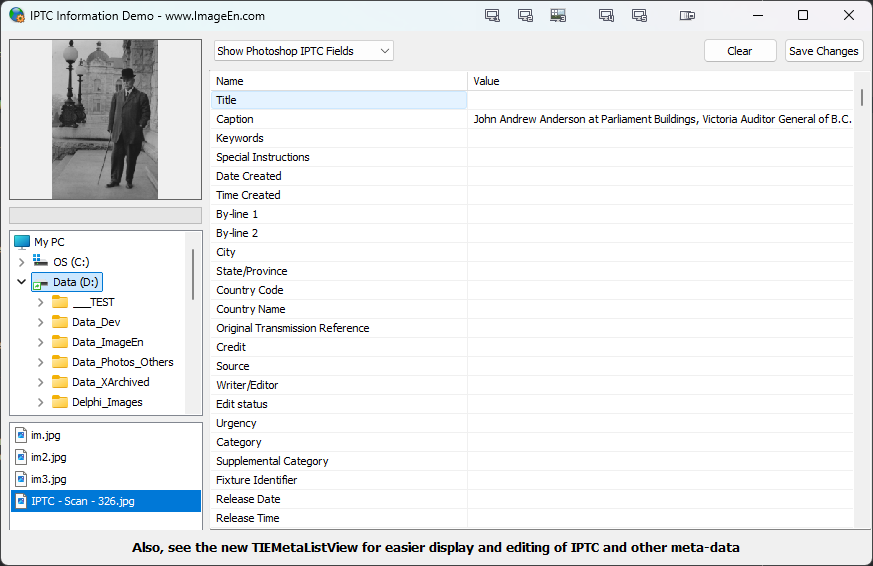
Now... I'm trying to access the IPTC tags and display the info. The IPTC and MetaListView demos retunr a blank screen if "Show Raw IPTC Fields" is selected and no values if the "Show Photoshop IPTC Fields" is selected. IrfanView does show the IPTC fields as expected..

Has anyone here successfully fetched IPTC tag values?

Thanks for any suggestions.

rba
xequte Posted - Oct 21 2025 : 18:38:30
Hi Robin

Do the tags show in the EXIF demo?

Demos\InputOutput\EXIF\EXIF.dpr
https://www.imageen.com/files/demos/run/InputOutput/EXIF/EXIF.zip


Nigel
Xequte Software
www.imageen.com
robinski Posted - Oct 21 2025 : 16:11:54
Hi again Nigel.

I failed to mention that I did check "ieixWantParams" in the "TImageEnFolderMView IOOptionsEx" object. I went looking for an EXIF tag reader that gave the tag number and values and got a trial version of a Windows app that shows thee tag and value.

0x010f Make Canon
0x0110 Camera Model Name Canon EOS R7

with IO.Params do
begin
lblCamera.Caption := String( EXIF_Make ) + ' ' +String( EXIF_Model ) + ' ' + IntToStr( thmbImages.SelectedImage );
...

Are the EXIF_Model and EXIF_Make constants defined as above? For debugging I added the Index ID to the label. If not can I create a constant with the hex numbers to pass as a parameter?


rba
robinski Posted - Oct 21 2025 : 11:16:32
Thanks Nigel.

This makes sense. I used your code snippet as a template. Now when I click on an image in the "TImageEnFolderMView" object I get "SelectedFileName" and the "SelectedImagee" index number but am still getting a blank EXIF_Make and EXIF_Model. The EXIF_LensModel does display.

I viewed a file in the EXIF demo (no make and model display) and the same file in Irfanview which gives the expected results. So I know the info is in the file. Am I missing something?

One change I made in the code was to use the extension overload in :
IO.ParamsFromFile( thmbImages.SelectedFilename, True );
.


rba
xequte Posted - Oct 20 2025 : 22:54:06
Hi Robin

A TImageEnFolderMView is filled automatically with folder content, so you don't (and shouldn't) need to call ParamsFromFile(). The MIO property should rarely be needed when using a TImageEnFolderMView.

However, by default, for performance reasons a TImageEnFolderMView does not retrieve EXIF data for the thumbnails it displays, so you have two options:

1. Retrieve EXIF data for all thumbnails by adding ieixWantParams to IOOptionsEx:

http://www.imageen.com/help/TImageEnMView.IOOptionsEx.html

2. When a thumbnail is displayed get the EXIF data for that image only, e.g. if you show a preview in a TImageEnView by loading the images, the EXIF data will be valid, or you can create a temporary TImageEnIO and retrieve its params, e.g.

// Show the EXIF date of an image
IO := TImageEnIO.Create( nil );
try
  IO.ParamsFromFile( sFilename );
  ShowMessage( DateTimeToStr(( IO.IOParams.EXIF_DateTimeOriginal2 ));
finally
  IO.Free;
end;

http://www.imageen.com/help/TImageEnIO.ParamsFromFile.html

Nigel
Xequte Software
www.imageen.com