| T O P I C R E V I E W |
| BobSmith |
Posted - Nov 04 2025 : 02:40:59
Hello,
I hit a dib error limit using Delphi timage when I try and set the image size to 24000x24000. 23000x23000 works.
Would ImageEn be a good drop in replacement to support larger resolutions (up to physical RAM limits)?
$500 is not cheap, but it would save me coding endless code to handle a huge offscreen image blitted partially to the on screen visible area.
Thanks,
Bob |
| 6 L A T E S T R E P L I E S (Newest First) |
| xequte |
Posted - Nov 08 2025 : 03:26:27
Hi Bob
Our TImageEnView is essentially a more powerful version of TImage.
1. You just need to set zoom to 100%:
https://www.imageen.com/help/TImageEnView.Zoom.html
2. Generally, with ImageEn you use TIEBitmap (a more powerful version of TBitmap). You can output a TIEBitmap to a TBitmap by various methods, such as:
http://www.imageen.com/help/TIEBitmap.CopyToTBitmap.html
3. Sure, you can just create it at runtime in the same way as other controls, e.g.
ImageEnView1 := TImageEnView.Create( Owner );
ImageEnView1.Parent := Form1;
...
You can email us for a v13 trial. V13 is supported since ImageEn v14.0.0.
Nigel
Xequte Software
www.imageen.com
|
| BobSmith |
Posted - Nov 06 2025 : 23:15:48
Also I was going to try the trial, but no support for Delphi v12 or v13? Is that the case with the paid version too?
I want to use it with v12 for now, but v13 soon. Would I need to pay an upgrade or will the same version work with v13? |
| BobSmith |
Posted - Nov 06 2025 : 19:05:54
OK, a few final questions. If I replace the current TImage on my main form with TImageEnView...
1. Can I set it to not zoom etc? I just want the basic TImage functionality with bigger image support. No zoom/stretch/fit etc needed. I will contain the image within a scrollbox for the user to move around if it is larger than the visible screen size.
2. When I display a bitmap (or bitmap32) on the screen I currently use bitmapname.drawto(imagename.canvas.handle,0,0); Will TimageEnView support that same drawto code to show a bitmap?
3. Source code included. Is it an easy process to include TImageEnView via code? Add to uses, then manually create the component at runtime? Reason being is where possible I always prefer to create extra objects at runtime. Saves all those annoying extra installs after you update the IDE.
If TImageEnView handles those then I should be 99% of the way to an easy replacement to fixing TImage. |
| xequte |
Posted - Nov 05 2025 : 16:13:17
Hi Bob
Yes, we have TImageEnView for that:
https://www.imageen.com/help/TImageEnView.html
Here it is displaying a 93,000 x 93,000 pixel image:
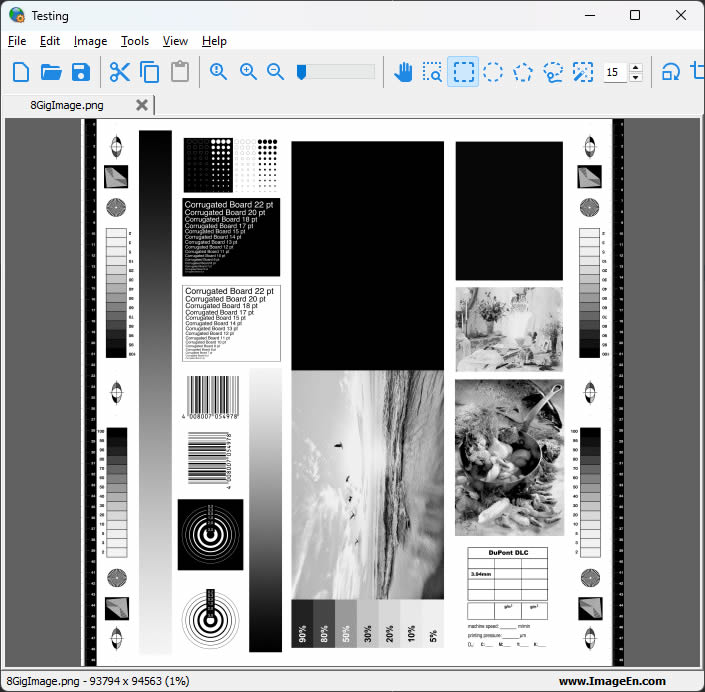
Nigel
Xequte Software
www.imageen.com
|
| BobSmith |
Posted - Nov 05 2025 : 02:52:04
My issue is with TImage and not bitmaps (I already use graphics32 for bitmaps and that works fine).
The problem is when I try and set a Delphi TImage to larger than around 23000x23000 it fails with DIB errors. I can replicate the same beahvior in MS Paint. If you try setting the image size to 24000x24000 it just ignores it. If you set it to 23000x23000 it happily creates an image that size.
So does ImageEn have a TImage replacement that handles all the memory issues? It would be put inside a scrollbox and the user will be scrolling around the potentially huge image.
Thanks. |
| xequte |
Posted - Nov 04 2025 : 20:53:50
Hi Bob
Yes, TIEBitmap has much better memory handling, using either memory, file or bitmap storage:
http://www.imageen.com/help/TIEBitmap.Location.html
Note to prevent memory issues with TIEBitmap you will need to avoid falling back to bitmap storage, e.g. by accessing the VCL TCanvas (of the bitmap).
We do have a non source version available for $249. Email us for more info.
Nigel
Xequte Software
www.imageen.com
|
 Search



