| T O P I C R E V I E W |
| ickkm |
Posted - Dec 16 2025 : 02:36:24
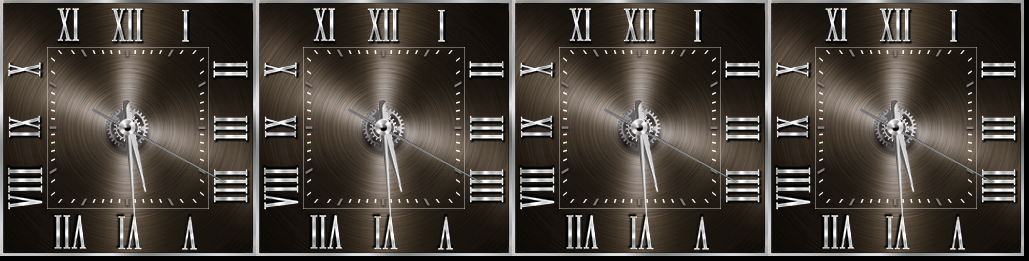
I'm trying to implement an analog clock, as shown in the attached image.
MainImageView.LayersCaching := -1;
MainImageView.LayersCropped := false;
MainImageView.LayersRotationFilter := ierBicubic;
MainImageView.LayersRotationUseFilterOnPreview := True;
MainImageView.LayersFastDrawing := iefDelayed;
I created a layer by setting it up as shown in the attached source above.
MainImageView.Layers[1+(Ni*4)].Rotate := -AHour;
MainImageView.Layers[2+(Ni*4)].Rotate := -AMin;
MainImageView.Layers[3+(Ni*4)].Rotate := -ASec;
And as shown above, the clock has been implemented successfully using the rotate command. However, when the minute image rotates, there's a slight fluctuation, as if PosX and PosY are changing. The most severe changes are around 180 and 360 degrees. The image size is 10 pixels wide and 256 pixels high. What's a good way to solve this problem?
 |
| 1 L A T E S T R E P L I E S (Newest First) |
| xequte |
Posted - Dec 16 2025 : 20:47:41
Hi
Rounding errors are likely to be an issue here.
I think that a more reliable method would be to create your hour, minute and second hand images at the size of their maximum rotation so that the rotation point of each hand (the pin) is located at precisely the center of the image.
Another possibility is to use TIEImageLayer( ImageEnView1.CurrentLayer ).RotateCenterX/Y for the position of the rotation point.
https://www.imageen.com/help/TIELayer.RotateCenterX.html
https://www.imageen.com/help/TIELayer.RotateCenterY.html
Nigel
Xequte Software
www.imageen.com
|
|
|
 Search



