| T O P I C R E V I E W |
| Ogaere |
Posted - Jul 13 2026 : 15:24:36
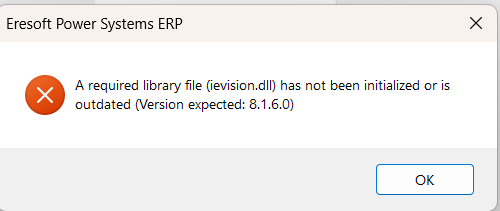
Below is my code, is there any out of the ordinary that is causing the error. The library ievision.dll is in the application folder:
function TfrmTokenSales.CountFaces(ABitmap: TBitmap): Integer;
var
ieBmp: TIEBitmap;
origImage, workImage: TIEVisionImage;
classifier: TIEVisionCascadeClassifier;
objects: TIEVisionVectorRect;
begin
ieBmp := TIEBitmap.Create;
try
ieBmp.Assign(ABitmap);
// Convert to single-channel grayscale
origImage := ieBmp.GetIEVisionImage();
workImage := IEVisionLib.createImage(origImage.getWidth(),
origImage.getHeight(), ievUINT8, 1);
origImage.convertColor(workImage, ievBGR2GRAY);
workImage.equalizeHistogram();
classifier := IEVisionLib.createCascadeClassifier(IEVC_FRONTAL_FACE_ALT_2);
objects :=classifier.detectObjects(
workImage,
1.05, // scaleFactor
5, // minNeighbors
ievDO_CANNY_PRUNING, // flags
IEVisionSize(workImage.getWidth() div 5,
workImage.getHeight() div 5), // minSize
IEVisionSize(workImage.getWidth(),
workImage.getHeight())); // maxSize
Result := objects.size();
finally
ieBmp.Free; // only the TIEBitmap needs freeing
end;
end;
|
| 2 L A T E S T R E P L I E S (Newest First) |
| xequte |
Posted - Jul 14 2026 : 16:02:25
Hi
Yes, because IEVision requires input of a serial number, it must be manually instantiated once by your application.
Nigel
Xequte Software
www.imageen.com
|
| Ogaere |
Posted - Jul 14 2026 : 02:03:42
I have resolved the issue by using the following:
IEGlobalSettings().RegisterPlugIns( [iepiIEVision], 'me@mycompany.com', 'ievis-12345-67890-12345-67890-12345-67890' );
if not ( iepiIEVision in IEGlobalSettings().ActivePlugIns ) then
begin
ShowMessage( 'This application requires the ievision.dll plug-in, v' + IEGlobalSettings().ImageEnVersion.IELibVersionStr +'. Please download it from www.imageen.com' );
exit;
end;
instead of:
IEVisionSetSerialNumber(const sUserEmail, sUserSerial: WideString);
It reminds me that I should have RTFM first at the first sign of trouble. |
|
|
 Search



