| T O P I C R E V I E W |
| gorchi |
Posted - Sep 30 2026 : 01:30:54
Hi,
I am sorry if this question was asked before but I haven't found the topic yet. I am making a small library that would scan documents and add the scanned document(s) to our main medical software. For the development I use a printer scanner from HP (HP LaserJet MFP M130nw) connected to a network, unfortunately only using WIA. I followed the example in demo AllAcquire and every time the scanner physically scan whole A4 page it holds the reader at the end position, waits about 30-50 seconds and then the transfer of the read data is executed. Meanwhile the reader is returned to starting point. I am puzzled why this happen as the network is 1 Gbit (although the printer has 100 Mbit connection)? Even more interesting is that if I scan using the acquire dialog, the preview button in it shows the scan quickly, not to mention if I scan the whole A4 page (in color, 300 dpi) using Corel PhotoPaint, it also scans the document perfectly. Any ideas? O/S is Windows 11 25H2, Delphi 13.1, ImageEn 15.2.3.
In the nearest future I'll get another scanner to try there but still I wonder if the problem cold be solved as I guess similar thing could happen with our customers in the future.
Thank You and best regards,
Goran |
| 11 L A T E S T R E P L I E S (Newest First) |
| xequte |
Posted - Oct 16 2026 : 18:54:35
Hi Goran
Thanks for the log. The progress values come straight from the driver (ImageEn just passes them through), and the 49% stall matches what you saw earlier in MS Paint. So I think your own application is still using WIA 1.0. In this preview, WIA 2.0 is opt-in. Please add the following before any acquisition object is created, e.g. in your project file or main form's OnCreate:
IEGlobalSettings().WiaVersion := iewvWia2;
You can check it is active with ImageEnMView1.MIO.AcquireParams.WIAParams.ActiveWiaVersion = 2.
Also, in the colour scan there are almost 3 minutes between 100% and "Scanning complete". Could you add log entries in MIO.OnAcquireBitmap and immediately after the Acquire call returns? That will show whether the time is spent in the driver or after the image has been delivered.
I'm looking into the other WIA 2.0 issues you reported (orientation, scaling, brightness/contrast and so on). Email me for a new beta.
Nigel
Xequte Software
www.imageen.com
|
| gorchi |
Posted - Oct 16 2026 : 05:13:57
Hi,
I tried scanning with my software (no acquire dialog) and I got interesting results. So NPIBBCA68 is a Windows driver for this printer which is slow in any case. I made 3 scans to prepare the attached log file.
The first was scan with HP driver and printer connected to USB; 300 dpi, 24 bit color, full page scan.
The second one was scan with ****ty NPIBBCA68, 300 dpi, greyscale, full page scan
The third one was scan with NPIBBCA68, 300 dpi, 24-bit color, full page scan
Maybe this log will be of some use to You.
Best regards,
Goran
attach/gorchi/2026101651347_2026-10-16_Scanning.zip
1.71 KB |
| gorchi |
Posted - Oct 16 2026 : 02:22:47
Hi Nigel,
First of all thank You for replying to the email. I owe You an report with scanning of Windows Scanner sw from MS store. I tried it and as You said I believe it is using WIA 2.0. protocol. Full page scan at 300 dpi takes only about 14 secs to complete, from the pressing the start button to the end of scanning and writing down the bitmap.
With the new component I compiled the WIAScanner demo project with the new component and I tried WIA 2.0. I can say this is much faster, the speed is similar to the MS application, about 14 sec for 200 or 300 dpi full page scan. 600 dpi takes about twice the time. What I observed with the demo is:
- Select source does not always show both scanners; USB and network. USB is always shown and leaving the window using OK button although selecting the scanner might show an error as there was no device selected.
- orientation is always reset to portrait when I press the button Write parameters. Selected rotation remains in the combo box but scanning does not obey it, it is always the same
- scanning with dpi greater than 200 dpi without dialog might not transfer whole picture to ImageEnView. Zoom out before scanning does not help either. With the dialog and custom settings I get the whole scanned image
- frame in pixels do work; so if I set X and Y position, the scanner moves head quickly to the position and scanns only up to the X/Y extent
- X/Y scaling, brightness, contrast, mirrored, invert do not have any effect
- under colors, the only useful options are B/W threshold (aka 1 bit black&white), grayscale (8 bits, 1 channel per pixel, 8 bits per pixel) and colors (8-3-24).
Bottom line, WIA 2.0. is fast, I observe no holdups after the scanning is complete. I can't judge what is the cause of the above problems though but since we agreed on beta testing, I guess it is better that I report them now :) I hope it is of some use.
I will now try with my application in the development and see if there are any differences.
Thank You and best regards,
Goran |
| xequte |
Posted - Oct 15 2026 : 20:05:20
We have a preview release with WIA 2.0 available now. Email us.
Nigel
Xequte Software
www.imageen.com
|
| gorchi |
Posted - Oct 15 2026 : 07:23:33
Hi,
I am sorry to be late with answer, there were other obligations to do. I will do the test with MS store's scanner and let You know, no problem. Regarding my printer and scanner, I have reinstalled it with the latest driver found on HP site. I will recheck the software driver if it is Microsoft and hopefully force to change it to HP's. Otherwise printing and scanning works great when connected to USB.
Anyway, I would try new WIA 2.0 code but at the moment I have ImageEn 15.2.3 so if You have any newer... I'll send You an email.
Best regards,
Goran |
| xequte |
Posted - Oct 02 2026 : 20:39:51
Also, in the current beta, we've decided to allow testing of our WIA 2.0 code by using:
IEGlobalSettings().WiaVersion := iewvWia2;
You can email me to test that too if you like.
Nigel
Xequte Software
www.imageen.com
|
| xequte |
Posted - Oct 02 2026 : 20:38:13
Hi Goran,
Thanks for the thorough testing. The logs and screenshots answer the question.
Your second screenshot is the key. The network scanner "NPIBBCA68 (HP LaserJet MFP M130nw)" is not using HP's driver. It's using Microsoft's generic WSD Scan Device driver, which Windows installs automatically for scanners it finds on the network. The logs show the same thing every time with that device:
- 0–49% in about 4–5 seconds (the actual scan)
- a stall of about 64 seconds at 49%
- 50–100% in under half a second
The stall is about the same length whatever the format, colour or resolution, so the driver seems to be waiting out a fixed timeout rather than processing anything. MS Paint shows the same pause with that device, which confirms it isn't ImageEn. It also explains why JPEG transfer made no difference.
By contrast, HP's own drivers over USB are fine with exactly the same ImageEn code: about 14 seconds for WIA and 16 seconds for TWAIN.
Here's what each entry in your list is:
- HP LJ M129M134 (USB): HP's WIA driver (USB)
- HP LJ M129M134 TWAIN: HP's TWAIN driver (USB)
- NPIBBCA68 (HP LaserJet MFP M130nw): Microsoft's generic WSD driver (network). This is the slow one.
- WIA-… entries: Microsoft's TWAIN-to-WIA wrappers for the two WIA devices above. You can usually hide these.
Some suggestions:
1. For your network setup: try adding the scanner through HP's full software installer, choosing a network connection (or entering the printer's IP address), instead of letting Windows find it. That should give you HP's own driver over the network rather than the WSD one. If the WSD device is still listed, remove it in Settings > Bluetooth & devices > Printers & scanners so it isn't picked by mistake.
2. For your customers: list TWAIN sources first, then WIA, and hide the "WIA-" wrappers. If a customer reports very slow network scanning, the first thing to check is whether their scanner shows "Microsoft / WSD Scan Device" as its driver.
3. One optional test, if you have time: scan from the network device with the Windows Scan app (from the Microsoft Store). It uses WIA 2.0. If it's fast, that tells us WIA 2.0 support in ImageEn would help with WSD devices, which is useful input for our planning.
Thanks again for taking the time to test all of this.
Nigel
Xequte Software
www.imageen.com
|
| gorchi |
Posted - Oct 02 2026 : 08:30:39
Hi Nigel,
I tested the scanning as You asked and the time/other obligations permitted. I hope I covered all the requested scanning tests. At first glance I must admit that if I have MFP connected only via network it is slow and the TWAIN is not available. As soon as I connect printer using USB, it is completely different story. So when the network and USB is available, in my application I have all these devices:
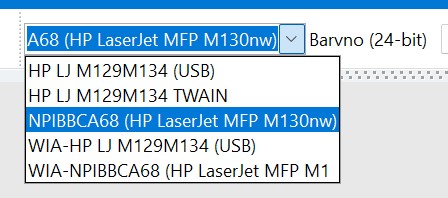
I get the same list with AllAcquire as well. The first two are visible only when the USB is connected, the last three always. The first two work quite fine and quickly while the rest are more problematic.
I tried first two with MS Paint but here I get different list:
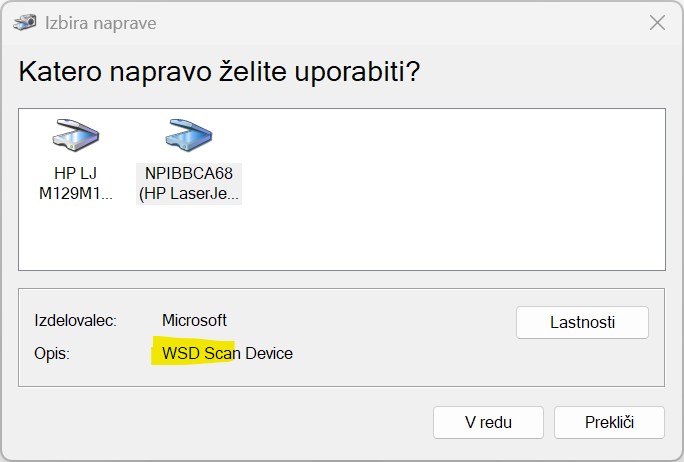
The left one is most probably TWAIN as it works fast and is visible only when USB is connected. The second is WIA and here the acquisition window opens. I set the 300dpi color scan and it scanned up to half and then waited for about 54 seconds, then the scanned image appeared.
With my application, I tested all the devices. I tried with the acquisition window and without; the logs are made without acquisition window. The first two logs here are using the VIA device without JPEG transfer and with it.
attach/gorchi/202610283215_Scanner_WIA_network.zip
1.94 KB
In the logs the device is stated wrong, it was NPIBBCA68, sorry. I don't see and difference between default and JPEG transfer.
Now I did also test with the first two (USB) devices. Here are the logs with these two as well.
attach/gorchi/202610283325_Scanning_USB.zip
1.36 KB
I hope this will help somehow. I will continue with the project next week but I can't say when exactly as I have to work on few projects.
Best regards,
Goran |
| xequte |
Posted - Oct 01 2026 : 19:29:54
Hi Goran,
Thanks, that's very useful, especially how the progress bar behaves. If it climbs to about 50% while the head moves, stops for 30–50 seconds and then races to 100%, the data is coming in while the page is scanned. Something is then held back before the rest is delivered. Here's what would help us narrow it down:
1. Logging. Something like this is enough. It writes a timestamp each time the percentage changes:
var
  LastPct: Integer = -1;
  StartTick: Cardinal;

// Before acquiring
StartTick := GetTickCount;
LastPct := -1;
Memo1.Lines.Clear;

procedure TForm1.ImageEnMView1Progress(Sender: TObject; per: Integer);
begin
  if per <> LastPct then
  begin
    Memo1.Lines.Add(Format('%6d ms  %3d%%', [GetTickCount - StartTick, per]));
    LastPct := per;
  end;
end;
Please also log the time when OnAcquireBitmap fires (or just after Acquire returns). Please run it twice, once as now and once with:
ImageEnMView1.MIO.WIAParams.TransferFormat := ietfJpeg;
2. A comparison outside ImageEn. Please scan the same page at the same settings in MS Paint (File > From scanner or camera), which uses Windows' own WIA transfer. If Paint shows the same pause, the HP WIA driver is causing it. If it doesn't, the problem is on our side and we'll dig into it. One note: the "Scan" button in the ImageEn WIA dialog only sets the options, and the transfer itself still uses our code. That's why it behaves the same as AllAcquire.
3. IsPixelTypeSupported. At the moment this only works with TWAIN. With WIA it always returns True, so it can't tell you that 16-bit greyscale isn't really supported. I'm sorry about that; we'll improve it. Until then, stick to 1-bit, 8-bit greyscale and 24-bit colour with WIA.
4. The three sources. The "WIA-NPB…" entry comes from Windows, not HP. It's Microsoft's TWAIN compatibility layer, which presents a WIA driver as a TWAIN source and adds the "WIA-" prefix. In practice it's usually the weakest of the three, so you can hide it from your users. The plain "NPB… (HP LJ MFP130)" entry is HP's WIA driver, and the TWAIN entry is HP's TWAIN driver. Connecting by USB to get HP's TWAIN driver working is a good idea. For your customers, it's sensible to offer TWAIN first and fall back to WIA.
5. WIA 2.0: We're looking to implement this later in 2026. Email me if you want to be involved in beta testing it.
Nigel
Xequte Software
www.imageen.com
|
| gorchi |
Posted - Oct 01 2026 : 01:37:40
Hi Nigel,
although I can't check everything today, I'll try to respond to some of Your questions. I hope it will be useful to solve the problem. At the moment I am using the dialog window (very much like this one: https://s7d1.scene7.com/is/image/canon/WIA730?scl=1) when I want to scan the document. If I press the preview button below, the scanner previews the document in the dialog, which is normally pretty fast. All other options and pressing the button "Scan" gives more or less the same result, the scanner scan's the page, holds up for 30-50 secs and returns the image to the application. From AllAcquire demo I used the progress bar and when the scanner moves the head towards the end, the progress bar moves and it holds on the half of the length. After the period, the progress bar quickly continues towards the end and the image is transferred to the application. With 300 dpi, the scanner head is returned to the start position a bit quicker than the progress bar comes to the end. The same happens with the AllAcquire demo as well as with WIA demo. I tried also scanning with 200 dpi and greyscale 8 bit (16-bit does not work, it gives garbled image) and there is still a holdup, maybe few seconds less but it is there.
Last week I reinstalled the driver hoping to get TWAIN driver working but unfortunately it still does not work so I even can't use HP Scan software :( I will try to connect the scanner-printer using USB cable hoping to make the TWAIN driver working. When I deleted the HP driver, Windows used their awful driver and after the reinstall, I had to manually change the driver. It is really poor, I admit. And after the reinstall I haven't tried Corel PhotoPaint 2020 but it should work just fine.
So I'll check the JPEG transfer as well as I shall provide the log. I can't get to it at the moment (I have it on my home computer), if You have any tips regarding the log, please let me know.
One more thing. Since I used the code from AllAcquire even with the array of all those pixel types, I do not get the error while testing with ImageEnMView1.MIO.AcquireParams.IsPixelTypeSupported(). Does this work only with TWAIN? I also get 3 scanners from ImageEnMView1.MIO.AcquireParams.FillListWithSources() of which is one TWAIN, one is WIA and one is "something in between", named WIA-NPB... and hardly useful. The correct and working one is named NPB... (HP LJ MFP130). Does that odd driver come from Windows driver?
Regarding the support of WIA 2.0. When do You think it will be ready from Your side? I would gladly test it :) In any case thank You in advance.
Best regards,
Goran |
| xequte |
Posted - Sep 30 2026 : 22:18:12
Hi,
Thanks for the report.
Bandwidth isn't the cause. A 300 dpi colour A4 page is about 25 MB uncompressed, which takes only a few seconds even at 100 Mbit. The time is going into how the driver hands the data over. Some background:
Preview vs full scan: the preview in the WIA dialog is a low-resolution scan, so its speed doesn't tell us much. Could you do a full 300 dpi colour scan from that same dialog and tell us whether it shows the same 30–50 second pause?
Corel PhotoPaint most likely uses HP's TWAIN driver (or the newer WIA 2.0 interface), not the WIA 1.0 banded transfer that TIEWia uses. So it isn't going through the same driver path.
Some things to try:
Request JPEG transfer. The M130nw produces JPEG natively over the network. The default asks for an uncompressed memory bitmap, which can make the driver decode and repackage the whole page before it sends anything:
delphi
ImageEnView1.IO.WIAParams.TransferFormat := ietfJpeg;
(For document scanning, JPEG quality is normally fine.)
Try TWAIN. If you install HP's full software package for the M130nw, it includes a TWAIN driver. Then use SelectAcquireSource with ieaTwain (or ieaDefault) and compare. For your customers, letting the user pick TWAIN or WIA is generally the most robust approach, because driver quality varies a lot between vendors.
Check the driver in Device Manager. If the scanner was added automatically as a network (WSD/eSCL) device, Windows may be using its generic driver rather than HP's. These generic drivers are known to be slow with WIA 1.0 transfers.
Help us see where the time goes. Please handle OnProgress and log the percentage with timestamps. If the percentage sits at 0 during the pause and then jumps to 100, the driver is holding the whole image before transferring. If it rises slowly, the data is arriving in small chunks. Testing at 150 dpi would also tell us whether the delay grows with image size.
We're also looking into the buffer settings ImageEn passes to the WIA transfer, which may help with some network drivers. Please send us the results above and we'll follow up.
Nigel
Xequte Software
www.imageen.com
|
|
|
 Search



