Thank you,
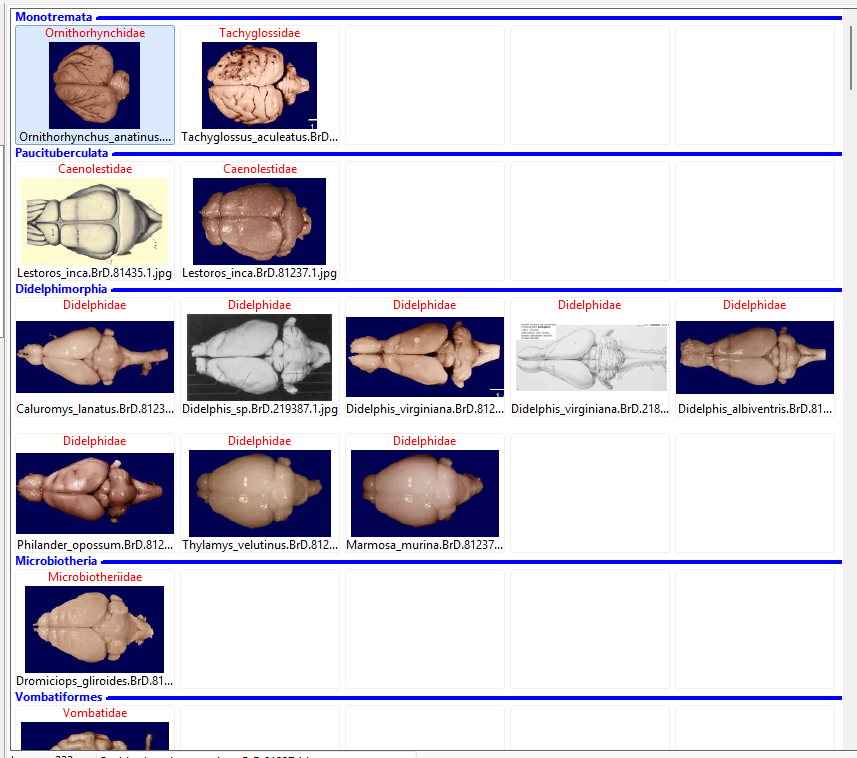
You can call it also 'groups', like in the download folder in windows explorer with headers 'yesterday', 'last week'...
Actually I got it to work. I add dummy images in the Resize event (below). And I add Headers in the ImageDraw event (not shown)
I populate the Mview manually from a TStringlist with filenames, with headers in the list to mark the beginning of a new group:
HEADER:Group1
filename1
filename2
HEADER:Group2
fileenam3
(see attached image)
But you can do it much better in a future version...
Michael
procedure TMHHPicEdit.ImageEnMView1Resize(Sender: TObject);
var
  cols,n,c,i,count,sel:integer;
  selfn:string;
begin
  Cols:=ImageEnMView1.CalcGridWidth;
  if cols<>CurrentColumns then
  begin
    ImageEnMView1.lockupdate;
    sel:=ImageEnMView1.selectedImage;
    selfn:=ImageEnMView1.ImageFilename[sel];// marks selected image
    // remove all dummy images
    for n:=ImageEnMView1.imagecount-1 downto 0 do
    begin
      if ImageEnMView1.imagetag[n]=-1 then
      begin
        ImageEnMView1.deleteimage(n);
      end;
    end;

    // add dummy images after 'line break' tag
    CurrentColumns:=cols;
    i:=0;
    n:=0;
    count:=ImageEnMView1.imagecount;
    repeat
      if ImageEnMView1.imagetag[n]=2 then
      begin
        c:=CurrentColumns-(n mod CurrentColumns)-1;
        for i:=0 to c-1 do
        begin
          ImageEnMView1.insertimage(n+1,10,10,ie24RGB,clwhite);
          ImageEnMView1.imagetag[n+1]:=-1;
          ImageEnMView1.ImageUserPointer[n+1]:=nil;
          inc(n);
        end;
      end;
      inc(n);
    until n>ImageEnMView1.imagecount-1;

    // search the selected and select it again
    for n:=0 to ImageEnMView1.imagecount-1 do
    begin
      if ImageEnMView1.ImageFilename[n]=selfn then
      begin
        ImageEnMView1.SelectedImage:=n;
        break;
      end;
    end;
    ImageEnMView1.unlockupdate;
  end;
end;
 Search




