ImageEn for Delphi and C++ Builder ImageEn for Delphi and C++ Builder


ImageEn Forum
Profile    Join    Active Topics    Forum FAQ    Search this forumSearch
Forum membership is Free!  Click Join to sign-up
Username:
Password:
Save Password
Forgot your Password?

 All Forums
 ImageEn Library for Delphi, C++ and .Net
 ImageEn and IEvolution Support Forum
 How to display complete text on line
 New Topic  Reply to Topic
Author Previous Topic Topic Next Topic  

supersk

110 Posts

Posted - Mar 22 2025 :  22:16:32  Show Profile  Reply
When I draw a line in a image, I set the line as following:

  TIELineLayer* CobbAnlgelyr;
  CobbAnlgelyr = (TIELineLayer*)(ImgEnMain->CurrentLayer);
  CobbAnlgelyr->LineColor = clGreen;
  CobbAnlgelyr->LabelFont->Color = clBlue;
  CobbAnlgelyr->LabelFont->Size = 16;
  CobbAnlgelyr->LabelPosition = ielpAbove;

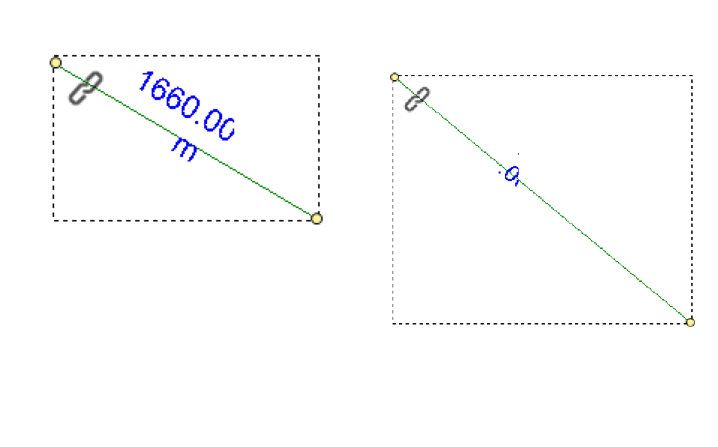
However#65292; when I display measurement results, the display is always incomplete, and the text disappears completely after rotating the selected line.


ImageEn 13.7 + RAD 12.2 + Win11 64bit

xequte

39327 Posts

Posted - Mar 23 2025 :  15:42:16  Show Profile  Reply
Hi

There is something odd happening there, as I can see the text appears to be trying to wrap. I think you might be seeing an issue in v13.7.0. Please email us for v14.0.0.

Nigel
Xequte Software
www.imageen.com
Go to Top of Page

supersk

110 Posts

Posted - Jan 13 2026 :  01:08:39  Show Profile  Reply
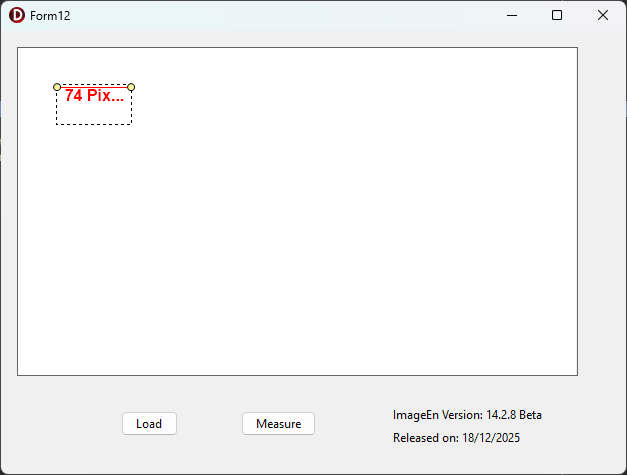
I have updated ImageEn to 14.2,but the display is always incomplete


attach/supersk/20261131754_Project12_2026-01-13.zip
6.63 KB
Go to Top of Page

xequte

39327 Posts

Posted - Jan 13 2026 :  15:21:22  Show Profile  Reply
Hi

Do you mean the ellipses "74 Pix..." when there is not enough space?

You can set:

llyr.TextOverflow := ieoShrink;

To shrink the text when the area is too small.


Nigel
Xequte Software
www.imageen.com
Go to Top of Page

supersk

110 Posts

Posted - Jan 13 2026 :  18:37:40  Show Profile  Reply
Yes, when the measurement line is too short, there isn't enough space to display the complete measurement information. This is the case even if you set it to ieoShrink
Go to Top of Page

xequte

39327 Posts

Posted - Jan 13 2026 :  19:29:05  Show Profile  Reply
Hi

Yes, that is a limitation of that LabelPosition. It will disappear when the text gets too small. We'll look at better handling of that for a later version.

You could use a second text layer object and update that with the measurement text.

Nigel
Xequte Software
www.imageen.com
Go to Top of Page
  Previous Topic Topic Next Topic  
 New Topic  Reply to Topic
Jump To: