| Author |
 Topic Topic  |
|
|
Coenenp
Belgium
8 Posts |
 Posted - Nov 20 2025 : 11:37:26 Posted - Nov 20 2025 : 11:37:26


|
Hi,
I'm using the latest version 14.2.7 and received feedback from a customer that my tool crashes regurlarly. He uses my tool to adjust pdf parameters and it seems to happen when loading the pdf file.
Log information from my tool when the problem starts:
2025-11-20 10:50:22 OutputIMG, Load Image from R:\ttlev\in\sudoko_scale\2-easy_sol.pdf error, FileType: Adobe PDF (PDF)
I'm using the following code:
      // Load IMG file
      tmpIEBmp := TIEBitmap.Create;
      tmpEnIO := TImageEnIO.CreateFromBitmap(tmpIEBmp);
      Try
        // https://www.imageen.com/help/index.php?topic=TIOParams.IPTC_Info&m=11
        // Load From File
        Try
          // Init FileType
          tmpInputfType := 'Unknown';
          // Do LoadFromFile
          tmpEnIO.LoadFromFile(tmpInputf, True);
          tmpInputfType := tmpEnIO.Params.FileTypeStr;
          // Check FileType
          If Trim(tmpInputfType) = '' Then
            tmpInputfType := 'Unknown';
          // Aborting can also be read after loading or saving to determine if an error or abort occured
          If Not tmpEnIO.Aborting Then
          Begin
            // Debug
            tmpInfo := Format('OutputIMG, Load Image from %s successful, FileType: %s', [tmpInputf, tmpInputfType]);
            UpdateLogging(0, IdLogLevInf, DefLogIMGPut, tmpInfo);
          End
          Else
          Begin
            tmpSuccess := False;
            // check
            tmpOSError := Winapi.Windows.GetLastError;
            // Debug
            If tmpOSError = 0 Then
              tmpInfo := Format('OutputIMG, Load Image from %s error, FileType: %s', [tmpInputf, tmpInputfType])
            Else
              tmpInfo := Format('OutputIMG, Load Image from %s error: %s, FileType: %s', [tmpInputf, SysErrorMessage(tmpOSError), tmpInputfType]);
            UpdateLogging(0, IdLogLevErr, DefLogIMGPut, tmpInfo);
          End;
        Except
          On e: Exception Do
          Begin
            tmpSuccess := False;
            // Debug
            tmpInfo := Format('OutputIMG, Load Image from %s exception: %s', [tmpInputf, Trim(e.Message)]);
            UpdateLogging(0, IdLogLevErr, DefLogIMGPut, tmpInfo);
          End;
        End;
It seems to happen in the iepdf64.dll
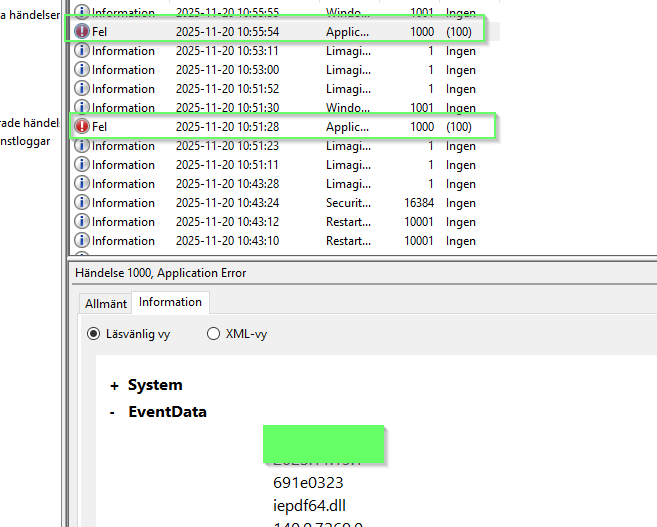
Any idea what I'm doing wrong?
Regards,
Pascal |
|
|
xequte

39564 Posts |
Posted - Nov 20 2025 : 14:39:44
|
Hi Pascal
Your code looks fine. Does the issue happen randomly, or always with certain PDF files? If so, please forward or post a sample.
Also, please confirm what version of iepdf64.dll you are using:
ShowMessage( IEGlobalSettings().ImageEnVersion.Status );
Nigel
Xequte Software
www.imageen.com
|
 |
|
|
Coenenp
Belgium
8 Posts |
Posted - Nov 21 2025 : 03:43:20
|
Hi,
Happens randomly.
Also, please confirm what version of iepdf64.dll you are using: 140.0.7269.0 (06/07/2025 14:40)
I received the following information from the customer. He added an extra option to check if the source pdf file in still in use before loading the pdf files using LoadFromFile. Since then no crash anymore. But ImageEn should never crash even if a source file is still in use by another process, not?
Regards,
Pascal |
|
|
|
xequte
39564 Posts |
Posted - Nov 21 2025 : 18:40:05
|
Hi Pascal
If the file is inaccessible or locked, then you should get an exception. What are you encountering
Nigel
Xequte Software
www.imageen.com
|
|
|
|
Coenenp
Belgium
8 Posts |
Posted - Nov 22 2025 : 03:03:45
|
What are you encountering:
The application crashes, see attached image of Windows event viewer mentioning iepdf64.dll during crash. There is a Try Except End around the loadfromfile so I don't knwo what I can do extra to prevent it from crashing. |
|
|
|
xequte
39564 Posts |
Posted - Nov 22 2025 : 21:10:04
|
Hmmm,
I tried to reproduce this issue by wrapping your code as follows:
procedure TForm1.Button3Click(Sender: TObject);
const
  tmpInputf = 'D:\Album PDF DEMO.pdf';
var
  tmpIEBmp : TIEBitmap;
  tmpEnIO : TImageEnIO;
  tmpInputfType, tmpInfo : string;
  tmpSuccess: Boolean;
  tmpOSError: Integer;
  FileStream: TFileStream;
begin
  FileStream := TFileStream.Create( tmpInputf, fmOpenReadWrite, fmShareExclusive);
  try

    // Load IMG file
    tmpIEBmp := TIEBitmap.Create;
    tmpEnIO := TImageEnIO.CreateFromBitmap(tmpIEBmp);
    Try
      // https://www.imageen.com/help/index.php?topic=TIOParams.IPTC_Info&m=11
      // Load From File
      Try
        // Init FileType
        tmpInputfType := 'Unknown';
        // Do LoadFromFile
        tmpEnIO.LoadFromFile(tmpInputf, True);
        tmpInputfType := tmpEnIO.Params.FileTypeStr;
        // Check FileType
        If Trim(tmpInputfType) = '' Then
          tmpInputfType := 'Unknown';
        // Aborting can also be read after loading or saving to determine if an error or abort occured
        If Not tmpEnIO.Aborting Then
        Begin
          // Debug
          tmpInfo := Format('OutputIMG, Load Image from %s successful, FileType: %s', [tmpInputf, tmpInputfType]);
          Caption := tmpInfo;
          ImageEnView1.Assign(tmpIEBmp);
         // UpdateLogging(0, IdLogLevInf, DefLogIMGPut, tmpInfo);
        End
        Else
        Begin
          tmpSuccess := False;
          // check
          tmpOSError := Winapi.Windows.GetLastError;
          // Debug
          If tmpOSError = 0 Then
            tmpInfo := Format('OutputIMG, Load Image from %s error, FileType: %s', [tmpInputf, tmpInputfType])
          Else
            tmpInfo := Format('OutputIMG, Load Image from %s error: %s, FileType: %s', [tmpInputf, SysErrorMessage(tmpOSError), tmpInputfType]);
          Caption := tmpInfo;
          // UpdateLogging(0, IdLogLevErr, DefLogIMGPut, tmpInfo);
        End;

      Except
        On e: Exception Do
        Begin
          tmpSuccess := False;
          // Debug
          tmpInfo := Format('OutputIMG, Load Image from %s exception: %s', [tmpInputf, Trim(e.Message)]);
          Caption := tmpInfo;
         // UpdateLogging(0, IdLogLevErr, DefLogIMGPut, tmpInfo);
        End;
      End;


      Finally
        tmpIEBmp.Free;
        tmpEnIO.Free;
      End;

  finally
    FileStream.Free;
  end;
end;
As expected, it failed silently because of your try/except block. Is there more information you can give me?
Nigel
Xequte Software
www.imageen.com
|
|
|
|
Coenenp
Belgium
8 Posts |
Posted - Nov 23 2025 : 06:46:53
|
| Not at the moment, I'm waiting on feedback of the customer. I'll keep you up to date. |
|
|
| |
Topic |
|
|
|
 Search


 Crash when using LoadFromFile with pdf files

