ImageEn for Delphi and C++ Builder ImageEn for Delphi and C++ Builder


ImageEn Forum
Profile    Join    Active Topics    Forum FAQ    Search this forumSearch
Forum membership is Free!  Click Join to sign-up
Username:
Password:
Save Password
Forgot your Password?

 All Forums
 ImageEn Library for Delphi, C++ and .Net
 ImageEn and IEvolution Support Forum
 Find Image in PDF file
 New Topic  Reply to Topic
Author Previous Topic Topic Next Topic  

DSBossen

USA
4 Posts

Posted - Dec 29 2025 :  12:19:47  Show Profile  Reply
I have been searching for a way to find a given Image in a PDF file then return the PDF page number.

Donald S Bossen

xequte

39337 Posts

Posted - Dec 29 2025 :  14:45:46  Show Profile  Reply
Hi

You can do image matching in ImageEn using various methods, e.g.

https://www.imageen.com/help/TImageEnProc.CompareWith.html

Using the source image and each image object in a page, iterating through all the pages:

http://www.imageen.com/help/TPdfObject.GetImage.html

However this would be a very slow process with a large PDF document.

Nigel
Xequte Software
www.imageen.com
Go to Top of Page

DSBossen

USA
4 Posts

Posted - Feb 25 2026 :  16:33:27  Show Profile  Reply
Thanks
I have been trying to get the one image from a PDF and nothing is showing in the third ImageEnView3 the ImageEnView1 is the PDF the Second is the image I am looking for. 1 and 2 load fine. Here is my code.

procedure TFrmMain.Button1Click(Sender: TObject);
  var
    x,i      : integer;
    B        : TieBitmap;
    Bm       : TieBitmap;
    FileName : ShortString;
    Find     : Boolean;
    Fn       : string;
    Source   : ShortString;
    Dest     : ShortString;
    fName    : ShortString;
    F        : TSearchRec;
    found    : Double;
    y        : integer;
    oPDF     : TPdfObject;
  begin
    Source := FrmTb2.ReadIniStr(FrmTb2.IniCfg,'Folder','Source');
    FileName    := Source + '\*.PDF';
    if FindFirst(FileName,faAnyFile,F) = 0 then
      begin
        ImageEnView1.PdfViewer.Enabled := True;
        ImageEnView1.PdfViewer.LoadFromFile(source+'\'+F.Name);
// Same as above but B is a TBitmap (must add iexHelperFunctions to your uses clause for TBitmap.Proc)
//        ImageEnView1.IO.Params.PDF_Compression := ioPDF_JPEG;
//        ImageEnView1.IO.Params.JPEG_Quality    := 75;
//        for i := 0 to ImageEnView1.PdfViewer.Objects.Count - 1 do
          i := 0;
          begin
            GetDPIPDFImageFile(F.Name,x,y);
            Found := ImageEnView1.Proc.CompareWith(ImageEnView2.IEBitmap);
          //  if ImageEnView1.PdfViewer.Find('PICK TICKET',True,True,False,False,True) then
              begin
                ImageEnView1.PdfViewer.Enabled := True;
//                if ImageEnView1.PdfViewer.FindNext() then
                  begin
                    oPDF := ImageEnView1.PdfViewer.Objects[i];
                  end;
              end;
          end;
        oPDF := ImageEnView1.PdfViewer.Objects[i];
        if oPDF.ObjectType = ptImage then
          begin
            B := TIEBitmap.Create();
            try
              if oPDF.GetImage( B ) then
                begin
                  ImageEnView3.IO.iebitmap := B;
                end;
            finally
              B.Free;
            end;
          end;
      end;
  end;

I have tried a lot of ways to make this work.

Donald S Bossen
Go to Top of Page

xequte

39337 Posts

Posted - Feb 25 2026 :  21:31:52  Show Profile  Reply
Hi Donald

So it looks like you are trying to compare a whole page of PDF document with a desired image? When what you are wanting to do is compare an image within the PDF page. Is that correct?

You might want to attach some examples so I can understand it better.

If that is the case, then you need to load the page in the PDF viewer then go through each image in that page comparing it with your image, i.e. iterate through the page objects:

http://www.imageen.com/help/TIEPdfViewer.Objects.html

And if the object type is ptImage:

http://www.imageen.com/help/TPdfObject.ObjectType.html

Then get the image:

http://www.imageen.com/help/TPdfObject.GetImage.html

And compare it with your desired image.

Let me know if you need more guidance. We are busy with the upcoming release of v15.0.0, but I can give you an example after its release (next week if all goes to plan).


Nigel
Xequte Software
www.imageen.com
Go to Top of Page

DSBossen

USA
4 Posts

Posted - Feb 26 2026 :  11:37:49  Show Profile  Reply

attach/DSBossen/2026226111322_Scan_2025_12_19_17_04_13_683.pdf


It Is that correct? Yes

The PDF is a picking ticket file. That can have this image (horizonal) on the top page of each picking ticket in the PDF. This example only has one Picking Ticket in it. The loop of the Images only showed 1 image at index 0. So I shortened the loop and set the Index to 0.

Donald S Bossen
Go to Top of Page

xequte

39337 Posts

Posted - Feb 26 2026 :  20:20:24  Show Profile  Reply
OK, so my advice above is not going to work, because as you say, the PDF page has only one object. It is not really a PDF document, just an image saved as a PDF file.

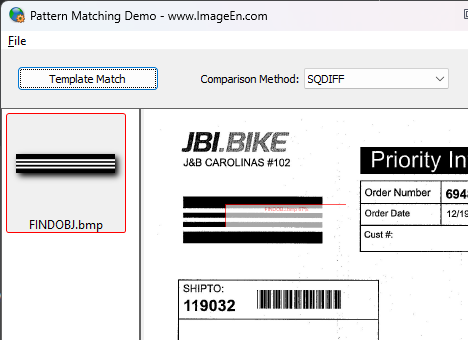
So what you are looking to do is find an image within another image. For this, you need to use Template Matching:

http://www.imageen.com/help/TIEVisionImage.matchTemplate.html

I tested your image, and it did not work great because of the lack of information in the template image and the JPEG quality loss in the PDF image:


Nigel
Xequte Software
www.imageen.com
Go to Top of Page
  Previous Topic Topic Next Topic  
 New Topic  Reply to Topic
Jump To: