| Author |
 Topic Topic  |
|
|
TerryK

USA
14 Posts |
 Posted - Mar 30 2026 : 15:46:22 Posted - Mar 30 2026 : 15:46:22


|
Hello,
We are having an issue with the TwainParams and obtaining a list of the scanners on a computer. The same program run on different computers have different results. It works on one system, but detects zero scanners on another. The straight forward code we are using is basically what is in the help files...
ImageEnMView1.MIO.TwainParams.SetDefaultParams();
for i := 0 to ImageEnMView1.MIO.TWainParams.SourceCount - 1 do
begin
   DeviceList.Add(ImageEnMView1.MIO.TWainParams.SourceName[i]);
end;
The "SourceCount" is always zero when the problem occurs.
This was a problem in the older version of ImageEn we had used, so we thought that upgrading to ImageEn 15 might fix it, but the problem still remains. We are running Delphi 11.3.
We know the scanners are installed on the problem computers because we not only see them in the printer/scanners settings in Windows 10 or 11, but also we run other scanning programs like one called "NAPS". Their program has settings that show the scanner in their device list. If it helps, we are using a double sided scanner called Ambir DS687 for this testing. As long as the devices are detected, we have had success with ImageEnMView to acquire images from this scanner in our own program. But obviously if we cannot detect the scanner through the TwainParams every time, we are stuck.
Is there anything else we can initialize or setup for this component so we can ensure the TwainParams can be found? Is there a way the component can tell us it tried a specific piece of hardward and failed? What types of things on a computer would block these parameters from loading when other scanning programs do not seem to have an issue?
Thank you for any help you can offer to make this piece of our program more consistent.
Terry |
|
|
xequte

39533 Posts |
|
|
TerryK
USA
14 Posts |
Posted - Mar 31 2026 : 09:23:07
|
Hi Nigel,
Attached is the logging results.
attach/TerryK/202633191915_TwainLog.txt
I also ran the demo through the ImageEn website demo page, and the scanner was found and filled into the dropdown box in the demo. I guess we can play around with using the AcquireParams structure to see if we can get what we need. But I'm confused about why the code we have always used (with SourceNames and SourceCount) would not work still.
Terry |
 |
|
|
TerryK
USA
14 Posts |
Posted - Mar 31 2026 : 09:27:39
|
Sorry i tried to attach a txt file, not realizing you can only attach pictures.. this is the contents of the log file...
Twain log. Core version 15.0.0 4-3-2026 * 64 bit
3/31/2026 10:10:39 AM : CreateProxyWindow : begin
3/31/2026 10:10:39 AM : CreateProxyWindow : end - Created
3/31/2026 10:10:39 AM : IETW_LoadSourceManager : begin
3/31/2026 10:10:39 AM : IETW_LoadSourceManager : end
3/31/2026 10:10:39 AM : DestroyProxyWindow : begin
3/31/2026 10:10:39 AM : DestroyProxyWindow : end - Not destroyed, for future uses
3/31/2026 10:10:39 AM : CreateProxyWindow : begin
3/31/2026 10:10:39 AM : CreateProxyWindow : Already created
3/31/2026 10:10:39 AM : IETW_LoadSourceManager : begin
3/31/2026 10:10:39 AM : IETW_LoadSourceManager : end
3/31/2026 10:10:39 AM : DestroyProxyWindow : begin
3/31/2026 10:10:39 AM : DestroyProxyWindow : end - Not destroyed, for future uses
3/31/2026 10:10:43 AM : DestroyProxyWindow : begin
3/31/2026 10:10:43 AM : DestroyProxyWindow : end - Destroyed
Terry |
|
|
|
TerryK
USA
14 Posts |
Posted - Mar 31 2026 : 11:43:11
|
| Another clue if it will help... When i run the demo, it uses the SelectAcquireSource under its select button to show a list of scanners. It shows the scanner we are testing on twice, once as a Twain device, and once as a WIA device. I scanned something in the demo using the Twain setting, which is what we want our program to do. However, when i use the SelectAcquireSource function in our program, no Twain devices are detected. I changed the parameter to "[ieaTwain]" and nothing happened. Setting it to [ieaWIA] shows the WIA devices in its list. I cannot find a difference between the demo's code and our code that would allow the demo to find Twain devices, but our program cannot. |
|
|
|
TerryK
USA
14 Posts |
Posted - Mar 31 2026 : 13:23:53
|
I apologize for so many back to back responses, but i found something else on this topic. I brought up the AllAcquire project in Delphi 11.3. I recompiled it and ran the resulting exe, and the demo seemed to work as expected, although quite slow. Then i noticed it was a 32 bit project, so i changed it to be a 64 bit project and rebuilt it. Running that 64 bit demo exe, I am seeing the missing Twain devices even in the demo.
So the issue seems to revolve around 32 bit vs. 64 bit builds? Is there something we are supposed to do in order to make ImageEn 15 turn on or initialize to run for 64 bit applications? |
|
|
|
xequte
39533 Posts |
Posted - Mar 31 2026 : 19:05:08
|
Hi Terry
64bit Twain drivers are only rarely provided these days. Most likely your scanner does not include any 64bit Twain drivers, so under 64bit you will only be able to use WIA drivers (Even though they sometimes list Twain in their names).
Under 32bit, it sounds like you are not seeing any Twain drivers either (limit output to [ieaTwain]). Is that correct?
Nigel
Xequte Software
www.imageen.com
|
|
|
|
TerryK
USA
14 Posts |
Posted - Apr 01 2026 : 09:30:49
|
We will investigate the nature of the driver we installed from this scanner's website. According to their website's labeling, they have 32/64 bit capabilities, but they did not seem to have separate download buttons for each bit type. If it is something you want to look at as well to help ImageEn handle this sort of thing for the future, the scanner name is Ambir, and the scanner's model number is DS687-3. We have used other scanning programs such as AmbirScan and NAPS2, and they have no issues finding Twain devices.
To answer your other question, we built the AllAcquire demo code in Delphi 11.3 as both a 32 bit version and 64 bit version. The 64 bit version has the missing Twain devices. The 32 bit version does find the Twain devices. Also in both versions, it takes anywhere from 20 to 30 seconds for any devices to load into the dropdown box. The call to "ImageEnMView1.MIO.AcquireParams.FillListWithSources" seems to be causing that. Could this huge slowdown be due to the drivers being wrong somehow too? I would think that the 32 bit demo program could use the 32 bit driver (if that is what it is) and find things quickly. Any thoughts on why we have this slow down effect would be appreicated too.
Thank you for your help,
Terry |
|
|
|
TerryK
USA
14 Posts |
Posted - Apr 01 2026 : 11:21:06
|
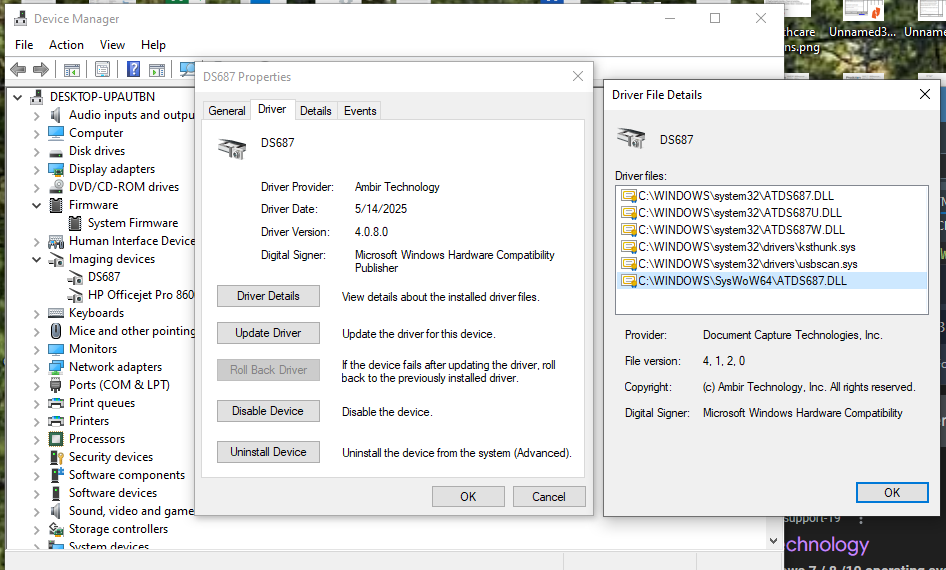
Just to offer as much information as i can on this topic, here is a screen shot of the scanner's drivers. I appears both 32 and 64 bit files were installed for the driver. I could be mistaken as i am not an expert when it comes to drivers.
 |
|
|
|
xequte
39533 Posts |
Posted - Apr 01 2026 : 14:55:20
|
Hi Terry
Your screenshot indicates the existence of both 32 and 64bit drivers, but not whether they are WIA or Twain. Regarding the slowness, are you talking about when trying to get [ieaTwain] devices or [ieaWIA] devices? E.g. is it only slow when it fails to get any drivers, or is it slow in general?
Can you download Twacker and using both the 32bit and 64bit app, compare the Twain devices that it returns:
https://github.com/twain/twain-samples
Nigel
Xequte Software
www.imageen.com
|
|
|
|
TerryK
USA
14 Posts |
Posted - Apr 01 2026 : 15:11:44
|
All previous tests were calling FillListWithSources with no API parameter. Testing again just now, when i only put in a parameter of [ieaWIA], it is slow. When i use [ieaTwain], it is very fast, but returns no devices found.
I will try out Twacker and get back to you.
|
|
|
|
TerryK
USA
14 Posts |
Posted - Apr 01 2026 : 16:23:27
|
I ran the 64 bit version of Twacker since that is where we want to end up is everything in 64 bit. It found the Twain scanner and was able to get an image scanned from it without a problem.
|
|
|
|
TerryK
USA
14 Posts |
Posted - Apr 02 2026 : 11:55:54
|
Just wanted to give you an update Nigel. We have no idea what happened over here since last night, but things have improved on this issue. We did not change any source code at all. It must be some sort of other system update, or scanner update, or something. But as of right now, the TwainParams.SourceCount and SourceName is being filled in correctly. The call to AcquireParams.FillListWithSources is finding the Twain devices now. We cannot explain it honestly.
The only thing that remains for your knowledge is that if you call FillListWithSources and include WIA as an API option, you get that extreme slow down. If you only pick Twain as the parameter, it works instantly. We are going to probably turn off the WIA option so we can move forward. The AllAcquire 64 bit demo we built a couple days ago changed in the same way, so we know it is not a coding change.
Wish i had a better explanation, but we appreciate all your attention you offered on this matter. If the Twain somehow reverts back to the non-working state, we'll let you know.
Terry |
|
|
|
TerryK
USA
14 Posts |
Posted - Apr 03 2026 : 14:54:08
|
Nigel,
We have a theory about the odd behavior of our Twain devices all of a sudden working. We do not know what causes the missing Twain devices initially, but a pattern we have seen revolves around the Twacker tool you had us test with. It was tested here, as well as on a client's computer that saw the same missing devices at first. After installing and/or using Twacker, then the devices are able to be found. I do not know what Twacker does behind the scenes (driver installed, registry adjusted, etc), but it does something that seems to "fix" this issue. Any thoughts about that? Let us know.
Thanks,
Terry |
|
|
|
xequte
39533 Posts |
Posted - Apr 06 2026 : 16:34:07
|
Hi Terry
That is interesting. I'm unaware of what Twacker might be doing in the background that would resolve. One theory I would suggest is that there was something amiss in the configuration of the Twain drivers on the system, and so when Twacker added its own driver that forced a refresh of the Twain setup.
Nigel
Xequte Software
www.imageen.com
|
|
|
| |
Topic |
|
 Search


 Twain devices are missing, but are installed on the computer

