| Author |
 Topic Topic  |
|
|
Mickael
France
3 Posts |
 Posted - Jul 08 2026 : 05:25:30 Posted - Jul 08 2026 : 05:25:30


|
Hi,
I'm using TImageEnVect in Delphi 10.2 to let users draw a freehand line and convert it into an arrow (tip placed at the starting point of the drawing).
Issue: When the arrow is drawn, the tip of the arrowhead appears slightly offset (up/left) from the actual starting point clicked by the user. The offset is small but very noticeable once the arrowhead shape is applied.
Code used to create the object:
pascalimageenvect.Cursor := crIECrossSight;
imageenvect.ObjBrushStyle[-1] := bsSolid;
imageenvect.ObjShapeWidth[-1] := dmFich.tParamsLARGEUR_BOUTS_FLECHES.Value;
imageenvect.ObjShapeHeight[-1] := dmFich.tParamsLONGUEUR_BOUTS_FLECHES.Value;
imageenvect.ObjPenWidth[-1] := dmFich.tParamsEPAISSEUR_FLECHES.Value;
imageenvect.ObjPenStyle[-1] := psSolid;
imageenvect.ObjAspectRatio[-1] := true;
ImageEnVect.ObjEndShape[-1] := iesNONE;
ImageEnVect.ObjBeginShape[-1] := iesOUTARROW;
imageenvect.MouseInteractVt := [miPutLineLabel];
imageenvect.InsertingPen.Color := COLOR_JAUNE;
imageenvect.InsertingPen.Mode := pmCopy;
imageenvect.InsertingPen.Width := 5;
imageenvect.InsertingPen.Style := psSolid;
imageenvect.MouseInteract := [];
What I've tested so far:
- Setting ObjAspectRatio[-1] := false => no change, offset still present.
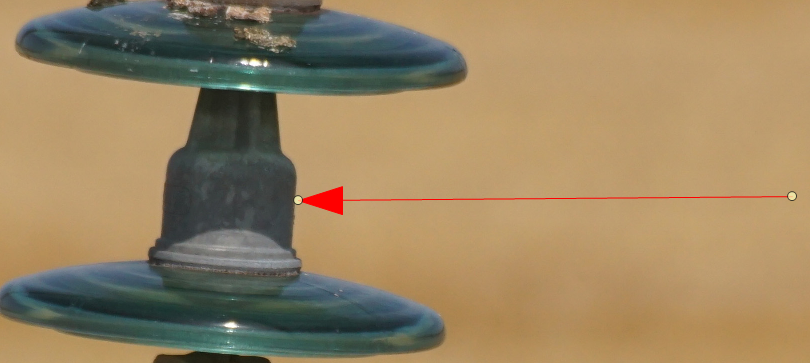
- ObjPenWidth[-1] := 1 => the offset completely disappears.
- Drawing a strictly horizontal line, then a strictly vertical line (with the original ObjPenWidth value) => the offset appears identically in both cases, so it doesn't seem to be related to the line angle or a trigonometric rounding issue.
- Zoom level is currently above 100% — mentioning this in case it's relevant, though the offset behavior described above was consistent regardless.
Conclusion so far: The offset seems proportional to ObjPenWidth and appears to affect only the rendering of the arrowhead tip, not the underlying line coordinates (I checked with GetObjRect and the stored rectangle looks correct).
Question: Is there a separate property to control the pen/outline width of the arrowhead shape independently from the line's ObjPenWidth? Or is this a known rendering behavior/bug when combining a thick pen with iesOUTARROW?
Any guidance would be appreciated — happy to provide a screenshot showing the before/after offset if useful.
Thanks!
Image with ObjPenWidth[-1] := dmFich.tParamsEPAISSEUR_FLECHES.Value
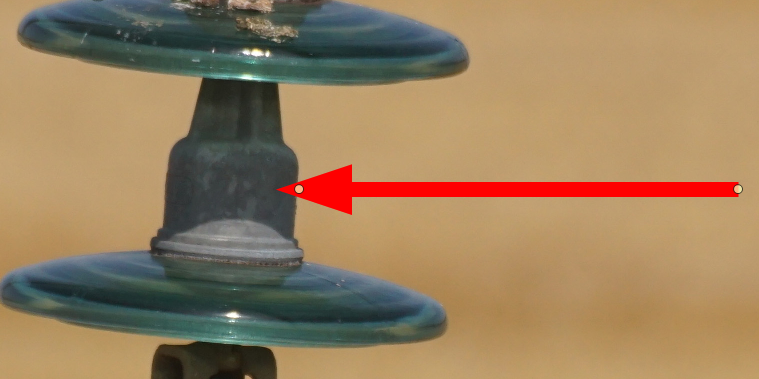
Image with ObjPenWidth[-1] := 1
CALON Mickaël |
|
|
xequte

39569 Posts |
Posted - Jul 14 2026 : 19:08:14
|
Hi Mickael
Unfortunately TImageEnVect does not take the width of the pen into account when rendering the arrow, so smaller pen widths are recommended.
If this is a new project you should use TIELineLayer:
https://www.imageen.com/help/TIELineLayer.html
Though in this respect it will work the same, i.e. it does not consider the width of the arrow border. However as you are using a filled arrowhead anyway, you can just set your arrow border at 0 to resolve the issue.
Nigel
Xequte Software
www.imageen.com
|
 |
|
|
Mickael
France
3 Posts |
Posted - Jul 15 2026 : 03:43:11
|
Hello Nigel,
Thank you very much for your feedback.
This isn't a new project, but I will still try replacing the TImageEnVect component with the TIELineLayer component by following your recommendations.
I will keep you posted once I have tested the implementation in a separate project.
Best regards,
CALON Mickaël |
|
|
|
xequte
39569 Posts |
Posted - Jul 15 2026 : 16:23:30
|
Hi Mickaël
Remember also that TImageEnVect it just a TImageEnView with layer support. So if you are transitioning your code, you don't need to remove the TImageEnVect and add a TImageEnView, just slowly replace the object functions with layers.
Also see:
http://www.imageen.com/help/TImageEnVect_vs_TIELayers.html
Nigel
Xequte Software
www.imageen.com
|
|
|
|
Mickael
France
3 Posts |
Posted - Jul 16 2026 : 03:00:45
|
Hello Nigel,
Ah yes, indeed—I hadn't necessarily viewed it that way, but this add-on is really very interesting.
I’ll go take a look at your documentation right away.
Thanks for the feedback,
Best regards,
CALON Mickaël |
|
|
| |
Topic |
|
|
|
 Search


 Arrow tip position offset when ObjPenWidth > 1 (ObjBeginShape = iesOUTARROW)

