TIEFillToolInteraction
Declaration
TIEFillToolInteraction = class(TIEUserInteraction);Description
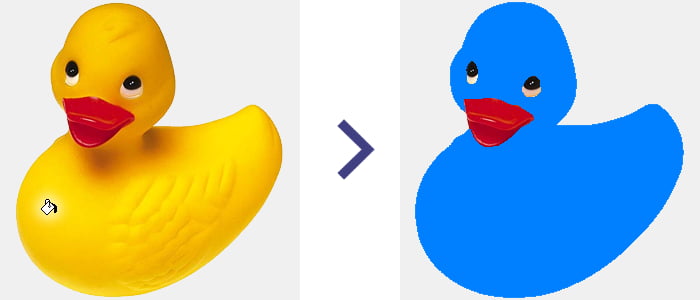
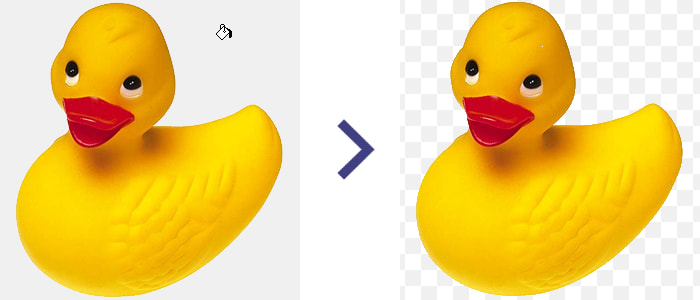
A class of TIEUserInteraction that provides properties when color filling using MouseInteractGeneral=miColorFill or alpha filling using MouseInteractGeneral=miAlphaFill.The Fill tool allows the user to click the image to flood fill an area of color with a new color or alpha transparency.
It is also used for the Color Picker (miColorPicker) interaction.
Examples
// Fill clicked areas with blueImageEnView1.FillTool.ColorFillValue := $00FF8000;
ImageEnView1.FillTool.Tolerance := 128;
ImageEnView1.MouseInteractGeneral := [ miColorFill ];
// Fill clicked areas with transparency
ImageEnView1.FillTool.AlphaFillValue := 0;
ImageEnView1.FillTool.Tolerance := 128;
ImageEnView1.MouseInteractGeneral := [ miAlphaFill ];
// Fill clicked areas with 50% transparency
ImageEnView1.FillTool.AlphaFillValue := 128;
ImageEnView1.MouseInteractGeneral := [ miAlphaFill ];
Demos
 | Demos\ImageEditing\FillTool\FillTool.dpr |
| | Demos\ImageEditing\IconEditor\IconEditor.dpr |
Methods and Properties
 | ActivePoint |
| | AlphaFillValue |
| | ColorFillAlpha |
| | ColorFillValue |
| | ColorSelectActions |
| | MaxFilter |
| | ResetAfterColorSelect |
| | SampleSize |
| | Tolerance |
See Also
◼ImageEn Interactive Tools◼OnUserInteraction
◼TImageEnView Actions