ImageEn for Delphi and C++ Builder ImageEn for Delphi and C++ Builder


ImageEn Forum
Profile    Join    Active Topics    Forum FAQ    Search this forumSearch
 All Forums
 ImageEn Library for Delphi, C++ and .Net
 ImageEn and IEvolution Support Forum
 How to display complete text on line

Note: You must be registered in order to post a reply.
To register, click here. Registration is FREE!

View 
UserName:
Password:
Format  Bold Italicized Underline  Align Left Centered Align Right  Horizontal Rule  Insert Hyperlink   Browse for an image to attach to your post Browse for a zip to attach to your post Insert Code  Insert Quote Insert List
   
Message 


Emoji
Smile [:)] Big Smile [:D] Cool [8D] Blush [:I]
Tongue [:P] Evil [):] Wink [;)] Black Eye [B)]
Frown [:(] Shocked [:0] Angry [:(!] Sleepy [|)]
Kisses [:X] Approve [^] Disapprove [V] Question [?]

 
Check here to subscribe to this topic.
   

T O P I C    R E V I E W
supersk Posted - Mar 22 2025 : 22:16:32
When I draw a line in a image, I set the line as following:

  TIELineLayer* CobbAnlgelyr;
  CobbAnlgelyr = (TIELineLayer*)(ImgEnMain->CurrentLayer);
  CobbAnlgelyr->LineColor = clGreen;
  CobbAnlgelyr->LabelFont->Color = clBlue;
  CobbAnlgelyr->LabelFont->Size = 16;
  CobbAnlgelyr->LabelPosition = ielpAbove;

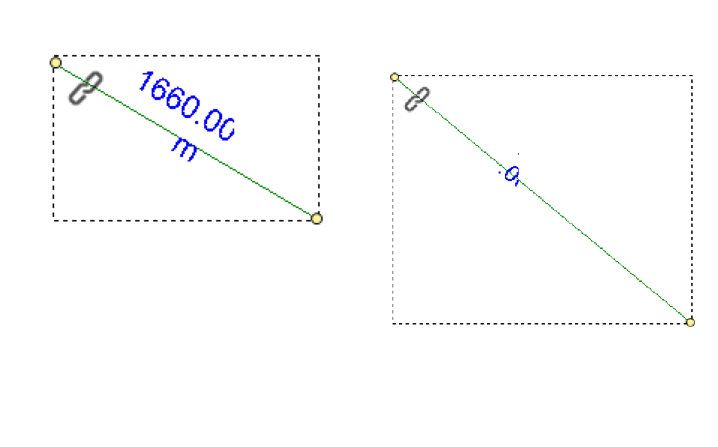
However#65292; when I display measurement results, the display is always incomplete, and the text disappears completely after rotating the selected line.


ImageEn 13.7 + RAD 12.2 + Win11 64bit
5   L A T E S T    R E P L I E S    (Newest First)
xequte Posted - Jan 13 2026 : 19:29:05
Hi

Yes, that is a limitation of that LabelPosition. It will disappear when the text gets too small. We'll look at better handling of that for a later version.

You could use a second text layer object and update that with the measurement text.

Nigel
Xequte Software
www.imageen.com
supersk Posted - Jan 13 2026 : 18:37:40
Yes, when the measurement line is too short, there isn't enough space to display the complete measurement information. This is the case even if you set it to ieoShrink
xequte Posted - Jan 13 2026 : 15:21:22
Hi

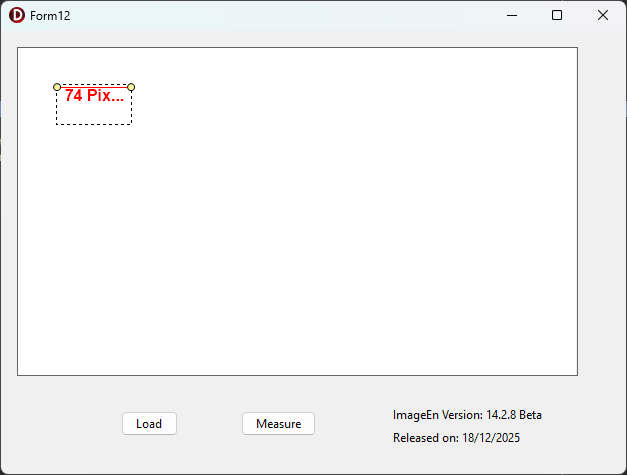
Do you mean the ellipses "74 Pix..." when there is not enough space?

You can set:

llyr.TextOverflow := ieoShrink;

To shrink the text when the area is too small.


Nigel
Xequte Software
www.imageen.com
supersk Posted - Jan 13 2026 : 01:08:39
I have updated ImageEn to 14.2,but the display is always incomplete


attach/supersk/20261131754_Project12_2026-01-13.zip
6.63 KB
xequte Posted - Mar 23 2025 : 15:42:16
Hi

There is something odd happening there, as I can see the text appears to be trying to wrap. I think you might be seeing an issue in v13.7.0. Please email us for v14.0.0.

Nigel
Xequte Software
www.imageen.com