| Author |
 Topic Topic  |
|
|
PeterPanino

1018 Posts |
 Posted - Sep 26 2025 : 06:22:11 Posted - Sep 26 2025 : 06:22:11


|
ImageEn 14.2.5:
// Register all available ImageEN plug-ins in FormCreate:
IEGlobalSettings().RegisterPlugIns();
iewebp32.dll is in the EXE DIRECTORY
// loading different image files at runtime dynamically:
// .webp file is displayed in ImageEnView1:
LoadedImageFile := ImageEnView1.IO.Params.FileName;
ImageEnView1.IO.SaveToFile(LoadedImageFile);
This results in LoadedImageFile.webp on disk having 0 Bytes! |
|
|
PeterPanino
1018 Posts |
Posted - Sep 26 2025 : 06:55:43
|
Even with this workaround, the saved WEBP file becomes 0 Bytes:
if LoadedImageFile.EndsWith('.webp', True) then
begin
  // Save the LoadedImageFile image to a lossless WebP:
  ImageEnView1.IO.Params.Lossless := True;
  ImageEnView1.IO.SaveToFileWebP(LoadedImageFile);
  CodeSite.Send('LoadedImageFile Saved as WebP');
end
else
begin
  ImageEnView1.IO.SaveToFile(LoadedImageFile);
end; |
 |
|
|
xequte
39564 Posts |
|
|
PeterPanino
1018 Posts |
Posted - Sep 26 2025 : 12:19:36
|
Hi Nigel,
I got this:
ImageEn Version: v14.2.6 Beta (Wednesday 10 09 2025)
IEVision DLL: v8.1.6.0
IELang DLL: Unavailable
PDFium DLL: v140.0.7269.0
SevenZip DLL: v22.1.0.0
WebP DLL: Unavailable
ImageMagick DLL: Unavailable
JPEG Engines: [DLL], Native, WIC
PNG Engines: [DLL], Native, WIC
JPEG2000 Engines: [DLL], Native
Raw Engines: [DLL], WIC
PDF Engines: [DLL], Native
WebP Engines: WIC
1. However, my ImageEn version is 14.2.5 as stated on the TImageEnView control

2. However, iewebp32.dll IS in the exe directory:
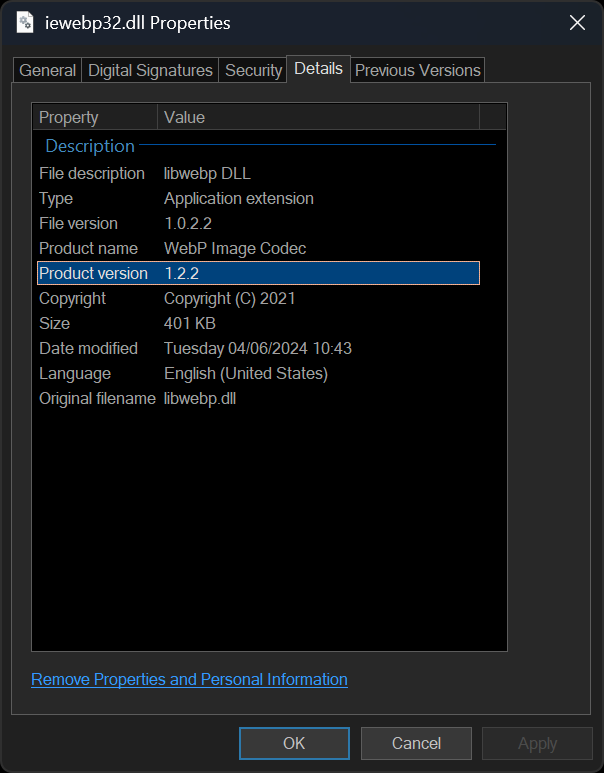
As I use SKIA, I've set this in FormCreate:
// Register all available ImageEN plug-ins:
  IEGlobalSettings().WebPEngine := ieenNative;
  IEGlobalSettings().RegisterPlugIns([]);
I still get the 0 Bytes WEBP file!
|
|
|
|
PeterPanino
1018 Posts |
Posted - Sep 26 2025 : 13:52:30
|
Sorry, the WEBP DLL was in the wrong directory. Now I get this:
ImageEn Version: v14.2.6 Beta (Wednesday 10 09 2025)
IEVision DLL: v8.1.6.0
IELang DLL: Unavailable
PDFium DLL: v140.0.7269.0
SevenZip DLL: v22.1.0.0
WebP DLL: v1.2.2
ImageMagick DLL: Unavailable
JPEG Engines: [DLL], Native, WIC
PNG Engines: [DLL], Native, WIC
JPEG2000 Engines: [DLL], Native
Raw Engines: [DLL], WIC
PDF Engines: [DLL], Native
WebP Engines: DLL, WIC
But the saved WEBP file is still 0 Bytes!! |
|
|
|
PeterPanino
1018 Posts |
Posted - Sep 26 2025 : 14:08:34
|
With this configuration it finally works:
// Save the LoadedImageFile image to a lossless WebP:
        IEGlobalSettings().WebPEngine := ieenDLL;
        ImageEnView1.IO.Params.Lossless := True;
        ImageEnView1.IO.SaveToFileWebP(LoadedImageFile);
        CodeSite.Send('LoadedImageFile Saved as WebP');
I've never encountered a DLL that was so complex and difficult to configure! |
|
|
|
xequte
39564 Posts |
Posted - Sep 27 2025 : 01:45:35
|
Hi Peter
If the WebP DLL is in the EXE folder then the default configuration is enough, i.e. ImageEnView1.IO.SaveToFile( 'D:\myimage.webp' );
Or you can explicitly set the WebP DLL using IEGlobalSettings().WebPEngine := ieenDLL;
Nigel
Xequte Software
www.imageen.com
|
|
|
|
PeterPanino
1018 Posts |
Posted - Sep 27 2025 : 07:06:06
|
Hi Nigel,
Thanks for the information.
When using the "IO.SaveToFile(...)" option, will the quality also be LossLess in contrast to the "IO.SaveToFileWebP/IO.Params.Lossless" method? |
|
|
|
xequte
39564 Posts |
|
| |
Topic |
|
 Search


 WEBP file saving results in 0 Byte file

