| Author |
 Topic Topic  |
|
|
xequte

39564 Posts |
 Posted - Mar 05 2026 : 17:11:10 Posted - Mar 05 2026 : 17:11:10


|
We have now released ImageEn, v15.0.0, a huge update to our image editing and display library for Delphi/C++Builder, and IEVision Advanced Tools Add-on 8.3.0. These updates are free if you purchased a license or extension after 6 March 2025:
http://www.imageen.com/support/download/
Other users can extend their registration for 12 months at:
http://www.imageen.com/order/#Extensions
Top Twenty-Five Enhancements in ImageEn v15.0.0
1. Can now display and edit individual channels (Red, Green, Blue or Alpha) in TImageEnView

2. Heif plug-in with support for Alpha channel and multiple frames, including AVIF saving
3. Significant work on supporting other native pixel formats (1bit, 8bit, 32bit, etc) throughout ImageEn, including many editing operations, conversion and saving
4. Implemented LibRaw 0.22 with support for many more cameras: Canon (EOS R1, EOS R5 Mark II, EOS R5 C, EOS R6 Mark II, EOS R8, EOS R50, EOS R100, EOS Ra), Fujifilm (X-T50, GFX 100S II, GFX100-II, X-T5, X-S20, X-H2, X-H2S), Hasselblad (CFV-50c, CFV-100c, X2D-100c), Leica (Q3 43, D-Lux8, SL3, Q3, M11), Nikon (Z6-III, Z f, Z30, Z8), Olympus (OM-1 Mark II, TG-7, OM-5), Panasonic (GH7, S9, DC-G9 II, DC-ZS200D, ZS220D, DC-TZ200D, TZ202D, TZ220D, DC-S5-II, DC-GH6), Pentax (KF, K III), Sony (ZV-E10M2, UMC-R10C, A9-III, ILX-LR1, A7C-II, A7CR, ILCE-6700, ZV-1M2, ZV-E1, ILCE-7RM5, A7R-V, ILME-FX30), etc.
5. The Every Method demo is now much more powerful with code examples, documentation link, filtering and over 100 more methods

6. AutoConvertFormat property for TImageEnIO and TImageEnMIO allows ImageEn to optionally auto-correct incompatible pixel formats to get the best save result while retaining the image quality and alpha
7. New Image Properties dialog that shows preview, meta-data, map and histogram for an image

8. Many WIC improvements, including automatic image orientation, scaled thumbnail loading and support for all pixel formats
9. Enhanced Slippy Maps and Equirectangular Renderer (for 3D images) with support for scrollbars, mouse wheel and zooming,
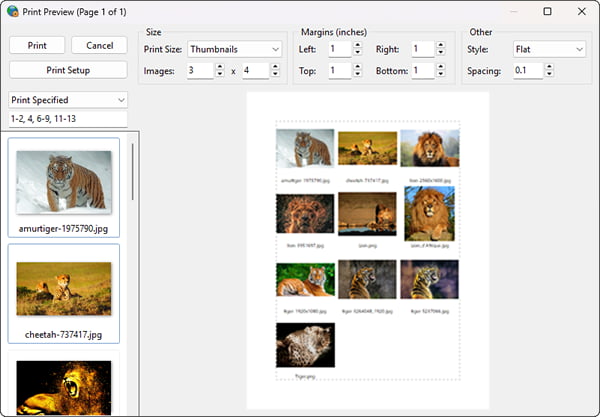
10. TImageEnMView Print Preview dialog allows a heading to be specified and styled when thumbnail printing
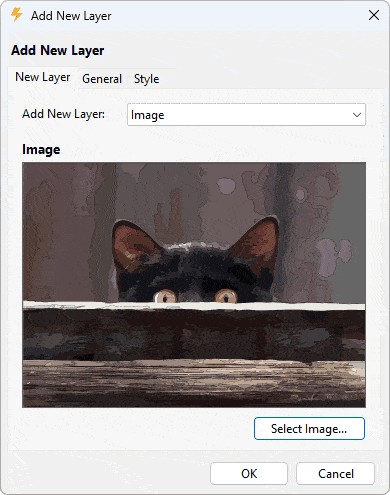
11. New Layer dialog allows selection and changing of layer type
12. New installer used for improved package downloading, security and styling
13. Many improvements to the documentation, including over 3000 code samples with before/after images
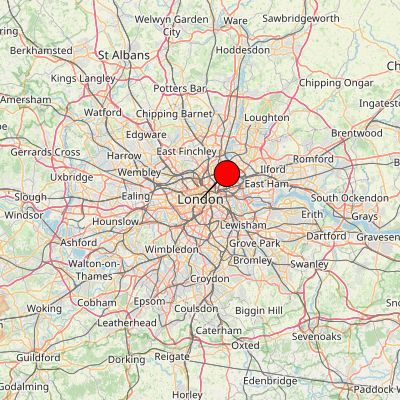
14. Generate Map helper method to create map images by image GPS EXIF or Lat/Long
15. EnableHoverHint property to display the color and alpha value under the cursor in TImageEnView (Also available in Debugging Visualizer)

16. Magnification layers can be now have a custom source, which can be locked when editing with the ALT key
17. New brush types for Painting Tool: Line, Rect, Filled Rect, Ellipse, Filled Ellipse
18. New Wallis Filter algorithm to optimize images without letterbox effect
19. Weighting options for color and alpha gradient fills, e.g. ease in/out, middle-weighted, etc.
20. DrawToBitmap method to draw all images in a TIEMultiBitmap or TImageEnMView to bitmap

21. IEGenerateSampleImage helper to create test images of all pixel formats

22. Complete native localization for Slovak language
23. TImageList can be assigned to a TIEBitmap or TImageEnView
24. Support for TIFF files that contain a single block larger than 2GB
25. Numerous optimizations and fixes from our enhanced unit testing system
Full Change History: https://www.imageen.com/info/HistoryFull.html
IEVision v8.3.0 Update
IEVision is our advanced features add-on for ImageEn.
Top Five Enhancements in IEVision v8.3.0
1. HoughCircles method to detect round objects in an image

2. Calculation of image blurriness using Laplacian variance
3. Updated LibRaw to 0.22 with support for many new cameras
4. More configuration options available for line detection
5. Other fixes and improvements
Full Change History: https://www.imageen.com/ievision/History.html
Important Compatibility Information
From v14.2.6, to include native format support, you now must add ieNativeJPEG, ieNativePNG, ieNativeJ2K to the uses clause of at least one of the units of your project.
You can use our new Compatibility Fixer to check your project files for compatibility issues like these:
https://www.imageen.com/files/other/IECompatibilityFixer.exe
Also see: https://www.imageen.com/help/Compatibility.html
Nigel
Xequte Software
www.imageen.com
|
|
|
mauriciopt
Portugal
45 Posts |
Posted - Jun 26 2026 : 10:43:00
|
Hi,
i am a registered user of imageen v8.0 and ievision v4.5
I have today installed imageen v8.6 and ievision v5.1 (thanks to extended twelve months licence).
It was very easy to update! Just click the setup and its done.
Since i have an exception reading qrCode form bitmap with my version , does it so easy to update and migrate my source code to the latest version ?
Thanks,
Mauricio
http://sourceforge.net/projects/tcycomponents/ |
 |
|
|
xequte
39564 Posts |
|
|
mauriciopt
Portugal
45 Posts |
Posted - Jun 29 2026 : 04:28:38
|
Thanks for your response.
Since my version is very old (ImageEN + IEVision was bought in 2018 or 2019), can i purchase ImageEn + IEVision Extension Extra 12 months access to updates of ImageEn and IEVision for $299.00 ?
Regards
Mauricio
http://sourceforge.net/projects/tcycomponents/ |
|
|
|
xequte
39564 Posts |
Posted - Jun 30 2026 : 04:56:40
|
Hi Mauricio
Yes, you can purchase for $299.00.
Nigel
Xequte Software
www.imageen.com
|
|
|
| |
Topic |
|
|
|
 Search


 ImageEn 15.0.0 and IEVision 8.3.0 Released

