ImageEn for Delphi and C++ Builder ImageEn for Delphi and C++ Builder


ImageEn Forum
Profile    Join    Active Topics    Forum FAQ    Search this forumSearch
Forum membership is Free!  Click Join to sign-up
Username:
Password:
Save Password
Forgot your Password?

 All Forums
 ImageEn Library for Delphi, C++ and .Net
 ImageEn and IEvolution Support Forum
 miMeasureLength or miMeasureRect stay hold on the image
 New Topic  Reply to Topic
Author Previous Topic Topic Next Topic  

Guido Cavalera

Italy
6 Posts

Posted - May 24 2026 :  03:21:30  Show Profile  Reply
Hi

If i draw a miMeasureLength or miMeasureRect on the image and after i do mouse-up (leave the key of mouse) MeasureLength hide BUT i want to keep it and to hide if i click another time on image ! I hope is clear :)

Thank you

Guido Cavalera

Italy
6 Posts

Posted - May 24 2026 :  09:50:48  Show Profile  Reply
... or can i manage MeasureLength as a layer in order to save it with image ? togheter other objects ?
Go to Top of Page

xequte

39420 Posts

Posted - May 24 2026 :  18:01:17  Show Profile  Reply
Hi Guido

You can just create a linelayer (miMeasureLength) or text layer (miMeasureRect) with RulerMode set to iermLabel:

http://www.imageen.com/help/TIELayer.RulerMode.html

When needed, just delete the layer.

Nigel
Xequte Software
www.imageen.com
Go to Top of Page

xequte

39420 Posts

Posted - May 24 2026 :  18:02:44  Show Profile  Reply
You can use the OnNewLayer event (or LayerDefaults) to set the initial layer properties:

http://www.imageen.com/help/TImageEnView.OnNewLayer.html

Nigel
Xequte Software
www.imageen.com
Go to Top of Page

Guido Cavalera

Italy
6 Posts

Posted - May 26 2026 :  02:16:59  Show Profile  Reply
ok but i must create layer after aitomatic MeasureLength draw in order to fix it on the image... what event i must use, OnMeasure ? i hope is clear
Go to Top of Page

xequte

39420 Posts

Posted - May 27 2026 :  00:15:52  Show Profile  Reply
No, I think you are better to use mlClickCreateLineLayers (measuring length) or mlCreateTextLayers (measuring rect) to recreate the same effect (but not automatically delete the layer).

http://www.imageen.com/help/TImageEnView.MouseInteractLayers.html

e.g. for a line measuring tool, set
ImageEnView1.MouseInteractLayers := [mlClickCreateLineLayers];


And add this event:
procedure TfrmMain.ImageEnView1NewLayer(Sender: TObject; LayerIdx: Integer; LayerKind: TIELayerKind);
var
  lineLayer: TIELineLayer;
begin
  if LayerKind = ielkLine then
  begin
    lineLayer := TIELineLayer( ImageEnView1.Layers[ LayerIdx ] );
    lineLayer.RulerMode := iermLabel;
    lineLayer.RulerUnits := ieuCentimeters;
    IEGlobalSettings().MeasureDecimalPlaces := 1;
    lineLayer.LabelPosition := ielpAutoAbove;
    lineLayer.StartShape := ieesBar;
    lineLayer.EndShape   := ieesBar;
  end;
end;


Nigel
Xequte Software
www.imageen.com
Go to Top of Page

Guido Cavalera

Italy
6 Posts

Posted - May 27 2026 :  10:31:23  Show Profile  Reply
Hi, now go fine, thank you. Last thing : if i want to do same operation but with a rectangle with sides measurements ?
Go to Top of Page

xequte

39420 Posts

Posted - May 27 2026 :  23:02:04  Show Profile  Reply
Hi

It's basically the same, but a text layer:
ImageEnView1.MouseInteractLayers := [mlCreateTextLayers];


And add this event:
procedure TfrmMain.ImageEnView1NewLayer(Sender: TObject; LayerIdx: Integer; LayerKind: TIELayerKind);
var
  txtLayer: TIETextLayer;
begin
  if LayerKind = ielkText then
  begin
    txtLayer.RulerMode  := iermLabel;
    txtLayer.RulerUnits := ieuCentimeters;
    IEGlobalSettings().MeasureDecimalPlaces := 1;
  end;
end;

Nigel
Xequte Software
www.imageen.com
Go to Top of Page

Guido Cavalera

Italy
6 Posts

Posted - May 27 2026 :  23:42:19  Show Profile  Reply
i tried it but is same thing of a line. I need a rectangle shape to measure the area of an object into.
Go to Top of Page

xequte

39420 Posts

Posted - May 27 2026 :  23:59:27  Show Profile  Reply
Sorry, are you using: ImageEnView1.MouseInteractLayers := [mlCreateTextLayers];

Here are some other examples:
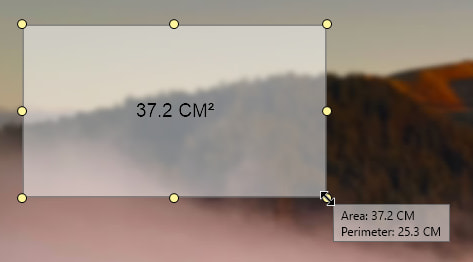
// Add a measurement rectangle allowing the user to measure an area (in CM to one decimal place)
ImageEnView1.LayersAdd( ielkText, 100, 100, 250, 250 );
ImageEnView1.CurrentLayer.RulerMode  := iermLabel;
ImageEnView1.CurrentLayer.RulerUnits := ieuCentimeters;
IEGlobalSettings().MeasureDecimalPlaces := 1;
ImageEnView1.CurrentLayer.BorderWidth := 2;
ImageEnView1.CurrentLayer.BorderColor := clBlack;
ImageEnView1.CurrentLayer.FillColor   := clWhite;
ImageEnView1.CurrentLayer.FillOpacity := 0.5;
TIETextLayer( ImageEnView1.CurrentLayer ).Layout := ielCenter;
TIETextLayer( ImageEnView1.CurrentLayer ).Alignment := iejCenter;
ImageEnView1.LayerOptions := ImageEnView1.LayerOptions - [loShowRotationGrip];
ImageEnView1.Update();

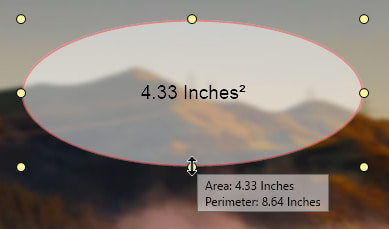
// Add a measurement ellipse allowing the user to measure an area (in inches)
ImageEnView1.LayersAdd( ielkText, 100, 100, 250, 250 );
ImageEnView1.CurrentLayer.RulerMode  := iermLabel;
ImageEnView1.CurrentLayer.RulerUnits := ieuInches;
ImageEnView1.CurrentLayer.BorderWidth := 2;
ImageEnView1.CurrentLayer.BorderColor := clRed;
ImageEnView1.CurrentLayer.FillColor   := clWhite;
ImageEnView1.CurrentLayer.FillOpacity := 0.5;
TIETextLayer( ImageEnView1.CurrentLayer ).BorderShape := iesEllipse;
TIETextLayer( ImageEnView1.CurrentLayer ).Layout      := ielCenter;
TIETextLayer( ImageEnView1.CurrentLayer ).Alignment   := iejCenter;
ImageEnView1.LayerOptions := ImageEnView1.LayerOptions - [loShowRotationGrip];
ImageEnView1.Update();


Nigel
Xequte Software
www.imageen.com
Go to Top of Page
  Previous Topic Topic Next Topic  
 New Topic  Reply to Topic
Jump To:
