ImageEn for Delphi and C++ Builder ImageEn for Delphi and C++ Builder


ImageEn Forum
Profile    Join    Active Topics    Forum FAQ    Search this forumSearch
Forum membership is Free!  Click Join to sign-up
Username:
Password:
Save Password
Forgot your Password?

 All Forums
 ImageEn Library for Delphi, C++ and .Net
 ImageEn and IEvolution Support Forum
 Label position on TIELineLayer
 New Topic  Reply to Topic
Author Previous Topic Topic Next Topic  

Guido Cavalera

Italy
8 Posts

Posted - May 28 2026 :  11:08:47  Show Profile  Reply
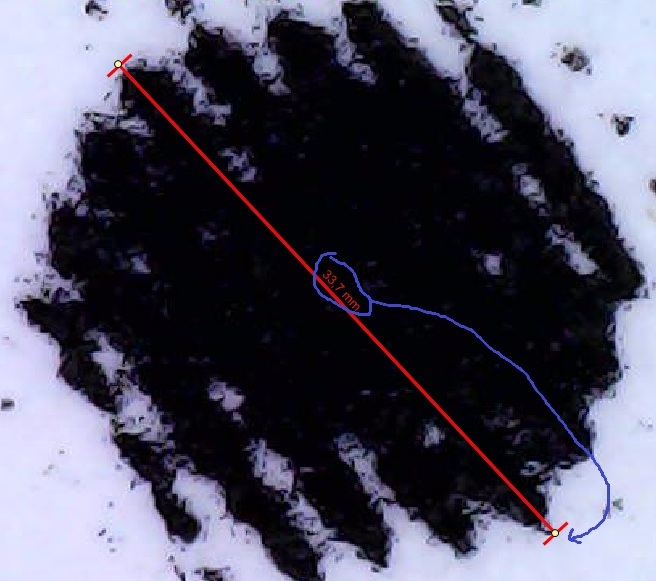
In the event imgViewNewLayer(...), when draw a line with mouse, is possible to show the label on the position as showed in the image attached ? at start or end of line (is same)


My code is

procedure TfrmMain.imgViewNewLayer(Sender: TObject; LayerIdx: Integer; LayerKind: TIELayerKind);
var lineLayer: TIELineLayer;
  txtLayer: TIETextLayer;
begin
  If(rgrToolType.ItemIndex = 0)AND(LayerKind = ielkLine)Then Begin
    lineLayer:=TIELineLayer(imgView.Layers[LayerIdx]);
    lineLayer.RulerMode:=iermLabel;
    lineLayer.RulerUnits:=ieuMillimeters;
    IEGlobalSettings().MeasureDecimalPlaces:=1;

    lineLayer.StartShape:=ieesBar;
    lineLayer.EndShape:=ieesBar;
    lineLayer.LineColor:=clRed;
    lineLayer.LineWidth:=2;

    lineLayer.LabelPosition:=ielpAutoAbove;
    lineLayer.LabelFont.Size:=6;
    lineLayer.LabelFont.Color:=clRed;
    //lineLayer.LabelText:= IntToStr(LayerIdx); // occorre settare RulerMode:=iermNone;

    lineLayer.Selected:=False; // altrim mi crea il contorno tratteggiato di selezione


Thank you


xequte

39425 Posts

Posted - May 28 2026 :  16:44:56  Show Profile  Reply
Sorry, that is unsupported at this time.

Nigel
Xequte Software
www.imageen.com
Go to Top of Page

Guido Cavalera

Italy
8 Posts

Posted - May 28 2026 :  22:31:31  Show Profile  Reply
The reason is to free image (or lesion) from objects that might hide interesting parts to evaluate. Having a dotted or dashed line is useful too.
Go to Top of Page

xequte

39425 Posts

Posted - May 28 2026 :  22:43:25  Show Profile  Reply
Hi

The current options are:

- Make the layer partially transparent

- Custom draw text yourself using one of the TImageEnView draw events
http://www.imageen.com/help/TImageEnView.OnDrawCanvas.html

- Use the interaction hint to display the size
http://www.imageen.com/help/TImageEnView.SetInteractionHint.html

Nigel
Xequte Software
www.imageen.com
Go to Top of Page
  Previous Topic Topic Next Topic  
 New Topic  Reply to Topic
Jump To:
