TImageEnView.SelectEllipse
Declaration
procedure SelectEllipse(CenterX, CenterY, Width, Height: Integer; Op: TIESelOp = iespReplace);Description
Makes an elliptical selection, centered at CenterX and CenterY, and with size specified by Width and Height (values are in terms of the control area).Op specifies whether to add a new selection (iespAdd) or replace the current one (iespReplace).
The style of selection are specified by:
◼SelColor1
◼SelColor2
◼SetSelectionGripStyle
Note:
◼SelectEllipse creates a "vectorized" selection (the selection will be made up of a series of lines and can be accessed via PolySel)
◼Values are specified in terms of the control area, to specify values in terms of the bitmap, set ImageEnView1.SelectionBase := iesbBitmap;
Demo
 | Demos\ImageEditing\EveryMethod\EveryMethod.dpr |
Examples
Also see: Automated Samples
// Select 20x20 ellipse centered at 100, 100ImageEnView1.SelectEllipse( 100, 100, 20, 20 );
// Add a circular selection and colorize (Sepia)
ImageEnView1.SelectionBase := iesbBitmap;
ImageEnView1.SelectEllipse( ImageEnView1.IEBitmap.Width div 2, ImageEnView1.IEBitmap.Height div 2, 480, 360 );
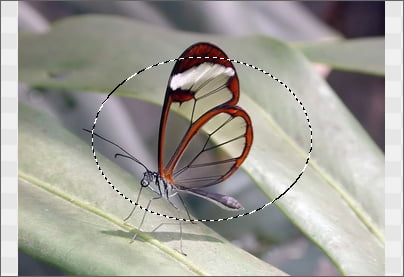
ImageEnView1.InvertSelection( True );
ImageEnView1.MakeSelectionFeather( 8 );
ImageEnView1.Proc.Colorize( 34, 50, 1.10 );
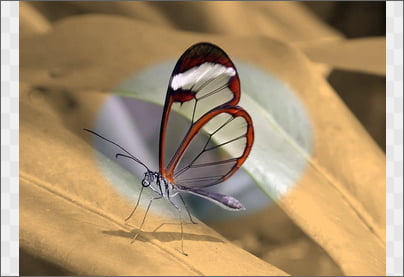
// Make circular selection of entire image and crop
ImageEnView1.SelectionBase := iesbBitmap;
ImageEnView1.SelectEllipse(ImageEnView1.IEBitmap.Width div 2,
ImageEnView1.IEBitmap.Height div 2,
ImageEnView1.IEBitmap.Width,
ImageEnView1.IEBitmap.Height);
ImageEnView1.Proc.CropSel();
// Subtract a circular area from a rectangular selection
ImageEnView1.Select( 42, 133, 326, 214, iespReplace );
ImageEnView1.SelectEllipse( 145, 130, 155, 170, iespSubtract );
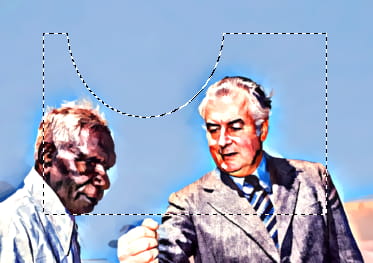
// Convert existing (e.g. rectangular) selection to circular
var
w, h: Integer;
begin
if ImageEnView1.Selected then
begin
w := ImageEnView1.SelX2 - ImageEnView1.SelX1;
h := ImageEnView1.SelY2 - ImageEnView1.SelY1;
ImageEnView1.SelectEllipse( ImageEnView1.SelX1 + w div 2,
ImageEnView1.SelY1 + h div 2,
w, h );
end;
end;
Other Selection Methods
◼Select◼SelectMagicWand
◼SelectChromaKey
◼SelectRoundRect
◼SelectShape
◼SelectCustom
View a preview of all selection types
See Also
◼SelectionBase◼InvertSelection
◼Deselect