TImageEnView.SelectShape
Declaration
procedure SelectShape(Left, Top, Right, Bottom: Integer;Shape: TIEShape; ShapeAngle: Integer = 0; ShapeModifier: Integer = 0;
Op: TIESelOp = iespReplace);
Description
Creates a polygonal selection using one of ImageEn's vector shapes.Left, Top, Right, Bottom are the selection bounds (in terms of the control area).
Shape specifies the selection shape, which can be modified using ShapeModifier and ShapeAngle.
Op specifies whether to add a new selection (iespAdd) or replace the current one (iespReplace).
The style of selection are specified by:
◼SelColor1
◼SelColor2
◼SetSelectionGripStyle
Note:
◼SelectShape creates a "vectorized" selection (the selection will be made up of a series of lines and can be accessed via PolySel)
◼You can allow your user to make a shaped selection by enabling SelectionShape
◼Values are specified in terms of the control area, to specify values in terms of the bitmap, set ImageEnView1.SelectionBase := iesbBitmap;
Demo
 | Demos\ImageEditing\EveryMethod\EveryMethod.dpr |
Example
Also see: Automated Samples
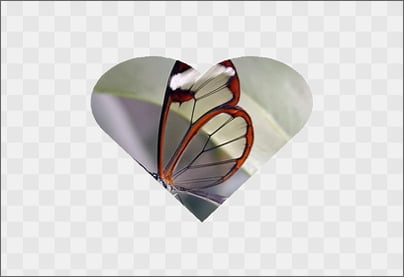
// Add a "Heart" shape selection and clearImageEnView1.SelectionBase := iesbBitmap;
ImageEnView1.SelectShape( 160, 120, ImageEnView1.IEBitmap.Width - 160, ImageEnView1.IEBitmap.Height - 120, iesHeart );
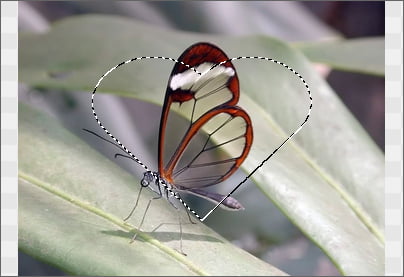
ImageEnView1.InvertSelection( True );
ImageEnView1.Proc.ClearSel( True );
Other Selection Methods
◼Select◼SelectEllipse
◼SelectMagicWand
◼SelectChromaKey
◼SelectRoundRect
◼SelectCustom
View a preview of all selection types
See Also
◼SelectionBase◼InvertSelection
◼Deselect