TIEBitmap.DrawToTIEBitmap
Declaration
procedure DrawToTIEBitmap(Dest: TIEBitmap; XDest, YDest: Integer); overload; // Draw whole imageprocedure DrawToTIEBitmap(Dest: TIEBitmap; XDest, YDest: Integer; SrcRect: TIERectangle); overload; // Draw part of image
procedure DrawToTIEBitmap(Dest: TIEBitmap; DestRect: TIERectangle; SrcRect: TIERectangle; Filter: TResampleFilter = rfLanczos3); overload; // Stretch draw image, Dest must be ie24RGB
procedure DrawToTIEBitmap(Dest: TIEBitmap; XDest, YDest: Integer; Transparency: Integer; RenderOp: TIERenderOperation = ielNormal); overload; // Draw whole image with rendering and transparency options, Dest must be ie24RGB
Description
Draws content of the current IEBitmap onto another IEBitmap.Overload 1 will draw the whole of the current image at coordinates XDest, YDest.
Overload 2 allows you to specify a portion of the current image to draw at coordinates XDest, YDest.
Overload 3 allows you to stretch draw (enlarge or reduce) the image.
Overload 4 provides rendering and transparency options. Overload 4 requires the Dest to be ie24RGB format.
The source image can be any PixelFormat. The PixelFormat of Dest bitmap must be ie24RGB/ie32RGB or have the same PixelFormat as the source. Other formats will raise an exception
Note:
◼DrawToTIEBitmap and RenderToTIEBitmapEx are simplified versions of RenderToTIEBitmap
◼Rendering will support the AlphaChannel if it is available, i.e. full painting will only occur where Alpha is 255 and partial painting where Alpha > 0. The alpha channel of Dest will not be changed.
◼Use IERectangle to convert a standard TRect to a TIERectangle
◼To draw to an image of ie32RGB pixel format, use MergeWithAlpha
Examples
Also see: Automated Samples
// Stretch Draw an image centered within a TIEBitmapaRect := GetImageRectWithinArea( srcBmp.Width, srcBmp.Height, DestBMP.Width, DestBMP.Height);
srcBmp.DrawToTIEBitmap( DestBMP, IERectangle( aRect ), IERectangle( 0, 0, srcBmp.Width, srcBmp.Height ) );
// DRAW TWO IMAGES BESIDE EACH OTHER (USING OVERLOAD 1)
// Load input files
IEBitmap1.LoadFromFile('D:\MyPic1.png');
IEBitmap2.LoadFromFile('D:\MyPic2.jpg');
// Get Left position for IEBitmap2
iBitmap1Width := IEBitmap1.Width;
// Resize IEBitmap1
IEBitmap1.Resize(IEBitmap1.Width + IEBitmap2.Width, iMax(IEBitmap1.Height, IEBitmap2.Height), clWhite, 255, iehLeft, ievCenter);
// Draw IEBitmap2
IEBitmap2.DrawToTIEBitmap(IEBitmap1, iBitmap1Width, 0);
// Save output file
IEBitmap2.SaveToFile('D:\Output.png');
// DRAW TWO IMAGES BESIDE EACH OTHER, BUT ONLY OUTPUT CENTRAL PORTION OF SECOND IMAGE (USING OVERLOAD 2)
// Load input files
IEBitmap1.LoadFromFile('D:\MyPic1.png');
IEBitmap2.LoadFromFile('D:\MyPic2.jpg');
// Get Left position for IEBitmap2
iBitmap1Width := IEBitmap1.Width;
// Resize IEBitmap1
IEBitmap1.Resize(IEBitmap1.Width + IEBitmap2.Width div 2, iMax(IEBitmap1.Height, IEBitmap2.Height div 2), clWhite, 255, iehLeft, ievCenter);
// Draw IEBitmap2
IEBitmap2.DrawToTIEBitmap(IEBitmap1, iBitmap1Width, 0, IERectangle(IEBitmap2.Width div 4, IEBitmap2.Height div 4, IEBitmap2.Width div 2, IEBitmap2.Height div 2));
// Save output file
IEBitmap2.SaveToFile('D:\Output.png');
// DRAW TWO IMAGES BESIDE EACH OTHER, BUT ONLY OUTPUT CENTRAL PORTION OF SECOND IMAGE AT DOUBLE SIZE (USING OVERLOAD 3)
// Load input files
IEBitmap1.LoadFromFile('D:\MyPic1.png');
IEBitmap2.LoadFromFile('D:\MyPic2.jpg');
// Get Left position for IEBitmap2
iBitmap1Width := IEBitmap1.Width;
// Resize IEBitmap1
IEBitmap1.Resize(IEBitmap1.Width + IEBitmap2.Width, iMax(IEBitmap1.Height, IEBitmap2.Height), clWhite, 255, iehLeft, ievCenter);
// Draw IEBitmap2
IEBitmap2.DrawToTIEBitmap(IEBitmap1,
IERectangle(iBitmap1Width, 0, IEBitmap2.Width, IEBitmap2.Height),
IERectangle(IEBitmap2.Width div 4, IEBitmap2.Height div 4, IEBitmap2.Width div 2, IEBitmap2.Height div 2));
// Save output file
IEBitmap2.SaveToFile('D:\Output.png');
// DRAW TWO IMAGES BESIDE EACH OTHER, BUT OUTPUT SECOND IMAGE AT HALF SIZE (USING OVERLOAD 3)
// Load input files
IEBitmap1.LoadFromFile('D:\MyPic1.png');
IEBitmap2.LoadFromFile('D:\MyPic2.jpg');
// Get Left position for IEBitmap2
iBitmap1Width := IEBitmap1.Width;
// Resize IEBitmap1
IEBitmap1.Resize(IEBitmap1.Width + IEBitmap2.Width div 2, iMax(IEBitmap1.Height, IEBitmap2.Height div 2), clWhite, 255, iehLeft, ievCenter);
// Draw IEBitmap2
IEBitmap2.DrawToTIEBitmap(IEBitmap1,
IERectangle(iBitmap1Width, 0, IEBitmap2.Width div 2, IEBitmap2.Height div 2),
IERectangle(0, 0, IEBitmap2.Width, IEBitmap2.Height));
// Save output file
IEBitmap2.SaveToFile('D:\Output.png');
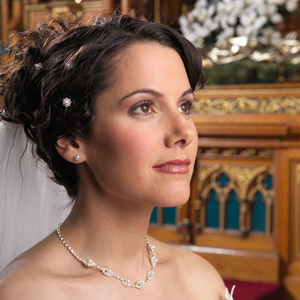
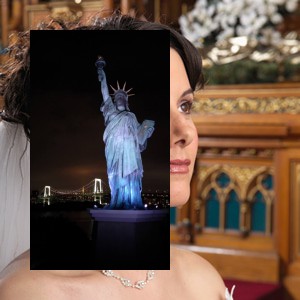
// Draw an image onto the current image
bmp := TIEBitmap.Create( 'D:\Portrait.jpg' );
bmp.Resample( -1, MulDiv( ImageEnView1.IEBitmap.Height, 8, 10 ), rfFastLinear ); // 80% of the height of the image
ImageEnView1.IEBitmap.PixelFormat := ie24RGB;
bmp.DrawToTIEBitmap( ImageEnView1.IEBitmap, ImageEnView1.IEBitmap.Width div 10, ImageEnView1.IEBitmap.Height div 10, 255, ielNormal );
ImageEnView1.Update(); // Show changes in our viewer
bmp.Free();

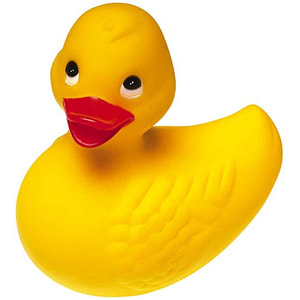
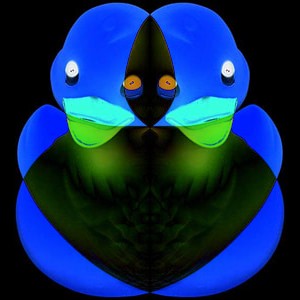
// Draw the image upon a flipped copy of itself using a "Subtract" render operation
bmp := TIEBitmap.Create( ImageEnView1.IEBitmap );
ImageEnView1.Proc.Flip( fdHorizontal );
ImageEnView1.IEBitmap.PixelFormat := ie24RGB;
bmp.DrawToTIEBitmap( ImageEnView1.IEBitmap, 0, 0, 255, ielSub );
ImageEnView1.Update(); // Show changes in our viewer
bmp.Free();
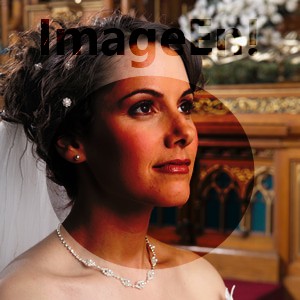
// Draw text and an ellipse onto the alpha channel of a darkened copy of the image, then draw it with alpha onto the image
bmp := TIEBitmap.Create( ImageEnView1.IEBitmap );
bmp.BlackValue := 122;
bmp.WhiteValue := 255;
bmp.StretchValues();
bmp.AlphaChannel.IECanvas.Font.Height := MulDiv( bmp.Height, 23, 100 );
bmp.AlphaChannel.IECanvas.Font.Style := [fsBold];
bmp.AlphaChannel.IECanvas.Font.Color := clBlack;
bmp.AlphaChannel.IECanvas.DrawText( 'ImageEn!', ( bmp.Width - bmp.AlphaChannel.IECanvas.TextWidth( 'ImageEn!' )) div 2, 0 );
bmp.AlphaChannel.IECanvas.Pen.Style := psClear;
bmp.AlphaChannel.IECanvas.Brush.Style := bsSolid;
bmp.AlphaChannel.IECanvas.Brush.Color := clBlack;
bmp.AlphaChannel.IECanvas.Brush.Transparency := 192;
bmp.AlphaChannel.IECanvas.Ellipse( MulDiv( bmp.Width, 15, 100 ), MulDiv( bmp.Height, 25, 100 ), bmp.Width - MulDiv( bmp.Width, 15, 100 ), bmp.Height - MulDiv( bmp.Height, 10, 100 ));
bmp.AlphaChannel.Negative(); // Make the ellipse opaque and the background transparent
bmp.DrawToTIEBitmap( ImageEnView1.IEBitmap, 0, 0 );
ImageEnView1.Update(); // Show changes in our viewer
bmp.Free();
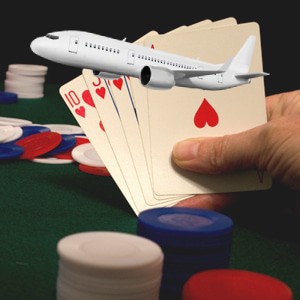
// Draw a transparent PNG onto the image
bmp := TIEBitmap.Create( 'D:\Plane.png' );
bmp.Resample( MulDiv( ImageEnView1.IEBitmap.Width, 8, 10 ), -1, rfFastLinear ); // 80% of the width of the image
ImageEnView1.IEBitmap.PixelFormat := ie24RGB;
bmp.DrawToTIEBitmap( ImageEnView1.IEBitmap, ImageEnView1.IEBitmap.Width div 10, ImageEnView1.IEBitmap.Height div 10, 255, ielNormal );
ImageEnView1.Update(); // Show changes in our viewer
bmp.Free();
See Also
◼RenderToTIEBitmap◼RenderToTIEBitmapEx
TIEBitmap Assignment and Drawing Methods
| Method | Mode | Purpose |
|---|---|---|
| Assign | From TIEBitmap/TBitmap/TGraphic/TIcon | Copy whole image |
| AssignImage | From TIEBitmap | Like assign, but does not copy the alpha channel |
| AssignRect | From TIEBitmap/TBitmap | Copy a specified rect |
| CopyAndConvertFormat | From TIEBitmap | Copy whole image |
| CopyRectTo | To TIEBitmap | Copy rect to another image (without scaling) |
| CopyWithMask1 | To TIEBitmap | Copy image using a mask to specify what is copied from the source |
| CopyWithMask2 | To TIEBitmap | Copy image using a mask to specify what is replaced in the destination |
| DrawToTIEBitmap | To TIEBitmap | Copies all or part of the image to a specified position and/or size |
| JoinBitmaps | From two TIEBitmaps | Draws two bitmaps to a single bitmap |
| MergeAlphaRectTo | With TIEBitmap | Merges the alpha channels of two TIEBitmaps using merge rules |
| MergeWithAlpha | With TIEBitmap | Merges all or part of two TIEBitmaps with alpha channels to a specified position |
| RenderToTIEBitmapEx | To TIEBitmap | Extended drawing of content to a TIEBitmap |
| StretchRectTo | To TIEBitmap | Copy rect to dest rect in another image (with scaling) |
| SwitchTo | To TIEBitmap | Move content from one TIEBitmap to another |
TBitmap Methods
| Method | Mode | Purpose |
|---|---|---|
| Assign | From TIEBitmap/TBitmap/TGraphic/TIcon | Copy whole image |
| AssignTo | To TIEBitmap/TBitmap | Copy whole image with optional scaling |
| AssignRect | From TIEBitmap/TBitmap | Copy a specified rect |
| CopyFromTBitmap | From TBitmap | Copy whole image |
| CopyToTBitmap | To TBitmap | Copy whole image |
| RenderToTBitmapEx | To TBitmap | Extended drawing of content to a TBitmap |
TCanvas Methods
| Method | Mode | Purpose |
|---|---|---|
| DrawToCanvas | To TCanvas | Copies whole image to canvas at specified position (ignoring the alpha channel) |
| DrawToCanvasWithAlpha | To TCanvas | Copies whole image to canvas at specified position (honoring the alpha channel) |
| RenderToCanvas | To TCanvas | Extended drawing of content to a TCanvas (ignoring the alpha channel) |
| RenderToCanvasWithAlpha | To TCanvas | Extended drawing of content to a TCanvas (honoring the alpha channel) |